17 Best Email Finder Tools in 2026 (Free & Paid)


Updated November 2026
The best email finder tool in 2026 is Emailchaser's free Email Finder: it gives you 3 free searches a day with no signup and nothing to install, and it found 88 of 100 work emails in our own test, against 67 for Hunter. Every result shows the address pattern, the mail server and each address checked. Hunter has the best domain search, GetProspect a monthly free allowance, Anymail Finder charges only for verified finds, and Lusha has phone numbers. For whole lists, Emailchaser's Lead Finder exports from LinkedIn Sales Navigator and bills per verification check ($0.0017 each), and every plan starts with a 7-day free trial.
Number 1 in the test
Find a work email by name
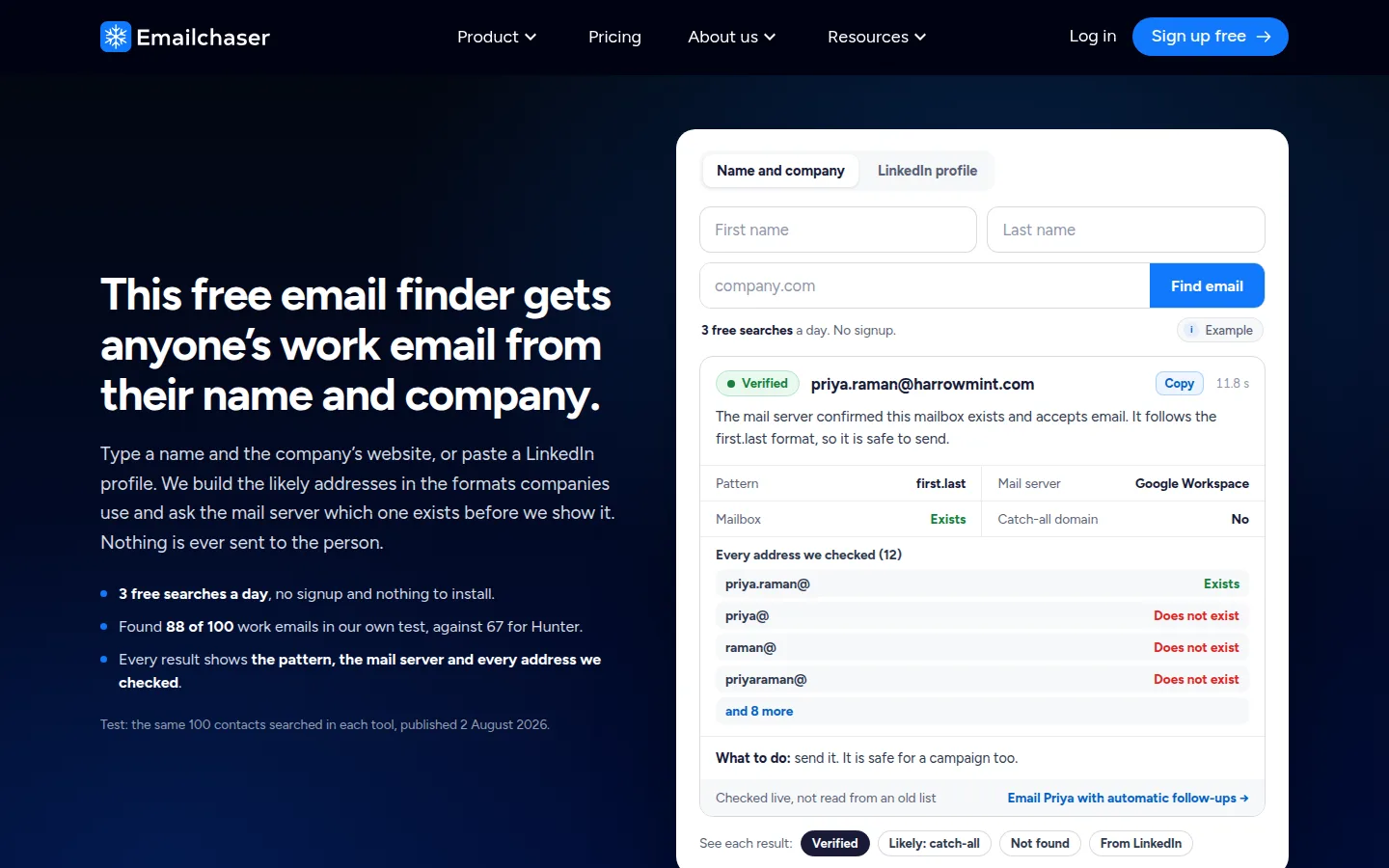
Enter a name and a company domain to get the work email address. 3 free searches a day, no signup. The full ranking continues below.
Enter the first name, last name and domain of the email address (for example "emailchaser.com"). 3 free searches a day, no signup.
To use it on its own page, open the free email finder by name, which also lists every address it checked and takes LinkedIn profiles.
Email finder tools let you find almost anyone's business email address from just their name and company.
The best email finder tool in 2026 is Emailchaser's free Email Finder: in my 100-contact accuracy test it found 88% of email addresses (versus 67% for Hunter), and it gives 3 free searches a day with no signup.
I spent a year building that email finder, so I've tested every serious competitor along the way. Below I rank the 17 best email finder tools for 2026, with their free options and prices, and I give every tool a real strength.
Note: I'm the founder of Emailchaser, so I'm biased, but everything below is fact-based. Last updated 10 November 2026.
 Emailchaser
 Hunter
 Lusha
Here are the 17 tools I compare:
The quick comparison table
Which finders are free
How an email finder works
How I tested accuracy
Which finder for which job
1. Emailchaser
2. Hunter
3. GetProspect
4. Voila Norbert
5. Snov.io
6. Lusha
7. RocketReach
8. Skrapp.io
9. Scalelist
10. Anymail Finder
11. ContactOut
12. Kaspr
13. UpLead
14. Wiza
15. Surfe
16. SignalHire
17. Clay
What a free email lookup can mean
How to choose an email finder
Emailchaser, Hunter and fifteen other email finders compare like this.
All prices are "as of 2026" unless a date is given, and they change often, so check the live pricing page before you buy. Anymail Finder was read on 3 November 2026, Wiza and Surfe on 10 November 2026, Clay on 5 November 2026, and ContactOut, Kaspr, UpLead and SignalHire on 23 October 2026.
| Tool | Free option | Paid from | Best for |
|---|---|---|---|
| Emailchaser | 3 free searches a day, no signup | The finder is free; the full platform is $47 a month with a 7-day free trial | Most accurate (88 of 100 found) and free without an account |
| Hunter | ~50 credits/mo | ~$49/mo (~$34/mo annual) for 2,000 credits | Domain search |
| GetProspect | 50 valid emails/mo | ~$49/mo | Recurring free allowance |
| Voila Norbert | 50 credits on signup | ~$49/mo for 1,000 leads | Simple one-off lookups |
| Snov.io | 50 credits per 30 days | ~$39/mo for 1,000 credits | Budget all-in-one toolkit |
| Lusha | 40 credits/mo | ~$49.90/user/mo (~$32/user/mo annual) | Emails and phone numbers |
| RocketReach | Limited trial lookups | ~$49/mo monthly (~$27/mo annual) | Hard-to-find contacts, broad coverage |
| Skrapp.io | 50 credits/mo | ~$39/mo (~$29/mo annual) for 2,000 credits | Cheap LinkedIn extension |
| Scalelist | Free credits on signup | $29/mo for 500 credits | Lead lists with emails and mobiles from one sentence |
| Anymail Finder | 7-day trial with 100 credits | $49/mo for 1,000 credits | Paying only for verified finds |
| ContactOut | 5 emails, 5 phones a day | $49/mo (Email plan, US and UK data) | Phone numbers and a daily free allowance |
| Kaspr | 15 B2B email credits/mo | $65/user/mo, billed monthly | LinkedIn contact details |
| UpLead | 5 credits in a 7-day trial | $99/mo for 170 credits | Contacts with direct dials, one credit each |
| Wiza | 20 valid emails and 5 phone numbers | $49/mo per user for 100 valid emails | Unlimited reveals at a flat yearly price |
| Surfe | 20 email credits a month | $49/user/mo for 150 email credits | Found emails synced to a CRM |
| SignalHire | 5 credits, plus 10 a month with its extension | $49/mo for 600 credits | Paying only when a search finds something |
| Clay | 100 data credits and 500 actions a month | $185/mo (Launch) | Building your own research workflow |
Most of these finders give a free allowance, and it comes back every day, every month or only once.
Emailchaser's 3 free searches a day need no account, which is the easiest way to try a finder without handing over an email address. Every other free start below comes from the tool's own pricing page, on the dates above.
| Finder | What you get free | How often it comes back |
|---|---|---|
| Emailchaser | 3 searches, no account | Every day: after you use them all, one search returns every 8 hours |
| ContactOut | 5 emails, 5 phone numbers and 5 exports | Every day |
| Hunter | About 50 credits | Every month |
| GetProspect | 50 valid emails | Every month |
| Snov.io | 50 credits | Every 30 days |
| Skrapp.io | 50 credits | Every month |
| Lusha | 40 credits | Every month |
| Kaspr | 15 B2B email credits, 5 phone credits and 5 direct email credits | Every month |
| Surfe | 20 email credits and 5 mobile credits | Every month |
| Clay | 100 data credits and 500 actions | Every month |
| SignalHire | 5 credits, and 10 more with its browser extension | The 10 extension credits come back every month |
| Wiza | 20 valid emails and 5 phone numbers | Its pricing page gives no period |
| Voila Norbert | 50 credits | Once, when you sign up |
| Scalelist | Free credits | Once, when you sign up |
| RocketReach | A few trial lookups | Trial only |
| Anymail Finder | 100 credits | A 7-day trial |
| UpLead | 5 credits | A 7-day trial |
An email finder gets a work email from a name in one of three ways.
An email finder takes a person's name and the website of the company they work for, and returns their work email address. How it gets there changes how far you can trust the answer.
The first way only finds what someone has already published, so it misses the many business addresses that are never listed anywhere. The second way can reach an address that is not public, because it asks the mail server and does not wait for the address to be published. The third way is as good as the last time that record was updated, and people change jobs. Whichever way a tool works, run what it returns through an email verifier before you send.
I tested accuracy on 100 contacts whose real email addresses I already knew.
I took 100 of my existing contacts, people whose real email addresses I already knew, and searched for each of them (name plus company domain) in every tool I could get access to. The score is how many of the 100 known addresses a tool returned.
The two numbers I stand behind publicly: Emailchaser's Email Finder found 88% of the addresses, while Hunter found 67%, about 21% fewer. The gap exists because Hunter mostly indexes emails that are published somewhere on the public web, while Emailchaser also finds valid non-public addresses. The test was published on 2 August 2026, and I only quote those two numbers because they are the two I can stand behind.
Among the rest, Voila Norbert and GetProspect landed mid-pack, while Snov.io and Skrapp.io trailed, and Snov.io in particular returned addresses that simply didn't exist, which is worse than returning nothing. The eight tools added in November 2026 (Anymail Finder, ContactOut, Kaspr, UpLead, Wiza, Surfe, SignalHire and Clay) were not in that test, so I describe them from their own pricing pages and give them no find rate.
That last point matters: an email finder that guesses will quietly wreck your deliverability. Whatever tool you use, run the results through an email verifier before you send, and see the best email verification tools to pick one.
Each job has a different best email finder.
| If you need | Pick | Why |
|---|---|---|
| The most accurate free search | Emailchaser | 88 of 100 found in our test, 3 free searches a day, no signup |
| A list from a LinkedIn Sales Navigator search | Emailchaser Lead Finder | A free extension, billed per verification check at $0.0017 |
| Every address a company has published | Hunter | Its domain search lists what it has indexed for the company |
| A free allowance that renews monthly | GetProspect | 50 valid emails a month, charged only for valid results |
| To pay only for emails that were found | Anymail Finder | A credit is spent only on a verified email |
| Emails and phone numbers together | Lusha | Direct dials next to emails |
| A lead list from a plain sentence | Scalelist | Describe the people you want and see the match count first |
| A hard-to-find senior contact | RocketReach | The broadest coverage on this list |
| Unlimited reveals at one flat yearly price | Wiza | $83 a month per user, billed $990 once a year |
| Found emails pushed into your CRM | Surfe | A two-way CRM sync on every plan |
| Your own multi-step research on a company | Clay | Many data sources and an AI research agent in one workspace |
Emailchaser found the most emails in our test and gives 3 free searches a day with no signup.
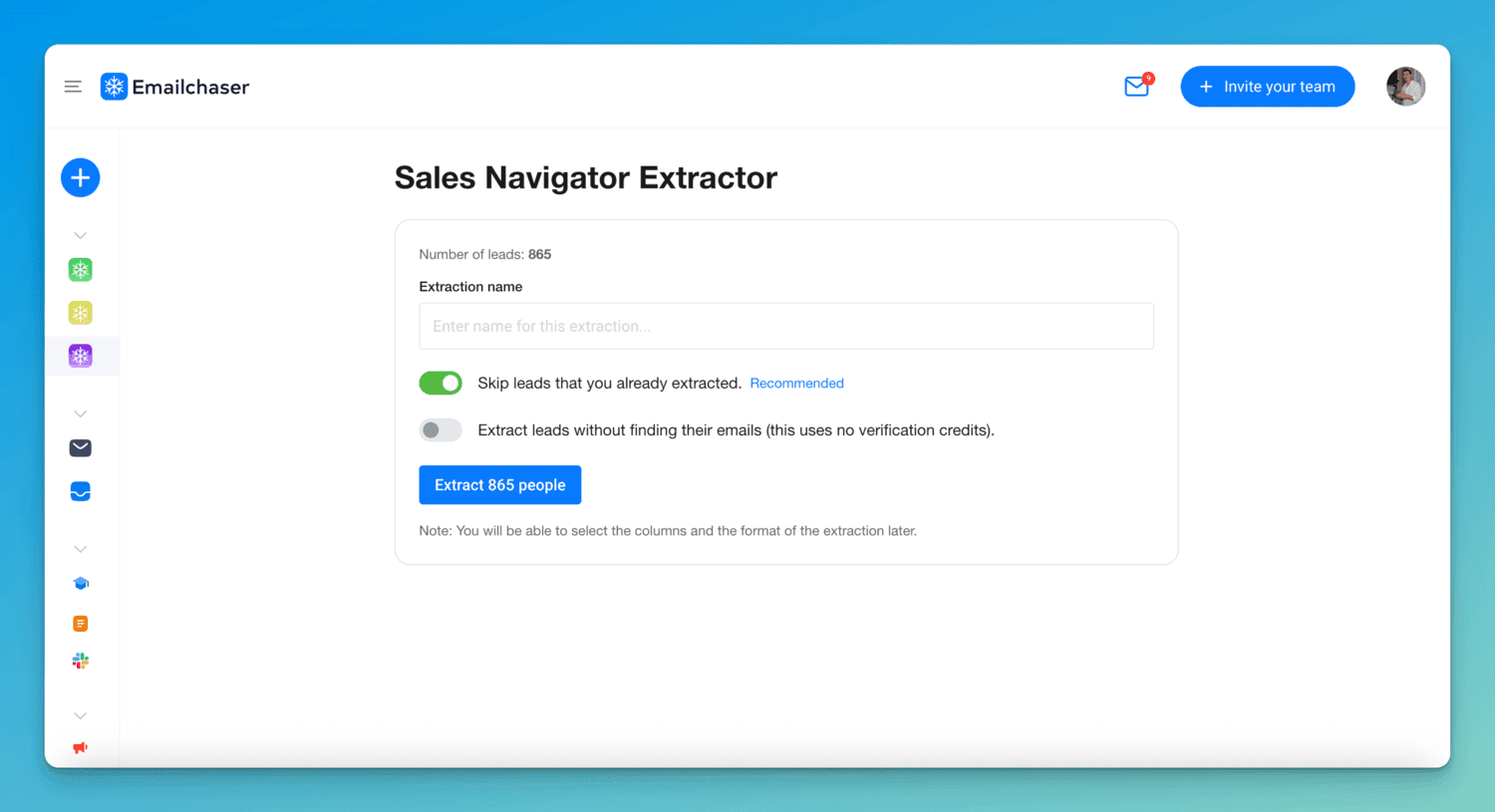
Emailchaser gives you two ways to find emails.
The first is the free Email Finder: type a name and a company website, or paste a LinkedIn profile, and get the work email address. You get 3 free searches a day with no account and nothing to install, and one search comes back every 8 hours after you use them all. It builds the likely addresses in the formats companies use, asks the mail server which one exists, and shows you the pattern, the mail server and every address it checked. In my 100-contact test it had the highest find rate of any tool (88%), because it finds valid non-public addresses rather than only scraping the public web.
The second is the Lead Finder Chrome extension, which is how you find emails in bulk. You run a search in LinkedIn Sales Navigator and click "Export with Emailchaser". You pay $0.0017 per verification check instead of a monthly search cap, and every returned email is double-verified: a second independent provider checks every address the first one does not reject.

Because Emailchaser is also a full cold email software, you can find, verify, send and manage replies in one tool instead of stitching subscriptions together. Every plan starts with a 7-day free trial.
Pros:
- Most accurate in my test (88 of 100 found, against 67 for Hunter)
- Free single searches with no signup, and every address checked is shown
- Bulk export from Sales Navigator with double verification
Cons:
- The free finder is capped at 3 searches a day
- Bulk verification is billed per check ($0.0017 each)
- The Lead Finder extension needs a LinkedIn Sales Navigator subscription for bulk exports
Best for: Anyone who wants the most accurate finder: free for single lookups, and built to turn a Sales Navigator search into a cold email list.
Hunter has the best domain search.

Hunter is the best-known email finder on the market, and its domain search is genuinely useful: enter a company domain and it lists every email address it has indexed for that company, along with the company's email format.
Pricing is reasonable for the brand recognition: a free plan with ~50 credits per month, then paid plans from ~$49/mo (~$34/mo billed annually) for 2,000 credits, scaling to ~$149/mo for 10,000 (as of 2026).
The honest gap is accuracy: Hunter found 67% of the emails in my test, about 21% fewer than Emailchaser, because it primarily indexes emails already published on the public web. It also has no LinkedIn email finder, and if you use it for outreach, it caps you at around 10 sending accounts. I wrote a full comparison in Hunter.io vs Emailchaser.
Best for: Quickly mapping a company's email format and publicly listed addresses.
GetProspect has one of the most useful free plans because it renews every month.

GetProspect's free plan is one of the most generous recurring ones: 50 valid emails per month, every month, and you're only charged credits for valid results. Paid plans start around ~$49/mo (as of 2026).
In my accuracy test it landed mid-pack, decent but behind Emailchaser and Voila Norbert, and it doesn't show you how it found an address, so you can't sanity-check the source. It's a solid budget pick for low-volume prospecting.
Best for: Free users who want a real monthly allowance of verified emails.
Voila Norbert is the best for simple one-off lookups.

Voila Norbert does one thing, name plus domain to email, and does it well. It was one of the more accurate tools in my test, close behind Emailchaser.
You get 50 free credits when you sign up, then it's ~$49/mo for 1,000 leads (as of 2026), with credit rollover and unlimited team members included.
The friction: you can't try it without creating an account first, and the free credits are a one-time signup bonus rather than a monthly allowance. For pure accuracy on single lookups it remains a respectable choice.
Best for: Occasional single lookups where accuracy matters more than volume.
Snov.io is the best budget toolkit if you verify everything it finds.

Snov.io bundles a lot for the money: email finder, verifier, LinkedIn extension, drip campaigns and warmup, from ~$39/mo for 1,000 credits (as of 2026), with a free 50-credit allowance that renews every 30 days.
My problem with it is the finder's behavior: in my test it returned a meaningful number of addresses that didn't exist, instead of admitting it couldn't find the correct one. Sending to invented addresses damages your sender reputation, so if you use Snov.io, verify everything before it goes into a campaign. Everything is also credit-metered, so finding and verifying both burn credits. More detail in my Snov.io alternatives guide.
Best for: Budget users who want finder + campaigns in one tool and are disciplined about verifying.
Lusha is the best pick when you also need phone numbers.
Lusha is a B2B contact database with a popular Chrome extension, and its differentiator is direct-dial phone numbers alongside emails (an email costs 1 credit, a phone number 10).
The free plan gives 40 credits per month; paid plans start around ~$49.90/user/mo, or ~$32/user/mo billed annually, for 400 credits (as of 2026). The catch is that pricing is per user and credit-metered, so costs climb quickly for teams, and, like any static database, accuracy varies by how recently a contact was updated.
Best for: Sales teams that call as well as email.
RocketReach has the broadest coverage.
 RocketReach's strength is sheer breadth: it's often the tool that finds contact details for hard-to-find people at large companies when other finders come up empty.
You pay for that coverage: as of 2026, monthly billing starts around ~$49/mo for a modest lookup allowance (annual billing drops the entry price to roughly ~$27/mo), and free usage is limited to a small number of trial lookups. Per-lookup, it's one of the pricier tools here, and it's a lookup database rather than an outreach tool.
Best for: One-off searches for senior or hard-to-find contacts.
Skrapp.io has one of the cheapest LinkedIn extensions.

Skrapp.io has improved its pricing since I first tested it: there's now a free plan with 50 credits per month, and the Professional plan is ~$39/mo (~$29/mo billed annually) for 2,000 credits (as of 2026), one of the cheapest per-credit rates on this list. Its LinkedIn extension pulls emails as you browse profiles.
The gap is accuracy: it was among the weakest performers in my test, so budget for a verification pass on everything it returns.
Best for: Budget LinkedIn prospecting at low volume.
Scalelist builds a lead list from one sentence.
Scalelist is an AI lead finder. You describe who you want in plain English, for example "Heads of Sales at SaaS companies in New York with 50 to 200 employees", and it returns the matching people with verified work emails and mobile numbers.
You see how many people match before you spend a credit, and you only pay for the contacts you reveal: 1 credit per email, 20 per mobile number. Lists export to CSV or go straight to HubSpot or Salesforce. Paid plans start at $29/mo for 500 credits (as of 2026), and new accounts get free credits with no credit card.
Pros:
- Plain-English search, no filters to set up
- Verified work emails and mobile numbers from one search
- You only pay for the contacts you reveal
Cons:
- A mobile number costs 20 credits, so phone-heavy lists use credits faster
- No built-in email sending: you export the list to your outreach tool
Best for: Teams that want a lead list ready to call and email from one sentence.
Anymail Finder charges a credit only when it finds a verified email.
Anymail Finder is a finder built around one billing rule: a search costs a credit only when it returns a verified email, and a search that finds nothing is free. Its pricing page (read 3 November 2026) lists plans by credit amount, for example $49 a month for 1,000 credits, and gives every monthly plan a 7-day trial with 100 credits. It also searches a whole company and finds a decision maker by role, which costs 2 credits.
Its pricing page shows no permanent free plan, so it suits someone who will find emails every week rather than once. Repeating the same search within 30 days costs nothing.
Best for: People who want to pay only for emails that are found and verified.
ContactOut gives a free daily allowance and counts personal emails and direct dials in its database.
 ContactOut's free plan (read on its pricing page on 23 October 2026) includes 5 emails, 5 phone numbers and 5 exports a day. Its Email plan is $49 a month with US and UK data included, "unlimited" emails under a fair use policy and 300 exports a month; the Email + Phone plan is $99 a month.
Its own pages count 150M personal emails, 100M direct dials and 200M work emails in its database, so it can return personal addresses and phone numbers as well as work emails. The limit to watch is exports: each lead you take out of the tool counts against the monthly export cap, not only the emails you view.
Best for: Recruiters and sellers who want a free daily allowance and phone numbers next to emails.
Kaspr is a LinkedIn tool with a small free plan and per-user paid plans.
 Kaspr's free plan (read on its pricing page on 23 October 2026) includes 15 B2B email credits, 5 phone credits and 5 direct email credits a month. The Starter plan is $65 per user a month on monthly billing, with "unlimited" B2B email credits under a fair use policy and 100 phone credits.
Kaspr is used from LinkedIn, and its help center says a LinkedIn account needs at least 20 connections to use it. Each lead you export costs one export credit, so the export limit, not the email count, is what runs out first.
Best for: Sellers who work in LinkedIn all day and want phone credits next to emails.
UpLead charges one credit per contact and lets you try it with 5 credits.
 UpLead's free trial (read on its pricing page on 23 October 2026) is 7 days with 5 credits. The Essentials plan is $99 a month for 170 credits, and Plus is $199 a month for 400 credits. One credit unlocks one contact for download or CRM export and includes the email and the mobile direct dial.
Credits do not roll over, and Essentials and Plus are single-user accounts.
Best for: Sellers who want a contact database with direct dials and will use every credit each month.
Wiza sells unlimited email reveals on a yearly plan for one flat price per user.
Wiza's pricing page (read 10 November 2026) lists a free plan with 20 valid emails and 5 phone numbers. Monthly billing starts with Starter at $49 per user for 100 valid emails, and the monthly Email plan is $99 per user for 500 valid emails, with extra emails at $0.15 each.
The yearly Email plan is $990 billed once, which works out to $83 a month per user, with unlimited email reveals and a cap of 2,500 exports a month. Phone numbers are a separate price: $0.35 each beyond what a plan includes.
Best for: Teams that pull a lot of emails and would rather pay one flat yearly price per user.
Surfe gives 20 free email credits a month and syncs what it finds to your CRM.
Surfe's pricing page (read 10 November 2026) lists a free plan with 20 email find credits and 5 mobile find credits a month. Essential is $49 per user a month for 150 email and 50 mobile credits, and Pro is $89 per user a month for 1,000 email and 100 mobile credits.
Every plan lists email validation and a two-way CRM sync. Both paid prices are per user, and the free plan can add only 1 contact a day to a CRM.
Best for: Sellers who want found emails pushed straight into their CRM.
SignalHire takes a credit only when it finds an email or a phone number.
 SignalHire's pricing page (read 23 October 2026) lists a free plan with 5 credits, and 10 more free credits a month with its browser extension. Emails plans on monthly billing are 600 credits for $49, 1,000 credits for $69 and an unlimited plan for $79, and every plan has unlimited users with no per-seat charge.
Its help center says a credit is used only when a search finds at least one email or phone number. The unlimited plan is under a fair usage policy that limits spending to 2,000 credits a month, so "unlimited" has a ceiling.
Best for: Teams that want to pay only for searches that find something and share one plan between many users.
Clay builds a lead list from many data sources, and its free plan has 100 data credits a month.
 Clay's pricing page (read 5 November 2026) lists a free plan with 500 actions and 100 data credits a month, then Launch at $185 a month and Growth at $495 a month. It runs lookups across many data providers one after another, and its AI research agent, Claygent, collects custom details about a company or a person.
Clay's own help pages count one action for every enrichment and, in their worked example, find an email for half a data credit. It is a workspace you set up yourself, not a single box that returns one address.
Best for: Teams that design their own prospect research and send from another tool.
A free email lookup can mean four different jobs, and Emailchaser has a free tool for each.
"Email lookup" is searched for two opposite things: finding a person's address and finding the person behind an address. Pick the row that matches what you have in your hands.
| You have | You want | Free tool |
|---|---|---|
| A name and a company website | Their work email | Email Finder: 3 free searches a day, no signup |
| A LinkedIn profile | Their work email | LinkedIn email finder: 3 free lookups a day, no signup |
| An email address | Who owns it | Reverse email lookup: free, no signup |
| An email address | Whether it is real | Email checker: 3 free checks a day, no signup |
The first two rows are email finders, which is what the rest of this guide compares. The last two start from an address you already hold: the reverse email lookup tells you who owns it, and the email checker tells you whether the mailbox exists. The best tools for each are ranked in the best reverse email lookup tools and the best email verification tools.
Three questions make the choice between email finders easy.
1. How accurate is it really? Run your own 20-contact test with people whose emails you already know. The two find rates I publish from my testing are 67% (Hunter) and 88% (Emailchaser), a difference that compounds over thousands of leads.
2. Does it verify before you pay or send? Guessed emails bounce, and bounces hurt deliverability. Prefer tools that verify results (Emailchaser double-verifies every returned email), and check anything else with a free email verifier.
3. Single lookups or bulk? For one-off searches, a free finder is enough. For campaigns, you want bulk extraction: see my LinkedIn email finder page for how Sales Navigator exports work, my comparison of the best LinkedIn email finder tools, and my guide to how to send cold emails for what to do with the list.
Some related use cases aren't "email finding": if you're starting from an email address and want to know who owns it, you need a reverse email lookup instead, and my comparison of the best reverse email lookup tools covers the options. If you are building a whole prospect list rather than looking for one address, read the best lead generation tools. If the addresses are already sitting in a page, a spreadsheet or a pile of text, my comparison of the best email extractor tools is the one to read, and the best bulk email verification services are where the list goes next. And if you'd rather find an email manually for free, I cover every method (permutators, Google operators, format lookup and more) in how to find someone's email address.
If you need hundreds of contacts at once, a ready email list is faster than a finder.
A finder looks up one person at a time. To reach a whole group, start from one of these lists: each shows a live count of US contacts with a verified work email, and you keep only the people you want.
Frequently asked questions
Is there a free email finder with no signup?
Yes. Emailchaser's Email Finder gives every visitor 3 free searches a day with no account and nothing to install, and one search comes back every 8 hours after you use them all. It found 88 of 100 work emails in our own test, against 67 for Hunter.
What is the best free email finder?
Emailchaser's Email Finder: it gives every visitor 3 free searches a day with no account and nothing to install, and it found 88 of 100 work emails in our own test, against 67 for Hunter. GetProspect (50 valid emails a month) and Hunter's free plan (about 50 credits a month, as of 2026) are decent capped alternatives.
What is the best unlimited email finder?
No free email finder is truly unlimited, because live lookups cost money to run. Emailchaser gives 3 free searches a day with no signup, and for bulk finding its Lead Finder extracts leads straight from LinkedIn Sales Navigator, billed per verification check ($0.0017 each) instead of a monthly search cap.
What is the best free email lookup tool?
"Email lookup" means two things. To find a person's work email from their name, use the free Email Finder, 3 searches a day with no signup. To learn who owns an address you already have, use the free reverse email lookup, also with no signup.
How do I find someone's email address for free?
Type their first name, last name and company website into the free Email Finder, or paste their LinkedIn profile. It builds the likely addresses, asks the mail server which one exists and shows every address it checked. The other free methods are covered in how to find someone's email address.
Can email finders find personal email addresses?
Most are built for business addresses, a name plus a company website, and Emailchaser's finder is one of them. A few tools, ContactOut for example, say their database also holds personal emails. Cold-emailing a personal address carries more legal risk than writing to a work address, so check the rules for the country you send to first.
What is the best free AI email finder?
If you mean describing the people you want in plain English, Scalelist does that and gives new accounts free credits. If you mean finding one person's email, Emailchaser's free finder was the most accurate in our test, and it does not guess: it asks the mail server which candidate address exists.
How accurate are email finder tools?
It varies a lot: the two find rates I publish from my 100-contact test are 67% (Hunter) and 88% (Emailchaser), and the rest fell in between or below, and some tools returned invalid guesses. Always verify found emails before sending, because bounces hurt your deliverability.
What is the difference between an email finder and a reverse email lookup?
An email finder starts from a name and a company and returns an address. A reverse email lookup starts from an address and returns who owns it. Emailchaser has a free tool for each, and neither needs a signup.
Which email finders have a free plan?
Most do, and the allowance comes back on a different schedule for each one. Emailchaser gives 3 searches a day with no account, ContactOut gives 5 emails a day, and Hunter, GetProspect, Snov.io and Skrapp.io each give about 50 credits a month. Voila Norbert and Scalelist give free credits once at signup, and Anymail Finder and UpLead are 7-day trials. The full table is above, read from each pricing page.
How does an email finder work?
It takes a name and a company website and gets to a work address in one of three ways: it reads addresses that are already published, it builds the likely addresses and asks the mail server which one exists, or it looks the person up in a stored database. Emailchaser asks the mail server, so it can find an address nobody has published. Whichever way a tool works, verify what it returns before you send.
Can I check an email address for free?
Yes. The free email checker tells you whether a mailbox exists without sending anything to it, and it gives 3 free checks a day with no signup. Use it on any address a finder returns, because a guessed address that bounces hurts your sender reputation.
Which email finder works with a CRM?
Surfe lists a two-way CRM sync on every plan, so found emails go straight into your CRM. Emailchaser's Lead Finder exports a verified list as a CSV file that you can import into any CRM.
Are email finder tools legal?
Generally yes for business emails: finding and emailing publicly relevant work addresses is legal in most countries. Under GDPR (EU/UK) you need a lawful basis, usually legitimate interest for relevant B2B outreach, and laws like CAN-SPAM govern how you email (identify yourself, honor opt-outs).
This guide was last updated on 10 November 2026.
- 10 November 2026: added four more tools (Wiza, Surfe, SignalHire and Clay), a table of which finders are free and when the allowance comes back, a short explanation of how a finder gets an address, a table of what "email lookup" can mean, and four more FAQ answers.
- 3 November 2026: added four tools (Anymail Finder, ContactOut, Kaspr and UpLead), a table of which finder suits which job, the find-rate chart, a screenshot of the free finder and a longer FAQ.
- 18 October 2026: corrected the bounce-rate and credit wording on the Emailchaser entry.
- 2 August 2026: the 100-contact test was published.
Emailchaser is the email finder to try first in 2026.
- It's the most accurate: 88 of 100 found in my test, versus 67 for Hunter, because it finds valid non-public addresses, not just scraped public ones.
- It's free to try with no signup, and the most direct route to bulk: the Lead Finder exports from LinkedIn Sales Navigator, with double-verified emails.
Try the Email Finder free, and when you're ready to send to those leads, see pricing or my ranking of the best cold email software.
Expert takes
What people who run cold email told us, in their own words.
“I search Google using the company name and LinkedIn, visit its company page, and identify the right decision-maker through its employee profiles. I then use email discovery tools to find their professional address, cross-check the company domain and contact details, and only send a personalized email when I’m reasonably confident I’ve identified the right person.”
 Nikhil SharmaFounder, Event 1O1Quoted Oct 2026
“We do a lot of email across our multiple businesses. First, we use AI for the data scraping and list building, and then we verify the email addresses before sending.”
 Chris LoverseedFounder, PK9 GearQuoted Nov 2026
“I just did this for our Drag Bingo Fundraiser, using ChatGPT to find the businesses near where the venue was. I wanted companies that had the same values as our charity and that understood our vision. Out of 10, I received 3 answers: 2 no's and 1 yes. I was so surprised, as I wasn't expecting any response.”
 Tracey HallCEO & Founder, Heroes of TodayQuoted Nov 2026
“Yes, we verify twice because found addresses die and lists left for a few weeks decay. The day before sending we re-check so a stale batch can't hurt the sending domain.”
 Dennis BeytekinCo-founder and CEO, Scale OxfordQuoted Nov 2026
Free tool
Find a work email by name
Found 88% of emails vs Hunter's 67% in our study. 3 free searches a day, no sign-up.
Try the free email finderFree tool
Check any email address for free
Our free email checker shows whether an address is valid and safe to send to before you launch a campaign. 3 free checks a day, no signup.
Try the free email checkerWhat customers reported
“1st appointment booked from small test lead list of 40 emails. 0% bounce rate”
“I’ve been managing cold email campaigns for quite some time, mostly for clients using Instantly and Smartlead. Recently, I started managing campaigns for two clients on Emailchaser, and honestly, it feels much smoother and more reliable than the other platforms. I’ve also seen higher reply rates here, which has been a great result.”
Related articles
- How to find anyone's email address
- How to find emails for cold emailing
- How to build a lead list
- The best email lookup tools, compared
- The best LinkedIn email finder tools, compared
- The best email extractor tools, compared
- The best email verification tools, compared
- The best cold email and sales tools, by job


Article by
George Wauchope
Founder of Emailchaser. George founded the company and is no longer with it.
I have been working in the sales & marketing industry for nearly a decade.
When I'm not working on my business, I enjoy eating sushi & doing jiu-jitsu.