How to Find Someone's Email Address: 10 Free Ways (2026)


Updated August 2026
How to find someone's email address in 2026: free email finder, permutator, company format lookup, Google operators, reverse lookup + 5 more ways that work.
Method one
Find a work email by name
Enter a name and a company domain to get the work email address. 3 free searches a day, no signup. The other methods continue below.
Enter the first name, last name and domain of the email address (for example "emailchaser.com"). 3 free searches a day, no signup.
You can find almost anyone's business email address in a couple of minutes — usually for free.
I spent almost a year building an email finder tool, so I've learnt a thing or two about finding email addresses.
Note: I'm the founder of Emailchaser, so I'm biased — but everything below is fact-based, and most of the methods don't use my tool at all.
The fastest way to find someone's email address is to enter their name and company website into a free email finder — it checks email formats, public sources and deliverability for you in seconds. When that fails, the other methods below cover everything else.
Here are 10 free ways to find someone's email address (plus one paid bonus method for finding emails in bulk):
1. Use a free email finder tool
2. Generate guesses with an email permutator (then verify)
3. Find the company's email format
4. Use Google search operators
5. Check LinkedIn and social media profiles
6. Check their company website
7. Check data breaches
8. Ask AI (but verify everything)
9. Use reverse email lookup (find someone by email)
10. Ask through their website's contact form
Bonus: Export emails in bulk from LinkedIn Sales Navigator
Note: These methods find business email addresses. They are not designed to find personal email addresses.
Here is every method at a glance:
| Method | What you need | Free tool |
|---|---|---|
| 1. Email finder tool | Name + company domain | Email Finder |
| 2. Email permutator + verifier | Name + company domain | Email Permutator + Email Verifier |
| 3. Company email format | Company domain | Company Email Format Finder |
| 4. Google search operators | Name + company domain | Google (free) |
| 5. LinkedIn & social profiles | Their profile | LinkedIn / X (free) |
| 6. Company website | Their website | None needed |
| 7. Data breaches | A guessed address | HaveIBeenPwned (free) |
| 8. AI search | Name + company | ChatGPT / Perplexity (always verify) |
| 9. Reverse email lookup | Their email address | Reverse Email Lookup |
| 10. Contact form | Their website | None needed |
| Bonus: Sales Navigator export | Sales Navigator ($119.99/mo, or ~$89.99/mo billed annually, as of July 2026) | Lead Finder extension |
1. Use a free email finder tool
The fastest way to find someone's email address is to enter their first name, last name and company website into an email finder tool.
You can try Emailchaser's Email Finder for free. Since Emailchaser is also a full cold email software, you can email the leads you find from the same tool.
Email finder tools are the best method because they automate most of the other methods in this article — checking common email formats, public web sources, social signals and deliverability — so you don't have to do each step manually.
Not all email finder tools are created equal, though. In our 100-person test, Emailchaser's Email Finder found 88% of emails vs Hunter's 67% — roughly 21% more — because it can find non-public emails rather than only scraping addresses already published on the web.
You can see how the major tools compare in my article 6 Best Email Finder Tools (Ranked By Accuracy).

2. Generate guesses with an email permutator (then verify)
Most business email addresses follow one of a handful of formats, such as firstname@domain.com, firstname.lastname@domain.com or f.lastname@domain.com.
That means you can generate every likely combination of someone's name and company domain with a free Email Permutator, then test which one is real with a free Email Verifier.
The verifier checks each guess against the mail server without sending anything, so you'll know which address is deliverable before you write a word.
One caveat: some domains are "catch-all", meaning the server accepts mail for any address. If the verifier flags a catch-all result, treat the guess as unconfirmed and cross-check it with one of the other methods below.
A quick manual trick: paste your best guesses into the "To" field in Gmail. If an address is tied to a Google account, Gmail will often show the person's profile picture. It doesn't always work, but it takes seconds.

3. Find the company's email format
If you know which format a company uses, you only need to test one guess instead of thirty.
Enter the company's domain into the free Company Email Format Finder to see the most likely pattern (e.g. first.last@company.com), then apply it to the person's name.
You can also work the format out yourself: find any one employee's email address publicly (a press contact, a blog author, a conference speaker list) and you almost certainly have the pattern for everyone else at that company.
4. Use Google search operators
Google can surface email addresses that are published anywhere on the indexed web — you just have to ask it precisely.
Try these searches:
"firstname lastname" "@company.com"— finds pages containing the name near any address at that domainsite:company.com "firstname lastname" email— searches only the company's own site"firstname.lastname@company.com"— an exact-match check on a permutator guess"firstname lastname" "@company.com" filetype:pdf— PDFs (whitepapers, event programs) often contain contact details that normal pages don't
Always click through and confirm the address actually appears on the page — snippets can be stale.

Tip: DuckDuckGo treats the "@" symbol more literally than Google, so repeating the same searches there sometimes returns results Google filters out.
This method only works for publicly indexed addresses; the finder and permutator methods above can find emails that were never published anywhere.
5. Check LinkedIn and social media profiles
Some people simply publish their email address on their social profiles — it takes ten seconds to check.
- LinkedIn: open their profile and click "Contact info". Some people list an email there (more often for first-degree connections). Also skim their About section.
- X (formerly Twitter): check the bio, and search their tweets for "email", "reach me" or "@" — people often share contact details in disguised formats like "name [at] company [dot] com".
- Instagram: business profiles can show a public "Email" contact button.
There's also a confirmation trick: most social networks' signup forms tell you if an email address is already associated with an existing account. If your guessed address is "already in use", it's a real, active address.

6. Check their company website
Company websites leak email addresses in predictable places.
Check the contact page, the about/team page, blog author bios, the press/media page and job listings — hiring managers and PR contacts frequently list direct addresses.
If the person is a software developer, there's a lesser-known trick: on GitHub, open one of their commits and add .patch to the end of the commit URL. The raw patch file shows a "From:" line that often contains the email address they commit with.
7. Check data breaches
The site HaveIBeenPwned.com tells you whether an email address has appeared in any known data breach.

This doesn't discover new addresses — but it's a strong way to confirm a guess. If a permutator guess shows up in a breach, that address definitely existed, because it couldn't be in a breach otherwise.
It's possible the address is no longer active, but most people keep the same work email for years, so a breach match usually means the address is still live. Pair it with an email verification check to be sure.
8. Ask AI (but verify everything)
AI tools like ChatGPT and Perplexity can search the public web and sometimes surface someone's published email address faster than manual Googling.
Honest warning: in my experience a meaningful share of AI-returned emails are outdated, mis-formatted or outright invented. AI can only see what's public, and it will confidently guess when it doesn't know.
Treat every AI-sourced address as a lead, not an answer — run it through a free Email Verifier before you ever hit send. Sending to bad addresses causes bounces, and bounces damage your sender reputation.
9. Use reverse email lookup (find someone by email)
Sometimes you have the opposite problem: you already have an email address, and you need to find the person behind it.
That's a reverse email lookup. Paste the address into Emailchaser's free Reverse Email Lookup and it analyzes the address structure, identifies the likely name and company domain, and generates Google and LinkedIn searches to confirm who owns it.
It's also useful in the forward direction: once one of the methods above produces an address, a reverse lookup helps you confirm the email actually belongs to the person you think it does — before you send anything.
10. Ask through their website's contact form
The last free option: email the company through its contact page and ask them to forward your message to the relevant person.

This is a last resort, but it works more often than you'd expect — if your message is relevant and concise. A rambling pitch won't get forwarded; a short, specific note often will.
I recommend reading my article How To Write A Cold Email (6-Step Process) — the same principles that get cold emails answered get contact-form messages forwarded.
Bonus: Export emails in bulk from LinkedIn Sales Navigator
Everything above finds one email at a time. If you need hundreds or thousands of emails, use Emailchaser's Lead Finder Chrome extension to export leads with their emails from LinkedIn Sales Navigator.
Sales Navigator is the best source of accurate B2B lead data, but LinkedIn doesn't show you anyone's email — so you filter your exact audience there, and the Lead Finder extension extracts the leads with their email addresses, thousands per day.
This is the one method in this article that isn't free: Sales Navigator costs $119.99/mo, or ~$89.99/mo billed annually (as of July 2026 — see my full LinkedIn Sales Navigator vs Premium cost breakdown). If you're doing outbound sales at any real volume, it pays for itself quickly.
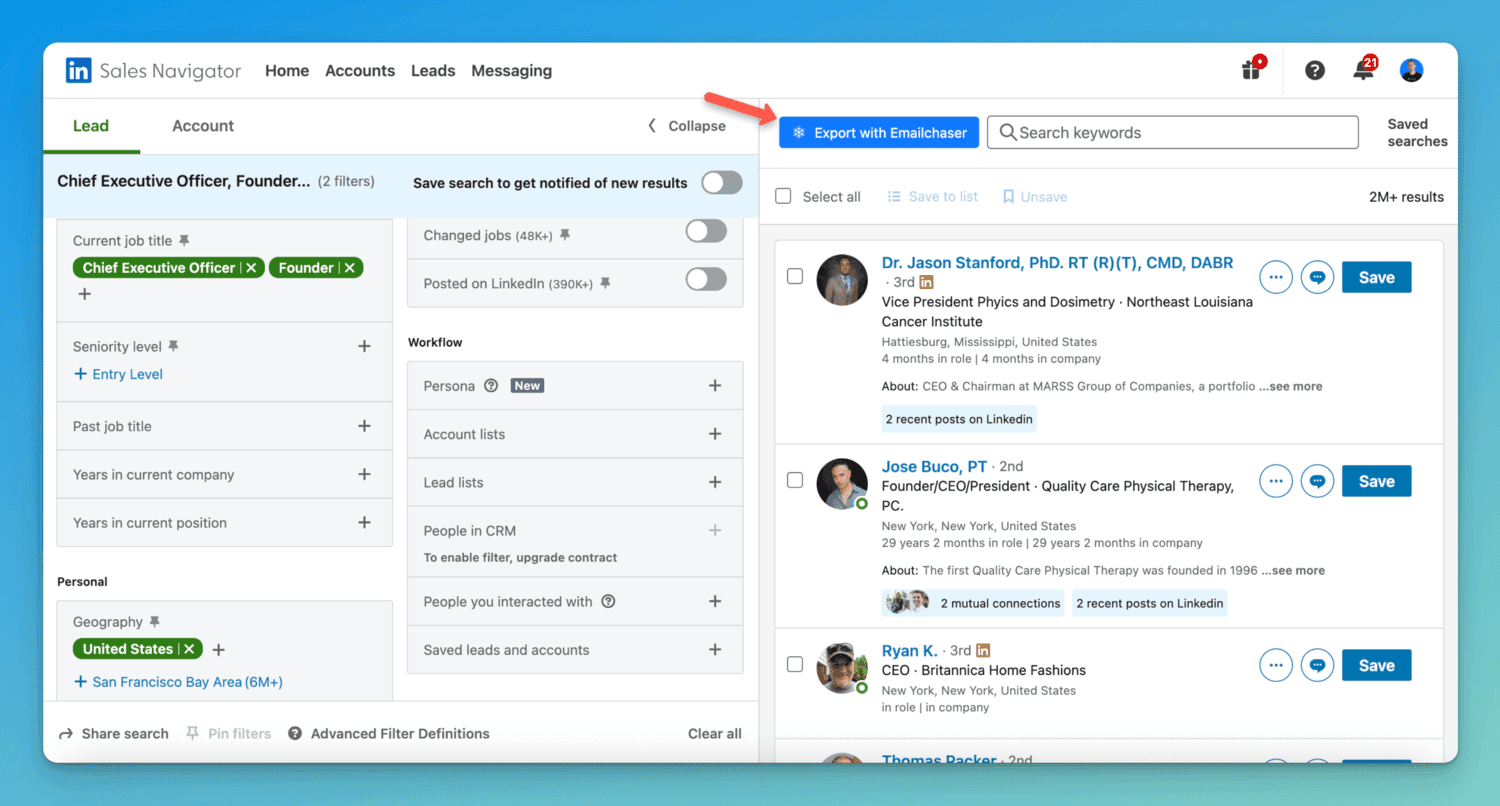
Exported leads can be double-verified (two independent verification providers must both approve an address before Emailchaser emails it — verification credits are a small extra cost), which keeps bounce rates under 1%. You can see how this fits into a full outbound workflow on the pricing page — every plan starts with a 7-day free trial.
Email formats of 937 large companies (as publicly reported) and who handles their inbound mail (measured)
Formats as publicly reported, not measured by Emailchaser. Who receives each company's mail is measured in our Inbox Rules Index on 2026-09-05, for the 285 of 937 domains the Index covers. That column is what the company has set up for receiving mail; it says nothing about any sender.
| Company | Domain | Format (as publicly reported) | Example | Receives mail via (measured 2026-09-05) |
|---|---|---|---|---|
| google.com | first | jane@google.com | not in the Index panel | |
| Meta | meta.com | first | jane@meta.com | not in the Index panel |
| Apple | apple.com | first.last | jane.doe@apple.com | not in the Index panel |
| Amazon | amazon.com | first.last | jane.doe@amazon.com | not in the Index panel |
| Microsoft | microsoft.com | first.last | jane.doe@microsoft.com | not in the Index panel |
| Netflix | netflix.com | first.last | jane.doe@netflix.com | Google Workspace (mailbox provider), DMARC p=reject |
| Salesforce | salesforce.com | first.last | jane.doe@salesforce.com | Proofpoint (security gateway), DMARC p=reject |
| Oracle | oracle.com | first.last | jane.doe@oracle.com | Proofpoint (security gateway), DMARC p=reject |
| Adobe | adobe.com | first.last | jane.doe@adobe.com | Microsoft 365 (mailbox provider), DMARC p=reject |
| IBM | ibm.com | first.last | jane.doe@ibm.com | not in the Index panel |
| Stripe | stripe.com | first | jane@stripe.com | Google Workspace (mailbox provider), DMARC p=reject |
| Uber | uber.com | first | jane@uber.com | not in the Index panel |
| Airbnb | airbnb.com | first.last | jane.doe@airbnb.com | Google Workspace (mailbox provider), DMARC p=reject |
| Spotify | spotify.com | first.last | jane.doe@spotify.com | Google Workspace (mailbox provider), DMARC p=reject |
| linkedin.com | first.last | jane.doe@linkedin.com | not in the Index panel | |
| Atlassian | atlassian.com | first.last | jane.doe@atlassian.com | Proofpoint (security gateway), DMARC p=reject |
| Shopify | shopify.com | first.last | jane.doe@shopify.com | Google Workspace (mailbox provider), DMARC p=reject |
| Slack | slack.com | first.last | jane.doe@slack.com | Google Workspace (mailbox provider), DMARC p=reject |
| Zoom | zoom.us | first.last | jane.doe@zoom.us | Proofpoint (security gateway), DMARC p=reject |
| Dropbox | dropbox.com | first.last | jane.doe@dropbox.com | Proofpoint (security gateway), DMARC p=reject |
| Tesla | tesla.com | first.last | jane.doe@tesla.com | Microsoft 365 (mailbox provider), DMARC p=reject |
| Nvidia | nvidia.com | flast | jdoe@nvidia.com | Microsoft 365 (mailbox provider), DMARC p=reject |
| Intel | intel.com | first.last | jane.doe@intel.com | Self-hosted or other (own mail server), DMARC p=none |
| Cisco | cisco.com | flast | jdoe@cisco.com | Cisco Secure Email (security gateway), DMARC p=reject |
| HubSpot | hubspot.com | first.last | jane.doe@hubspot.com | Google Workspace (mailbox provider), DMARC p=reject |
| McKinsey | mckinsey.com | first_last | jane_doe@mckinsey.com | Proofpoint (security gateway), DMARC p=reject |
| Bain & Company | bain.com | first.last | jane.doe@bain.com | Proofpoint (security gateway), DMARC p=reject |
| Boston Consulting Group | bcg.com | first.last | jane.doe@bcg.com | Mimecast (security gateway), DMARC p=reject |
| Accenture | accenture.com | first.last | jane.doe@accenture.com | Proofpoint (security gateway), DMARC p=reject |
| Deloitte | deloitte.com | first.last | jane.doe@deloitte.com | Cisco Secure Email (security gateway), DMARC p=reject |
| PwC | pwc.com | first.last | jane.doe@pwc.com | Proofpoint (security gateway), DMARC p=reject |
| EY | ey.com | first.last | jane.doe@ey.com | Cisco Secure Email (security gateway), DMARC p=reject |
| KPMG | kpmg.com | first.last | jane.doe@kpmg.com | Proofpoint (security gateway), DMARC p=reject |
| Goldman Sachs | gs.com | first.last | jane.doe@gs.com | not in the Index panel |
| JPMorgan | jpmorgan.com | first.last | jane.doe@jpmorgan.com | Self-hosted or other (own mail server), DMARC p=reject |
| Nike | nike.com | first.last | jane.doe@nike.com | Proofpoint (security gateway), DMARC p=reject |
| Zendesk | zendesk.com | flast | jdoe@zendesk.com | Google Workspace (mailbox provider), DMARC p=reject |
| Asana | asana.com | firstlast | janedoe@asana.com | Google Workspace (mailbox provider), DMARC p=quarantine |
| Figma | figma.com | flast | jdoe@figma.com | Google Workspace (mailbox provider), DMARC p=quarantine |
| Box | box.com | flast | jdoe@box.com | Proofpoint (security gateway), DMARC p=reject |
| DocuSign | docusign.com | first.last | jane.doe@docusign.com | Proofpoint (security gateway), DMARC p=reject |
| Twilio | twilio.com | flast | jdoe@twilio.com | Google Workspace (mailbox provider), DMARC p=reject |
| Squarespace | squarespace.com | flast | jdoe@squarespace.com | Google Workspace (mailbox provider), DMARC p=reject |
| Wix | wix.com | firstl | janed@wix.com | Google Workspace (mailbox provider), DMARC p=quarantine |
| GoDaddy | godaddy.com | flast | jdoe@godaddy.com | Microsoft 365 (mailbox provider), DMARC p=reject |
| Akamai | akamai.com | flast | jdoe@akamai.com | Proofpoint (security gateway), DMARC p=reject |
| DigitalOcean | digitalocean.com | flast | jdoe@digitalocean.com | Google Workspace (mailbox provider), DMARC p=reject |
| Vercel | vercel.com | first.last | jane.doe@vercel.com | Google Workspace (mailbox provider), DMARC p=quarantine |
| Netlify | netlify.com | first.last | jane.doe@netlify.com | Google Workspace (mailbox provider), DMARC p=reject |
| GitLab | gitlab.com | flast | jdoe@gitlab.com | Google Workspace (mailbox provider), DMARC p=reject |
| JetBrains | jetbrains.com | first.last | jane.doe@jetbrains.com | Google Workspace (mailbox provider), DMARC p=reject |
| Postman | postman.com | first.last | jane.doe@postman.com | Google Workspace (mailbox provider), DMARC p=quarantine |
| Datadog | datadoghq.com | first.last | jane.doe@datadoghq.com | Google Workspace (mailbox provider), DMARC p=reject |
| New Relic | newrelic.com | flast | jdoe@newrelic.com | Google Workspace (mailbox provider), DMARC p=reject |
| Elastic | elastic.co | first.last | jane.doe@elastic.co | Google Workspace (mailbox provider), DMARC p=quarantine |
| MongoDB | mongodb.com | first.last | jane.doe@mongodb.com | Google Workspace (mailbox provider), DMARC p=reject |
| Snowflake | snowflake.com | first.last | jane.doe@snowflake.com | Google Workspace (mailbox provider), DMARC p=reject |
| Databricks | databricks.com | first.last | jane.doe@databricks.com | Google Workspace (mailbox provider), DMARC p=reject |
| HashiCorp | hashicorp.com | flast | jdoe@hashicorp.com | Proofpoint (security gateway), DMARC p=reject |
| Okta | okta.com | first.last | jane.doe@okta.com | Proofpoint (security gateway), DMARC p=reject |
| 1Password | 1password.com | first.last | jane.doe@1password.com | Google Workspace (mailbox provider), DMARC p=quarantine |
| LastPass | lastpass.com | first.last | jane.doe@lastpass.com | Microsoft 365 (mailbox provider), DMARC p=reject |
| CrowdStrike | crowdstrike.com | first.last | jane.doe@crowdstrike.com | Proofpoint (security gateway), DMARC p=reject |
| Palo Alto Networks | paloaltonetworks.com | flast | jdoe@paloaltonetworks.com | Proofpoint (security gateway), DMARC p=reject |
| Fortinet | fortinet.com | flast | jdoe@fortinet.com | Self-hosted or other (own mail server), DMARC p=quarantine |
| SentinelOne | sentinelone.com | first.last | jane.doe@sentinelone.com | Google Workspace (mailbox provider), DMARC p=reject |
| Rapid7 | rapid7.com | first_last | jane_doe@rapid7.com | Google Workspace (mailbox provider), DMARC p=quarantine |
| Tenable | tenable.com | flast | jdoe@tenable.com | Mimecast (security gateway), DMARC p=reject |
| Qualys | qualys.com | flast | jdoe@qualys.com | Proofpoint (security gateway), DMARC p=reject |
| Proofpoint | proofpoint.com | flast | jdoe@proofpoint.com | Proofpoint (security gateway), DMARC p=reject |
| Mimecast | mimecast.com | flast | jdoe@mimecast.com | Mimecast (security gateway), DMARC p=reject |
| Sophos | sophos.com | first.last | jane.doe@sophos.com | Self-hosted or other (own mail server), DMARC p=quarantine |
| Trend Micro | trendmicro.com | first_last | jane_doe@trendmicro.com | Trend Micro (security gateway), DMARC p=reject |
| McAfee | mcafee.com | first_last | jane_doe@mcafee.com | Microsoft 365 (mailbox provider), DMARC p=reject |
| Kaspersky | kaspersky.com | first.last | jane.doe@kaspersky.com | Self-hosted or other (own mail server), DMARC p=reject |
| VMware | vmware.com | flast | jdoe@vmware.com | Google Workspace (mailbox provider), DMARC p=reject |
| Citrix | citrix.com | first.last | jane.doe@citrix.com | Microsoft 365 (mailbox provider), DMARC p=reject |
| Red Hat | redhat.com | flast | jdoe@redhat.com | Mimecast (security gateway), DMARC p=quarantine |
| Canonical | canonical.com | first.last | jane.doe@canonical.com | Self-hosted or other (own mail server), DMARC p=reject |
| SAP | sap.com | first.last | jane.doe@sap.com | Microsoft 365 (mailbox provider), DMARC p=reject |
| Workday | workday.com | first.last | jane.doe@workday.com | Proofpoint (security gateway), DMARC p=reject |
| ServiceNow | servicenow.com | first.last | jane.doe@servicenow.com | Mimecast (security gateway), DMARC p=reject |
| Autodesk | autodesk.com | first.last | jane.doe@autodesk.com | Microsoft 365 (mailbox provider), DMARC p=quarantine |
| Intuit | intuit.com | first_last | jane_doe@intuit.com | Cisco Secure Email (security gateway), DMARC p=reject |
| Xero | xero.com | first.last | jane.doe@xero.com | Google Workspace (mailbox provider), DMARC p=reject |
| Sage | sage.com | first.last | jane.doe@sage.com | Microsoft 365 (mailbox provider), DMARC p=quarantine |
| Freshworks | freshworks.com | first.last | jane.doe@freshworks.com | Google Workspace (mailbox provider), DMARC p=quarantine |
| Pipedrive | pipedrive.com | first.last | jane.doe@pipedrive.com | Google Workspace (mailbox provider), DMARC p=reject |
| ZoomInfo | zoominfo.com | first.last | jane.doe@zoominfo.com | Proofpoint (security gateway), DMARC p=reject |
| Gong | gong.io | first.last | jane.doe@gong.io | Proofpoint (security gateway), DMARC p=quarantine |
| Outreach | outreach.io | first.last | jane.doe@outreach.io | Microsoft 365 (mailbox provider), DMARC p=reject |
| Salesloft | salesloft.com | first.last | jane.doe@salesloft.com | Google Workspace (mailbox provider), DMARC p=reject |
| Klaviyo | klaviyo.com | first.last | jane.doe@klaviyo.com | Google Workspace (mailbox provider), DMARC p=reject |
| Braze | braze.com | first.last | jane.doe@braze.com | Google Workspace (mailbox provider), DMARC p=quarantine |
| Qlik | qlik.com | first.last | jane.doe@qlik.com | Proofpoint (security gateway), DMARC p=quarantine |
| UiPath | uipath.com | first.last | jane.doe@uipath.com | Microsoft 365 (mailbox provider), DMARC p=quarantine |
| Automation Anywhere | automationanywhere.com | first.last | jane.doe@automationanywhere.com | Proofpoint (security gateway), DMARC p=quarantine |
| Airtable | airtable.com | first.last | jane.doe@airtable.com | Google Workspace (mailbox provider), DMARC p=reject |
| Smartsheet | smartsheet.com | first.last | jane.doe@smartsheet.com | Proofpoint (security gateway), DMARC p=reject |
| 8x8 | 8x8.com | first.last | jane.doe@8x8.com | Google Workspace (mailbox provider), DMARC p=quarantine |
| Five9 | five9.com | first.last | jane.doe@five9.com | Microsoft 365 (mailbox provider), DMARC p=none |
| NICE | nice.com | first.last | jane.doe@nice.com | Self-hosted or other (own mail server), DMARC p=reject |
| Genesys | genesys.com | first.last | jane.doe@genesys.com | Mimecast (security gateway), DMARC p=quarantine |
| Plaid | plaid.com | flast | jdoe@plaid.com | Google Workspace (mailbox provider), DMARC p=reject |
| Gusto | gusto.com | first.last | jane.doe@gusto.com | Google Workspace (mailbox provider), DMARC p=reject |
| Morgan Stanley | morganstanley.com | first.last | jane.doe@morganstanley.com | Self-hosted or other (own mail server), DMARC p=reject |
| Bank of America | bofa.com | first.last | jane.doe@bofa.com | not in the Index panel |
| Wells Fargo | wellsfargo.com | first.last | jane.doe@wellsfargo.com | Proofpoint (security gateway), DMARC p=reject |
| Citi | citi.com | first.last | jane.doe@citi.com | Self-hosted or other (own mail server), DMARC p=reject |
| U.S. Bank | usbank.com | first.last | jane.doe@usbank.com | Proofpoint (security gateway), DMARC p=reject |
| PNC | pnc.com | first.last | jane.doe@pnc.com | Proofpoint (security gateway), DMARC p=reject |
| Truist | truist.com | first.last | jane.doe@truist.com | Proofpoint (security gateway), DMARC p=reject |
| Capital One | capitalone.com | first.last | jane.doe@capitalone.com | Proofpoint (security gateway), DMARC p=reject |
| Discover | discover.com | firstlast | janedoe@discover.com | Proofpoint (security gateway), DMARC p=quarantine |
| Mastercard | mastercard.com | first.last | jane.doe@mastercard.com | Proofpoint (security gateway), DMARC p=reject |
| PayPal | paypal.com | flast | jdoe@paypal.com | Self-hosted or other (own mail server), DMARC p=reject |
| Fidelity Investments | fmr.com | first.last | jane.doe@fmr.com | not in the Index panel |
| Charles Schwab | schwab.com | first.last | jane.doe@schwab.com | Proofpoint (security gateway), DMARC p=reject |
| Vanguard | vanguard.com | first_last | jane_doe@vanguard.com | Proofpoint (security gateway), DMARC p=reject |
| BlackRock | blackrock.com | first.last | jane.doe@blackrock.com | Proofpoint (security gateway), DMARC p=quarantine |
| Nasdaq | nasdaq.com | first.last | jane.doe@nasdaq.com | Proofpoint (security gateway), DMARC p=quarantine |
| S&P Global | spglobal.com | first.last | jane.doe@spglobal.com | Proofpoint (security gateway), DMARC p=reject |
| Moody's | moodys.com | first.last | jane.doe@moodys.com | Proofpoint (security gateway), DMARC p=reject |
| Refinitiv | refinitiv.com | first.last | jane.doe@refinitiv.com | Mimecast (security gateway), DMARC p=reject |
| Fiserv | fiserv.com | first.last | jane.doe@fiserv.com | Proofpoint (security gateway), DMARC p=reject |
| FIS | fisglobal.com | first.last | jane.doe@fisglobal.com | Proofpoint (security gateway), DMARC p=reject |
| Global Payments | globalpay.com | first.last | jane.doe@globalpay.com | not in the Index panel |
| Klarna | klarna.com | first.last | jane.doe@klarna.com | Self-hosted or other (own mail server), DMARC p=reject |
| Revolut | revolut.com | first.last | jane.doe@revolut.com | Google Workspace (mailbox provider), DMARC p=quarantine |
| Barclays | barclays.com | first.last | jane.doe@barclays.com | not in the Index panel |
| Lloyds Bank | lloydsbanking.com | first.last | jane.doe@lloydsbanking.com | not in the Index panel |
| NatWest | natwest.com | first.last | jane.doe@natwest.com | Self-hosted or other (own mail server), DMARC p=reject |
| BNP Paribas | bnpparibas.com | first.last | jane.doe@bnpparibas.com | Self-hosted or other (own mail server), DMARC p=reject |
| Deutsche Bank | db.com | first.last | jane.doe@db.com | Self-hosted or other (own mail server), DMARC p=reject |
| UBS | ubs.com | first.last | jane.doe@ubs.com | Self-hosted or other (own mail server), DMARC p=reject |
| Allianz | allianz.com | first.last | jane.doe@allianz.com | Cisco Secure Email (security gateway), DMARC p=reject |
| AXA | axa.com | first.last | jane.doe@axa.com | Proofpoint (security gateway), DMARC p=reject |
| AIG | aig.com | first.last | jane.doe@aig.com | Proofpoint (security gateway), DMARC p=reject |
| Prudential Financial | prudential.com | first.last | jane.doe@prudential.com | Self-hosted or other (own mail server), DMARC p=none |
| Chubb | chubb.com | first.last | jane.doe@chubb.com | Proofpoint (security gateway), DMARC p=reject |
| Marsh | marsh.com | first.last | jane.doe@marsh.com | Proofpoint (security gateway), DMARC p=reject |
| Aon | aon.com | first.last | jane.doe@aon.com | Microsoft 365 (mailbox provider), DMARC p=reject |
| Walmart | walmart.com | first.last | jane.doe@walmart.com | Proofpoint (security gateway), DMARC p=reject |
| Kroger | kroger.com | first.last | jane.doe@kroger.com | Proofpoint (security gateway), DMARC p=reject |
| Albertsons | albertsons.com | first.last | jane.doe@albertsons.com | Proofpoint (security gateway), DMARC p=none |
| Home Depot | homedepot.com | first_last | jane_doe@homedepot.com | Proofpoint (security gateway), DMARC p=reject |
| Lowe's | lowes.com | first.last | jane.doe@lowes.com | Microsoft 365 (mailbox provider), DMARC p=reject |
| Best Buy | bestbuy.com | first.last | jane.doe@bestbuy.com | Proofpoint (security gateway), DMARC p=reject |
| Macy's | macys.com | first.last | jane.doe@macys.com | Proofpoint (security gateway), DMARC p=reject |
| Nordstrom | nordstrom.com | first.last | jane.doe@nordstrom.com | Proofpoint (security gateway), DMARC p=reject |
| Kohl's | kohls.com | first.last | jane.doe@kohls.com | Cisco Secure Email (security gateway), DMARC p=reject |
| Gap | gap.com | first_last | jane_doe@gap.com | Microsoft 365 (mailbox provider), DMARC p=reject |
| adidas | adidas.com | first.last | jane.doe@adidas.com | Microsoft 365 (mailbox provider), DMARC p=reject |
| Patagonia | patagonia.com | first.last | jane.doe@patagonia.com | Microsoft 365 (mailbox provider), DMARC p=none |
| Wayfair | wayfair.com | flast | jdoe@wayfair.com | Proofpoint (security gateway), DMARC p=quarantine |
| IKEA | ingka.ikea.com | first.last | jane.doe@ingka.ikea.com | not in the Index panel |
| Williams-Sonoma | wsgc.com | flast | jdoe@wsgc.com | not in the Index panel |
| Chewy | chewy.com | flast | jdoe@chewy.com | Mimecast (security gateway), DMARC p=reject |
| Petco | petco.com | first.last | jane.doe@petco.com | Microsoft 365 (mailbox provider), DMARC p=reject |
| Sephora | sephora.com | first.last | jane.doe@sephora.com | Proofpoint (security gateway), DMARC p=reject |
| Ulta Beauty | ulta.com | flast | jdoe@ulta.com | Proofpoint (security gateway), DMARC p=reject |
| CVS Health | cvshealth.com | first.last | jane.doe@cvshealth.com | not in the Index panel |
| Walgreens | walgreens.com | first.last | jane.doe@walgreens.com | Mimecast (security gateway), DMARC p=quarantine |
| Dollar Tree | dollartree.com | first.last | jane.doe@dollartree.com | Proofpoint (security gateway), DMARC p=reject |
| TJX | tjx.com | first_last | jane_doe@tjx.com | Proofpoint (security gateway), DMARC p=reject |
| AutoZone | autozone.com | first.last | jane.doe@autozone.com | Mimecast (security gateway), DMARC p=none |
| Tractor Supply | tractorsupply.com | flast | jdoe@tractorsupply.com | Proofpoint (security gateway), DMARC p=reject |
| Office Depot | officedepot.com | first.last | jane.doe@officedepot.com | Microsoft 365 (mailbox provider), DMARC p=reject |
| Grainger | grainger.com | first.last | jane.doe@grainger.com | Microsoft 365 (mailbox provider), DMARC p=quarantine |
| Etsy | etsy.com | flast | jdoe@etsy.com | Google Workspace (mailbox provider), DMARC p=reject |
| Sainsbury's | sainsburys.co.uk | first.last | jane.doe@sainsburys.co.uk | Proofpoint (security gateway), DMARC p=reject |
| Zalando | zalando.de | first.last | jane.doe@zalando.de | not in the Index panel |
| ASOS | asos.com | first.last | jane.doe@asos.com | Microsoft 365 (mailbox provider), DMARC p=reject |
| Elevance Health | elevancehealth.com | first.last | jane.doe@elevancehealth.com | Proofpoint (security gateway), DMARC p=reject |
| Cigna | cigna.com | first.last | jane.doe@cigna.com | Proofpoint (security gateway), DMARC p=quarantine |
| Humana | humana.com | flast | jdoe@humana.com | Proofpoint (security gateway), DMARC p=reject |
| HCA Healthcare | hcahealthcare.com | first.last | jane.doe@hcahealthcare.com | Proofpoint (security gateway), DMARC p=quarantine |
| Tenet Healthcare | tenethealth.com | first.last | jane.doe@tenethealth.com | Microsoft 365 (mailbox provider), DMARC p=reject |
| CommonSpirit Health | commonspirit.org | first.last | jane.doe@commonspirit.org | Proofpoint (security gateway), DMARC p=reject |
| Ascension | ascension.org | first.last | jane.doe@ascension.org | Mimecast (security gateway), DMARC p=reject |
| Mayo Clinic | mayo.edu | last.first | doe.jane@mayo.edu | not in the Index panel |
| Pfizer | pfizer.com | first.last | jane.doe@pfizer.com | Proofpoint (security gateway), DMARC p=reject |
| Merck | merck.com | first.last | jane.doe@merck.com | Microsoft 365 (mailbox provider), DMARC p=reject |
| AbbVie | abbvie.com | first.last | jane.doe@abbvie.com | Cisco Secure Email (security gateway), DMARC p=quarantine |
| Bristol Myers Squibb | bms.com | first.last | jane.doe@bms.com | Microsoft 365 (mailbox provider), DMARC p=reject |
| Amgen | amgen.com | flast | jdoe@amgen.com | Microsoft 365 (mailbox provider), DMARC p=reject |
| Gilead | gilead.com | first.last | jane.doe@gilead.com | Proofpoint (security gateway), DMARC p=none |
| Biogen | biogen.com | first.last | jane.doe@biogen.com | Microsoft 365 (mailbox provider), DMARC p=reject |
| Moderna | modernatx.com | first.last | jane.doe@modernatx.com | not in the Index panel |
| Regeneron | regeneron.com | first.last | jane.doe@regeneron.com | Proofpoint (security gateway), DMARC p=reject |
| Vertex Pharmaceuticals | vrtx.com | first_last | jane_doe@vrtx.com | not in the Index panel |
| Novartis | novartis.com | first.last | jane.doe@novartis.com | Proofpoint (security gateway), DMARC p=reject |
| Roche | roche.com | first.last | jane.doe@roche.com | Self-hosted or other (own mail server), DMARC p=reject |
| Sanofi | sanofi.com | first.last | jane.doe@sanofi.com | Mimecast (security gateway), DMARC p=quarantine |
| AstraZeneca | astrazeneca.com | first.last | jane.doe@astrazeneca.com | Proofpoint (security gateway), DMARC p=none |
| Bayer | bayer.com | first.last | jane.doe@bayer.com | Microsoft 365 (mailbox provider), DMARC p=none |
| Stryker | stryker.com | first.last | jane.doe@stryker.com | Microsoft 365 (mailbox provider), DMARC p=quarantine |
| Boston Scientific | bsci.com | first.last | jane.doe@bsci.com | not in the Index panel |
| Zimmer Biomet | zimmerbiomet.com | first.last | jane.doe@zimmerbiomet.com | Microsoft 365 (mailbox provider), DMARC p=quarantine |
| Danaher | danaher.com | first.last | jane.doe@danaher.com | Proofpoint (security gateway), DMARC p=reject |
| Thermo Fisher Scientific | thermofisher.com | first.last | jane.doe@thermofisher.com | Proofpoint (security gateway), DMARC p=quarantine |
| McKesson | mckesson.com | first.last | jane.doe@mckesson.com | Proofpoint (security gateway), DMARC p=reject |
| Cardinal Health | cardinalhealth.com | first.last | jane.doe@cardinalhealth.com | Cisco Secure Email (security gateway), DMARC p=reject |
| Epic Systems | epic.com | flast | jdoe@epic.com | Proofpoint (security gateway), DMARC p=reject |
| Veeva Systems | veeva.com | first.last | jane.doe@veeva.com | Google Workspace (mailbox provider), DMARC p=quarantine |
| IQVIA | iqvia.com | first.last | jane.doe@iqvia.com | Microsoft 365 (mailbox provider), DMARC p=reject |
| GE | ge.com | first.last | jane.doe@ge.com | Proofpoint (security gateway), DMARC p=none |
| Honeywell | honeywell.com | first.last | jane.doe@honeywell.com | Microsoft 365 (mailbox provider), DMARC p=reject |
| Cummins | cummins.com | first.last | jane.doe@cummins.com | Proofpoint (security gateway), DMARC p=none |
| Emerson | emerson.com | first.last | jane.doe@emerson.com | Proofpoint (security gateway), DMARC p=reject |
| Eaton | eaton.com | firstlast | janedoe@eaton.com | Microsoft 365 (mailbox provider), DMARC p=reject |
| Parker Hannifin | parker.com | first.last | jane.doe@parker.com | Proofpoint (security gateway), DMARC p=reject |
| Illinois Tool Works | itw.com | flast | jdoe@itw.com | not in the Index panel |
| Dover | dovercorp.com | flast | jdoe@dovercorp.com | not in the Index panel |
| Northrop Grumman | ngc.com | first.last | jane.doe@ngc.com | not in the Index panel |
| Airbus | airbus.com | first.last | jane.doe@airbus.com | Self-hosted or other (own mail server), DMARC p=reject |
| Siemens | siemens.com | first.last | jane.doe@siemens.com | Microsoft 365 (mailbox provider), DMARC p=reject |
| Schneider Electric | se.com | first.last | jane.doe@se.com | not in the Index panel |
| Bosch | bosch.com | first.last | jane.doe@bosch.com | Microsoft 365 (mailbox provider), DMARC p=reject |
| BASF | basf.com | first.last | jane.doe@basf.com | Microsoft 365 (mailbox provider), DMARC p=reject |
| Linde | linde.com | first.last | jane.doe@linde.com | Microsoft 365 (mailbox provider), DMARC p=reject |
| Nucor | nucor.com | first.last | jane.doe@nucor.com | Microsoft 365 (mailbox provider), DMARC p=reject |
| Alcoa | alcoa.com | first.last | jane.doe@alcoa.com | Proofpoint (security gateway), DMARC p=none |
| GM | gm.com | first.last | jane.doe@gm.com | Microsoft 365 (mailbox provider), DMARC p=reject |
| Stellantis | stellantis.com | first.last | jane.doe@stellantis.com | Microsoft 365 (mailbox provider), DMARC p=reject |
| Toyota | toyota.com | first.last | jane.doe@toyota.com | Proofpoint (security gateway), DMARC p=reject |
| American Honda | ahm.honda.com | first_last | jane_doe@ahm.honda.com | not in the Index panel |
| Volkswagen | vw.com | first.last | jane.doe@vw.com | not in the Index panel |
| BMW | bmwgroup.com | first.last | jane.doe@bmwgroup.com | not in the Index panel |
| Mercedes-Benz | mercedes-benz.com | first.last | jane.doe@mercedes-benz.com | Self-hosted or other (own mail server), DMARC p=reject |
| Carrier | carrier.com | first.last | jane.doe@carrier.com | Proofpoint (security gateway), DMARC p=reject |
| Trane Technologies | tranetechnologies.com | first.last | jane.doe@tranetechnologies.com | not in the Index panel |
| Johnson Controls | jci.com | first.last | jane.doe@jci.com | not in the Index panel |
| The New York Times | nytimes.com | first.last | jane.doe@nytimes.com | Google Workspace (mailbox provider), DMARC p=reject |
| The Wall Street Journal | wsj.com | first.last | jane.doe@wsj.com | Proofpoint (security gateway), DMARC p=quarantine |
| Financial Times | ft.com | first.last | jane.doe@ft.com | Self-hosted or other (own mail server), DMARC p=reject |
| Associated Press | ap.org | flast | jdoe@ap.org | not in the Index panel |
| BBC | bbc.co.uk | first.last | jane.doe@bbc.co.uk | Self-hosted or other (own mail server), DMARC p=reject |
| The Guardian | theguardian.com | first.last | jane.doe@theguardian.com | not in the Index panel |
| CNN | cnn.com | first.last | jane.doe@cnn.com | Microsoft 365 (mailbox provider), DMARC p=reject |
| Paramount | paramount.com | first.last | jane.doe@paramount.com | Proofpoint (security gateway), DMARC p=none |
| Warner Bros. | warnerbros.com | first.last | jane.doe@warnerbros.com | Microsoft 365 (mailbox provider), DMARC p=quarantine |
| Disney | disney.com | first.last | jane.doe@disney.com | Microsoft 365 (mailbox provider), DMARC p=none |
| Hearst | hearst.com | flast | jdoe@hearst.com | Microsoft 365 (mailbox provider), DMARC p=quarantine |
| Forbes | forbes.com | flast | jdoe@forbes.com | Mimecast (security gateway), DMARC p=reject |
| The Economist | economist.com | firstlast | janedoe@economist.com | Google Workspace (mailbox provider), DMARC p=quarantine |
| Vox Media | voxmedia.com | first.last | jane.doe@voxmedia.com | not in the Index panel |
| WPP | wpp.com | first.last | jane.doe@wpp.com | Proofpoint (security gateway), DMARC p=reject |
| Omnicom | omc.com | first.last | jane.doe@omc.com | not in the Index panel |
| Publicis Groupe | publicisgroupe.com | first.last | jane.doe@publicisgroupe.com | Microsoft 365 (mailbox provider), DMARC p=none |
| Dentsu | dentsu.com | first.last | jane.doe@dentsu.com | Microsoft 365 (mailbox provider), DMARC p=reject |
| Marriott | marriott.com | first.last | jane.doe@marriott.com | Microsoft 365 (mailbox provider), DMARC p=reject |
| Hilton | hilton.com | first.last | jane.doe@hilton.com | Microsoft 365 (mailbox provider), DMARC p=quarantine |
| Hyatt | hyatt.com | first.last | jane.doe@hyatt.com | Proofpoint (security gateway), DMARC p=reject |
| IHG | ihg.com | first.last | jane.doe@ihg.com | Proofpoint (security gateway), DMARC p=none |
| Wyndham Hotels | wyndham.com | first.last | jane.doe@wyndham.com | not in the Index panel |
| Accor | accor.com | first.last | jane.doe@accor.com | Trend Micro (security gateway), DMARC p=none |
| American Airlines | aa.com | first.last | jane.doe@aa.com | Microsoft 365 (mailbox provider), DMARC p=reject |
| United Airlines | united.com | first.last | jane.doe@united.com | Proofpoint (security gateway), DMARC p=reject |
| Delta Air Lines | delta.com | first.last | jane.doe@delta.com | Proofpoint (security gateway), DMARC p=reject |
| Southwest Airlines | wnco.com | first.last | jane.doe@wnco.com | not in the Index panel |
| JetBlue | jetblue.com | first.last | jane.doe@jetblue.com | Microsoft 365 (mailbox provider), DMARC p=reject |
| Alaska Airlines | alaskaair.com | first.last | jane.doe@alaskaair.com | Microsoft 365 (mailbox provider), DMARC p=quarantine |
| Lufthansa | dlh.de | first.last | jane.doe@dlh.de | not in the Index panel |
| Emirates | emirates.com | first.last | jane.doe@emirates.com | Mimecast (security gateway), DMARC p=quarantine |
| Booking.com | booking.com | first.last | jane.doe@booking.com | Proofpoint (security gateway), DMARC p=reject |
| Expedia | expediagroup.com | flast | jdoe@expediagroup.com | not in the Index panel |
| Tripadvisor | tripadvisor.com | flast | jdoe@tripadvisor.com | Google Workspace (mailbox provider), DMARC p=reject |
| Carnival | carnival.com | flast | jdoe@carnival.com | Microsoft 365 (mailbox provider), DMARC p=reject |
| Royal Caribbean | rccl.com | flast | jdoe@rccl.com | not in the Index panel |
| Avis Budget Group | avisbudget.com | first.last | jane.doe@avisbudget.com | not in the Index panel |
| Verizon | verizon.com | first.last | jane.doe@verizon.com | Proofpoint (security gateway), DMARC p=reject |
| T-Mobile | t-mobile.com | first.last | jane.doe@t-mobile.com | Proofpoint (security gateway), DMARC p=reject |
| Comcast | comcast.com | first_last | jane_doe@comcast.com | Proofpoint (security gateway), DMARC p=reject |
| Charter Communications | charter.com | first.last | jane.doe@charter.com | Microsoft 365 (mailbox provider), DMARC p=quarantine |
| Cox Communications | cox.com | first.last | jane.doe@cox.com | Microsoft 365 (mailbox provider), DMARC p=reject |
| Lumen Technologies | lumen.com | first.last | jane.doe@lumen.com | Proofpoint (security gateway), DMARC p=reject |
| Frontier Communications | ftr.com | first.last | jane.doe@ftr.com | not in the Index panel |
| Telefónica | telefonica.com | first.last | jane.doe@telefonica.com | Microsoft 365 (mailbox provider), DMARC p=none |
| Orange | orange.com | first.last | jane.doe@orange.com | Self-hosted or other (own mail server), DMARC p=none |
| Deutsche Telekom | telekom.de | first.last | jane.doe@telekom.de | not in the Index panel |
| TELUS | telus.com | first.last | jane.doe@telus.com | Self-hosted or other (own mail server), DMARC p=reject |
| Rogers | rci.rogers.com | first.last | jane.doe@rci.rogers.com | not in the Index panel |
| Bell | bell.ca | first.last | jane.doe@bell.ca | Self-hosted or other (own mail server), DMARC p=reject |
| Arista Networks | arista.com | first | jane@arista.com | Google Workspace (mailbox provider), DMARC p=reject |
| Nokia | nokia.com | first.last | jane.doe@nokia.com | Microsoft 365 (mailbox provider), DMARC p=reject |
| Ericsson | ericsson.com | first.last | jane.doe@ericsson.com | Microsoft 365 (mailbox provider), DMARC p=reject |
| Broadcom | broadcom.com | first.last | jane.doe@broadcom.com | Google Workspace (mailbox provider), DMARC p=reject |
| AMD | amd.com | first.last | jane.doe@amd.com | Microsoft 365 (mailbox provider), DMARC p=quarantine |
| Analog Devices | analog.com | first.last | jane.doe@analog.com | Proofpoint (security gateway), DMARC p=quarantine |
| NXP | nxp.com | first.last | jane.doe@nxp.com | Microsoft 365 (mailbox provider), DMARC p=none |
| Capgemini | capgemini.com | first.last | jane.doe@capgemini.com | Cisco Secure Email (security gateway), DMARC p=reject |
| Wipro | wipro.com | first.last | jane.doe@wipro.com | Microsoft 365 (mailbox provider), DMARC p=quarantine |
| Cognizant | cognizant.com | first.last | jane.doe@cognizant.com | Microsoft 365 (mailbox provider), DMARC p=reject |
| ADP | adp.com | first.last | jane.doe@adp.com | Proofpoint (security gateway), DMARC p=reject |
| Paychex | paychex.com | flast | jdoe@paychex.com | Proofpoint (security gateway), DMARC p=reject |
| Robert Half | roberthalf.com | first.last | jane.doe@roberthalf.com | Microsoft 365 (mailbox provider), DMARC p=reject |
| Randstad | randstad.com | first.last | jane.doe@randstad.com | Google Workspace (mailbox provider), DMARC p=reject |
| ManpowerGroup | manpowergroup.com | first.last | jane.doe@manpowergroup.com | Microsoft 365 (mailbox provider), DMARC p=reject |
| CBRE | cbre.com | first.last | jane.doe@cbre.com | Proofpoint (security gateway), DMARC p=reject |
| JLL | jll.com | first.last | jane.doe@jll.com | Proofpoint (security gateway), DMARC p=reject |
| Cushman & Wakefield | cushwake.com | first.last | jane.doe@cushwake.com | not in the Index panel |
| Sodexo | sodexo.com | first.last | jane.doe@sodexo.com | Proofpoint (security gateway), DMARC p=reject |
| UPS | ups.com | flast | jdoe@ups.com | Proofpoint (security gateway), DMARC p=reject |
| FedEx | fedex.com | first.last | jane.doe@fedex.com | Proofpoint (security gateway), DMARC p=reject |
| DHL | dhl.com | first.last | jane.doe@dhl.com | Self-hosted or other (own mail server), DMARC p=reject |
| Maersk | maersk.com | first.last | jane.doe@maersk.com | Microsoft 365 (mailbox provider), DMARC p=reject |
| Kuehne+Nagel | kuehne-nagel.com | first.last | jane.doe@kuehne-nagel.com | Self-hosted or other (own mail server), DMARC p=reject |
| C.H. Robinson | chrobinson.com | first.last | jane.doe@chrobinson.com | Proofpoint (security gateway), DMARC p=reject |
| XPO | xpo.com | first.last | jane.doe@xpo.com | Proofpoint (security gateway), DMARC p=quarantine |
| J.B. Hunt | jbhunt.com | first.last | jane.doe@jbhunt.com | Proofpoint (security gateway), DMARC p=reject |
| Union Pacific | up.com | flast | jdoe@up.com | Microsoft 365 (mailbox provider), DMARC p=quarantine |
| CSX | csx.com | first_last | jane_doe@csx.com | Microsoft 365 (mailbox provider), DMARC p=none |
| Norfolk Southern | nscorp.com | first.last | jane.doe@nscorp.com | Proofpoint (security gateway), DMARC p=reject |
| Penske | penske.com | first.last | jane.doe@penske.com | Proofpoint (security gateway), DMARC p=reject |
| ConocoPhillips | conocophillips.com | first.last | jane.doe@conocophillips.com | Microsoft 365 (mailbox provider), DMARC p=reject |
| Shell | shell.com | first.last | jane.doe@shell.com | Microsoft 365 (mailbox provider), DMARC p=quarantine |
| BP | bp.com | first.last | jane.doe@bp.com | Microsoft 365 (mailbox provider), DMARC p=reject |
| TotalEnergies | totalenergies.com | first.last | jane.doe@totalenergies.com | Microsoft 365 (mailbox provider), DMARC p=reject |
| Eni | eni.com | first.last | jane.doe@eni.com | Microsoft 365 (mailbox provider), DMARC p=reject |
| SLB | slb.com | flast | jdoe@slb.com | Proofpoint (security gateway), DMARC p=reject |
| Halliburton | halliburton.com | first.last | jane.doe@halliburton.com | Microsoft 365 (mailbox provider), DMARC p=reject |
| Baker Hughes | bakerhughes.com | first.last | jane.doe@bakerhughes.com | Microsoft 365 (mailbox provider), DMARC p=reject |
| Duke Energy | duke-energy.com | first.last | jane.doe@duke-energy.com | Cisco Secure Email (security gateway), DMARC p=quarantine |
| NextEra Energy | nexteraenergy.com | first.last | jane.doe@nexteraenergy.com | Proofpoint (security gateway), DMARC p=reject |
| Exelon | exeloncorp.com | first.last | jane.doe@exeloncorp.com | Microsoft 365 (mailbox provider), DMARC p=quarantine |
| Southern California Edison | sce.com | first.last | jane.doe@sce.com | not in the Index panel |
| National Grid | nationalgrid.com | first.last | jane.doe@nationalgrid.com | Proofpoint (security gateway), DMARC p=reject |
| Iberdrola | iberdrola.es | flast | jdoe@iberdrola.es | not in the Index panel |
| Enel | enel.com | first.last | jane.doe@enel.com | Microsoft 365 (mailbox provider), DMARC p=reject |
| Engie | engie.com | first.last | jane.doe@engie.com | Proofpoint (security gateway), DMARC p=reject |
| First Solar | firstsolar.com | first.last | jane.doe@firstsolar.com | Microsoft 365 (mailbox provider), DMARC p=none |
| DoorDash | doordash.com | first.last | jane.doe@doordash.com | not in the Index panel |
| SoFi | sofi.org | flast | jdoe@sofi.org | not in the Index panel |
| Electronic Arts | ea.com | flast | jdoe@ea.com | not in the Index panel |
| Applied Materials | amat.com | first_last | jane_doe@amat.com | not in the Index panel |
| Microchip Technology | microchip.com | first.last | jane.doe@microchip.com | not in the Index panel |
| Western Digital | wdc.com | first.last | jane.doe@wdc.com | not in the Index panel |
| Motorola Solutions | motorolasolutions.com | first.last | jane.doe@motorolasolutions.com | not in the Index panel |
| Keysight | keysight.com | first.last | jane.doe@keysight.com | not in the Index panel |
| CyberArk | cyberark.com | first.last | jane.doe@cyberark.com | not in the Index panel |
| Tyler Technologies | tylertech.com | first.last | jane.doe@tylertech.com | not in the Index panel |
| BigCommerce | bigcommerce.com | first.last | jane.doe@bigcommerce.com | not in the Index panel |
| Teradata | teradata.com | first.last | jane.doe@teradata.com | not in the Index panel |
| Nutanix | nutanix.com | first.last | jane.doe@nutanix.com | not in the Index panel |
| Extreme Networks | extremenetworks.com | flast | jdoe@extremenetworks.com | not in the Index panel |
| Jack Henry | jackhenry.com | flast | jdoe@jackhenry.com | not in the Index panel |
| WEX | wexinc.com | first.last | jane.doe@wexinc.com | not in the Index panel |
| Rubrik | rubrik.com | first.last | jane.doe@rubrik.com | not in the Index panel |
| Appian | appian.com | first.last | jane.doe@appian.com | not in the Index panel |
| Shutterstock | shutterstock.com | flast | jdoe@shutterstock.com | not in the Index panel |
| Getty Images | gettyimages.com | first.last | jane.doe@gettyimages.com | not in the Index panel |
| Logitech | logitech.com | flast | jdoe@logitech.com | not in the Index panel |
| Sirius XM | siriusxm.com | first.last | jane.doe@siriusxm.com | not in the Index panel |
| Magnite | magnite.com | flast | jdoe@magnite.com | not in the Index panel |
| Integral Ad Science | integralads.com | flast | jdoe@integralads.com | not in the Index panel |
| Criteo | criteo.com | f.last | j.doe@criteo.com | not in the Index panel |
| AppLovin | applovin.com | first.last | jane.doe@applovin.com | not in the Index panel |
| Anywhere Real Estate | anywhere.re | first.last | jane.doe@anywhere.re | not in the Index panel |
| Cars.com | cars.com | flast | jdoe@cars.com | not in the Index panel |
| Sabre | sabre.com | first.last | jane.doe@sabre.com | not in the Index panel |
| Fifth Third | 53.com | first.last | jane.doe@53.com | not in the Index panel |
| KeyBank | key.com | first.last | jane.doe@key.com | not in the Index panel |
| Northern Trust | ntrs.com | first.last | jane.doe@ntrs.com | not in the Index panel |
| T. Rowe Price | troweprice.com | first.last | jane.doe@troweprice.com | not in the Index panel |
| LPL Financial | lpl.com | first.last | jane.doe@lpl.com | not in the Index panel |
| Lazard | lazard.com | first.last | jane.doe@lazard.com | not in the Index panel |
| Moelis | moelis.com | first.last | jane.doe@moelis.com | not in the Index panel |
| Carlyle | carlyle.com | first.last | jane.doe@carlyle.com | not in the Index panel |
| Ares Management | aresmgmt.com | flast | jdoe@aresmgmt.com | not in the Index panel |
| CME Group | cmegroup.com | first.last | jane.doe@cmegroup.com | not in the Index panel |
| Intercontinental Exchange | ice.com | first.last | jane.doe@ice.com | not in the Index panel |
| Cboe | cboe.com | flast | jdoe@cboe.com | not in the Index panel |
| MSCI | msci.com | first.last | jane.doe@msci.com | not in the Index panel |
| Morningstar | morningstar.com | first.last | jane.doe@morningstar.com | not in the Index panel |
| FactSet | factset.com | first.last | jane.doe@factset.com | not in the Index panel |
| Principal Financial | principal.com | last.first | doe.jane@principal.com | not in the Index panel |
| Lincoln Financial | lfg.com | first.last | jane.doe@lfg.com | not in the Index panel |
| Aflac | aflac.com | flast | jdoe@aflac.com | not in the Index panel |
| The Hartford | thehartford.com | first.last | jane.doe@thehartford.com | not in the Index panel |
| Markel | markel.com | first.last | jane.doe@markel.com | not in the Index panel |
| Arch Capital | archgroup.com | flast | jdoe@archgroup.com | not in the Index panel |
| Everest Group | everestglobal.com | first.last | jane.doe@everestglobal.com | not in the Index panel |
| Willis Towers Watson | wtwco.com | first.last | jane.doe@wtwco.com | not in the Index panel |
| Arthur J. Gallagher | ajg.com | first_last | jane_doe@ajg.com | not in the Index panel |
| Freddie Mac | freddiemac.com | first_last | jane_doe@freddiemac.com | not in the Index panel |
| Rocket Companies | rocketcompanies.com | firstlast | janedoe@rocketcompanies.com | not in the Index panel |
| PennyMac | pnmac.com | first.last | jane.doe@pnmac.com | not in the Index panel |
| Annaly | annaly.com | flast | jdoe@annaly.com | not in the Index panel |
| Voya | voya.com | first.last | jane.doe@voya.com | not in the Index panel |
| Assurant | assurant.com | first.last | jane.doe@assurant.com | not in the Index panel |
| Hanover Insurance | hanover.com | flast | jdoe@hanover.com | not in the Index panel |
| Selective Insurance | selective.com | first.last | jane.doe@selective.com | not in the Index panel |
| Root Insurance | joinroot.com | first.last | jane.doe@joinroot.com | not in the Index panel |
| First Horizon | firsthorizon.com | first.last | jane.doe@firsthorizon.com | not in the Index panel |
| Zions | zionsbancorp.com | first.last | jane.doe@zionsbancorp.com | not in the Index panel |
| East West Bank | eastwestbank.com | first.last | jane.doe@eastwestbank.com | not in the Index panel |
| Western Alliance | westernalliancebank.com | flast | jdoe@westernalliancebank.com | not in the Index panel |
| Flagstar | flagstar.com | first.last | jane.doe@flagstar.com | not in the Index panel |
| Webster | websterbank.com | flast | jdoe@websterbank.com | not in the Index panel |
| Valley National | valley.com | flast | jdoe@valley.com | not in the Index panel |
| Cullen/Frost | frostbank.com | first.last | jane.doe@frostbank.com | not in the Index panel |
| BankUnited | bankunited.com | flast | jdoe@bankunited.com | not in the Index panel |
| Associated Banc-Corp | associatedbank.com | first.last | jane.doe@associatedbank.com | not in the Index panel |
| Old National | oldnational.com | first.last | jane.doe@oldnational.com | not in the Index panel |
| Wintrust | wintrust.com | flast | jdoe@wintrust.com | not in the Index panel |
| Texas Capital | texascapital.com | first.last | jane.doe@texascapital.com | not in the Index panel |
| Piper Sandler | psc.com | first.last | jane.doe@psc.com | not in the Index panel |
| Oppenheimer | opco.com | first.last | jane.doe@opco.com | not in the Index panel |
| Virtu Financial | virtu.com | flast | jdoe@virtu.com | not in the Index panel |
| MarketAxess | marketaxess.com | flast | jdoe@marketaxess.com | not in the Index panel |
| Tradeweb | tradeweb.com | first.last | jane.doe@tradeweb.com | not in the Index panel |
| Bakkt | bakkt.com | first.last | jane.doe@bakkt.com | not in the Index panel |
| Galaxy Digital | galaxydigital.io | first.last | jane.doe@galaxydigital.io | not in the Index panel |
| Fidelity National Financial | fnf.com | first.last | jane.doe@fnf.com | not in the Index panel |
| First American | firstam.com | flast | jdoe@firstam.com | not in the Index panel |
| Old Republic | oldrepublic.com | flast | jdoe@oldrepublic.com | not in the Index panel |
| CNA Financial | cna.com | first.last | jane.doe@cna.com | not in the Index panel |
| Manulife | manulife.com | first_last | jane_doe@manulife.com | not in the Index panel |
| Royal Bank of Canada | rbc.com | first.last | jane.doe@rbc.com | not in the Index panel |
| TD Bank | td.com | first.last | jane.doe@td.com | not in the Index panel |
| Scotiabank | scotiabank.com | first.last | jane.doe@scotiabank.com | not in the Index panel |
| BMO | bmo.com | first.last | jane.doe@bmo.com | not in the Index panel |
| CIBC | cibc.com | first.last | jane.doe@cibc.com | not in the Index panel |
| Intesa Sanpaolo | intesasanpaolo.com | first.last | jane.doe@intesasanpaolo.com | not in the Index panel |
| Swiss Re | swissre.com | first_last | jane_doe@swissre.com | not in the Index panel |
| Mizuho | mizuhogroup.com | first.last | jane.doe@mizuhogroup.com | not in the Index panel |
| Illumina | illumina.com | flast | jdoe@illumina.com | not in the Index panel |
| Agilent | agilent.com | first.last | jane.doe@agilent.com | not in the Index panel |
| Revvity | revvity.com | first.last | jane.doe@revvity.com | not in the Index panel |
| Zoetis | zoetis.com | first.last | jane.doe@zoetis.com | not in the Index panel |
| Alnylam | alnylam.com | flast | jdoe@alnylam.com | not in the Index panel |
| Exelixis | exelixis.com | flast | jdoe@exelixis.com | not in the Index panel |
| Sarepta | sarepta.com | flast | jdoe@sarepta.com | not in the Index panel |
| Medpace | medpace.com | f.last | j.doe@medpace.com | not in the Index panel |
| Dexcom | dexcom.com | first.last | jane.doe@dexcom.com | not in the Index panel |
| Insulet | insulet.com | flast | jdoe@insulet.com | not in the Index panel |
| Steris | steris.com | first_last | jane_doe@steris.com | not in the Index panel |
| Molina Healthcare | molinahealthcare.com | first.last | jane.doe@molinahealthcare.com | not in the Index panel |
| Encompass Health | encompasshealth.com | first.last | jane.doe@encompasshealth.com | not in the Index panel |
| Select Medical | selectmedical.com | flast | jdoe@selectmedical.com | not in the Index panel |
| Mettler-Toledo | mt.com | first.last | jane.doe@mt.com | not in the Index panel |
| West Pharmaceutical | westpharma.com | first.last | jane.doe@westpharma.com | not in the Index panel |
| Avantor | avantorsciences.com | first.last | jane.doe@avantorsciences.com | not in the Index panel |
| Twist Bioscience | twistbioscience.com | flast | jdoe@twistbioscience.com | not in the Index panel |
| CRISPR Therapeutics | crisprtx.com | first.last | jane.doe@crisprtx.com | not in the Index panel |
| Intellia | intelliatx.com | first.last | jane.doe@intelliatx.com | not in the Index panel |
| Vir Biotechnology | vir.bio | flast | jdoe@vir.bio | not in the Index panel |
| Halozyme | halozyme.com | flast | jdoe@halozyme.com | not in the Index panel |
| Argenx | argenx.com | flast | jdoe@argenx.com | not in the Index panel |
| Astellas | astellas.com | first.last | jane.doe@astellas.com | not in the Index panel |
| Integra LifeSciences | integralife.com | first.last | jane.doe@integralife.com | not in the Index panel |
| Haemonetics | haemonetics.com | first.last | jane.doe@haemonetics.com | not in the Index panel |
| Fresenius | fresenius.com | first.last | jane.doe@fresenius.com | not in the Index panel |
| Philips | philips.com | first.last | jane.doe@philips.com | not in the Index panel |
| Siemens Healthineers | siemens-healthineers.com | first.last | jane.doe@siemens-healthineers.com | not in the Index panel |
| Ross Stores | ros.com | first.last | jane.doe@ros.com | not in the Index panel |
| Levi Strauss | levi.com | flast | jdoe@levi.com | not in the Index panel |
| Tapestry | tapestry.com | flast | jdoe@tapestry.com | not in the Index panel |
| Crocs | crocs.com | flast | jdoe@crocs.com | not in the Index panel |
| Carter's | carters.com | first.last | jane.doe@carters.com | not in the Index panel |
| Church & Dwight | churchdwight.com | first.last | jane.doe@churchdwight.com | not in the Index panel |
| Mattel | mattel.com | first.last | jane.doe@mattel.com | not in the Index panel |
| Keurig Dr Pepper | kdrp.com | first.last | jane.doe@kdrp.com | not in the Index panel |
| Hershey | hersheys.com | flast | jdoe@hersheys.com | not in the Index panel |
| Tyson Foods | tyson.com | first.last | jane.doe@tyson.com | not in the Index panel |
| McCormick | mccormick.com | first_last | jane_doe@mccormick.com | not in the Index panel |
| Constellation Brands | cbrands.com | first.last | jane.doe@cbrands.com | not in the Index panel |
| Yum Brands | yum.com | first.last | jane.doe@yum.com | not in the Index panel |
| Wendy's | wendys.com | first.last | jane.doe@wendys.com | not in the Index panel |
| Sysco | sysco.com | first.last | jane.doe@sysco.com | not in the Index panel |
| Performance Food Group | pfgc.com | first.last | jane.doe@pfgc.com | not in the Index panel |
| Harley-Davidson | harley-davidson.com | first.last | jane.doe@harley-davidson.com | not in the Index panel |
| Goodyear | goodyear.com | first_last | jane_doe@goodyear.com | not in the Index panel |
| Lear | lear.com | flast | jdoe@lear.com | not in the Index panel |
| CNH | cnh.com | first.last | jane.doe@cnh.com | not in the Index panel |
| Ollie's | ollies.us | flast | jdoe@ollies.us | not in the Index panel |
| BJ's Wholesale | bjs.com | flast | jdoe@bjs.com | not in the Index panel |
| Casey's | caseys.com | first.last | jane.doe@caseys.com | not in the Index panel |
| Murphy USA | murphyusa.com | first.last | jane.doe@murphyusa.com | not in the Index panel |
| Signet Jewelers | signetjewelers.com | first.last | jane.doe@signetjewelers.com | not in the Index panel |
| Dillard's | dillards.com | first.last | jane.doe@dillards.com | not in the Index panel |
| Children's Place | childrensplace.com | flast | jdoe@childrensplace.com | not in the Index panel |
| Brunswick | brunswick.com | first.last | jane.doe@brunswick.com | not in the Index panel |
| Thor Industries | thorindustries.com | flast | jdoe@thorindustries.com | not in the Index panel |
| Spectrum Brands | spectrumbrands.com | first.last | jane.doe@spectrumbrands.com | not in the Index panel |
| Edgewell | edgewell.com | first.last | jane.doe@edgewell.com | not in the Index panel |
| Scotts Miracle-Gro | scotts.com | first.last | jane.doe@scotts.com | not in the Index panel |
| Celsius Holdings | celsius.com | flast | jdoe@celsius.com | not in the Index panel |
| Boston Beer | bostonbeer.com | first.last | jane.doe@bostonbeer.com | not in the Index panel |
| Nestle | nestle.com | first.last | jane.doe@nestle.com | not in the Index panel |
| CACI | caci.com | first.last | jane.doe@caci.com | not in the Index panel |
| Parsons | parsons.com | first.last | jane.doe@parsons.com | not in the Index panel |
| Jacobs | jacobs.com | first.last | jane.doe@jacobs.com | not in the Index panel |
| AECOM | aecom.com | first.last | jane.doe@aecom.com | not in the Index panel |
| Fluor | fluor.com | first.last | jane.doe@fluor.com | not in the Index panel |
| Xylem | xylem.com | first.last | jane.doe@xylem.com | not in the Index panel |
| Stanley Black & Decker | sbdinc.com | first.last | jane.doe@sbdinc.com | not in the Index panel |
| Mohawk | mohawkind.com | first_last | jane_doe@mohawkind.com | not in the Index panel |
| Owens Corning | owenscorning.com | first.last | jane.doe@owenscorning.com | not in the Index panel |
| Pentair | pentair.com | first.last | jane.doe@pentair.com | not in the Index panel |
| Ingersoll Rand | irco.com | first.last | jane.doe@irco.com | not in the Index panel |
| Waste Management | wm.com | flast | jdoe@wm.com | not in the Index panel |
| Sealed Air | sealedair.com | first.last | jane.doe@sealedair.com | not in the Index panel |
| Newmont | newmont.com | first.last | jane.doe@newmont.com | not in the Index panel |
| Cleveland-Cliffs | clevelandcliffs.com | first.last | jane.doe@clevelandcliffs.com | not in the Index panel |
| Mosaic Company | mosaicco.com | first.last | jane.doe@mosaicco.com | not in the Index panel |
| Corteva | corteva.com | first.last | jane.doe@corteva.com | not in the Index panel |
| FMC | fmc.com | first.last | jane.doe@fmc.com | not in the Index panel |
| Avery Dennison | averydennison.com | first.last | jane.doe@averydennison.com | not in the Index panel |
| Hexcel | hexcel.com | first.last | jane.doe@hexcel.com | not in the Index panel |
| Howmet | howmet.com | first.last | jane.doe@howmet.com | not in the Index panel |
| Woodward | woodward.com | first.last | jane.doe@woodward.com | not in the Index panel |
| Roper | ropertech.com | flast | jdoe@ropertech.com | not in the Index panel |
| Vontier | vontier.com | first.last | jane.doe@vontier.com | not in the Index panel |
| nVent | nvent.com | first.last | jane.doe@nvent.com | not in the Index panel |
| Regal Rexnord | regalrexnord.com | first.last | jane.doe@regalrexnord.com | not in the Index panel |
| Timken | timken.com | first.last | jane.doe@timken.com | not in the Index panel |
| Kennametal | kennametal.com | first.last | jane.doe@kennametal.com | not in the Index panel |
| Terex | terex.com | first.last | jane.doe@terex.com | not in the Index panel |
| Manitowoc | manitowoc.com | first.last | jane.doe@manitowoc.com | not in the Index panel |
| Holcim | holcim.com | first.last | jane.doe@holcim.com | not in the Index panel |
| Volvo Cars | volvocars.com | first.last | jane.doe@volvocars.com | not in the Index panel |
| Polestar | polestar.com | first.last | jane.doe@polestar.com | not in the Index panel |
| Sony | sony.com | first.last | jane.doe@sony.com | not in the Index panel |
| Valero | valero.com | first.last | jane.doe@valero.com | not in the Index panel |
| Kinder Morgan | kindermorgan.com | first_last | jane_doe@kindermorgan.com | not in the Index panel |
| Devon Energy | dvn.com | first.last | jane.doe@dvn.com | not in the Index panel |
| Diamondback | diamondbackenergy.com | flast | jdoe@diamondbackenergy.com | not in the Index panel |
| Coterra | coterra.com | first.last | jane.doe@coterra.com | not in the Index panel |
| Cheniere | cheniere.com | first.last | jane.doe@cheniere.com | not in the Index panel |
| FirstEnergy | firstenergycorp.com | flast | jdoe@firstenergycorp.com | not in the Index panel |
| WEC Energy | wecenergygroup.com | first.last | jane.doe@wecenergygroup.com | not in the Index panel |
| CMS Energy | cmsenergy.com | first.last | jane.doe@cmsenergy.com | not in the Index panel |
| Evergy | evergy.com | first.last | jane.doe@evergy.com | not in the Index panel |
| NiSource | nisource.com | flast | jdoe@nisource.com | not in the Index panel |
| AES | aes.com | first.last | jane.doe@aes.com | not in the Index panel |
| Vistra | vistracorp.com | first.last | jane.doe@vistracorp.com | not in the Index panel |
| Constellation Energy | constellation.com | first.last | jane.doe@constellation.com | not in the Index panel |
| SolarEdge | solaredge.com | first.last | jane.doe@solaredge.com | not in the Index panel |
| ChargePoint | chargepoint.com | first.last | jane.doe@chargepoint.com | not in the Index panel |
| Fluence | fluenceenergy.com | first.last | jane.doe@fluenceenergy.com | not in the Index panel |
| Peabody | peabodyenergy.com | flast | jdoe@peabodyenergy.com | not in the Index panel |
| Plains All American | plains.com | first.last | jane.doe@plains.com | not in the Index panel |
| Glencore | glencore.com | first.last | jane.doe@glencore.com | not in the Index panel |
| Anglo American | angloamerican.com | first.last | jane.doe@angloamerican.com | not in the Index panel |
| Vale | vale.com | first.last | jane.doe@vale.com | not in the Index panel |
| Warner Music Group | wmg.com | first.last | jane.doe@wmg.com | not in the Index panel |
| Fox Corporation | fox.com | first.last | jane.doe@fox.com | not in the Index panel |
| News Corp | newscorp.com | flast | jdoe@newscorp.com | not in the Index panel |
| Lionsgate | lionsgate.com | flast | jdoe@lionsgate.com | not in the Index panel |
| AMC Networks | amcnetworks.com | first.last | jane.doe@amcnetworks.com | not in the Index panel |
| TKO | tkogrp.com | flast | jdoe@tkogrp.com | not in the Index panel |
| Endeavor | endeavorco.com | flast | jdoe@endeavorco.com | not in the Index panel |
| Caesars Entertainment | caesars.com | flast | jdoe@caesars.com | not in the Index panel |
| MGM Resorts | mgmresorts.com | flast | jdoe@mgmresorts.com | not in the Index panel |
| Wynn Resorts | wynnresorts.com | first.last | jane.doe@wynnresorts.com | not in the Index panel |
| Boyd Gaming | boydgaming.com | firstlast | janedoe@boydgaming.com | not in the Index panel |
| Six Flags | sixflags.com | first.last | jane.doe@sixflags.com | not in the Index panel |
| Tegna | tegna.com | flast | jdoe@tegna.com | not in the Index panel |
| Lee Enterprises | lee.net | first.last | jane.doe@lee.net | not in the Index panel |
| Scholastic | scholastic.com | flast | jdoe@scholastic.com | not in the Index panel |
| McGraw Hill | mheducation.com | first.last | jane.doe@mheducation.com | not in the Index panel |
| RELX | relx.com | first.last | jane.doe@relx.com | not in the Index panel |
| Thomson Reuters | thomsonreuters.com | first.last | jane.doe@thomsonreuters.com | not in the Index panel |
| Informa | informa.com | first.last | jane.doe@informa.com | not in the Index panel |
| Universal Music Group | umusic.com | first.last | jane.doe@umusic.com | not in the Index panel |
| Telephone and Data Systems | tdsinc.com | first.last | jane.doe@tdsinc.com | not in the Index panel |
| Viasat | viasat.com | first.last | jane.doe@viasat.com | not in the Index panel |
| Globalstar | globalstar.com | first.last | jane.doe@globalstar.com | not in the Index panel |
| Gogo | gogoair.com | flast | jdoe@gogoair.com | not in the Index panel |
| Uniti | uniti.com | first.last | jane.doe@uniti.com | not in the Index panel |
| SBA Communications | sbasite.com | flast | jdoe@sbasite.com | not in the Index panel |
| American Tower | americantower.com | first.last | jane.doe@americantower.com | not in the Index panel |
| Forrester | forrester.com | flast | jdoe@forrester.com | not in the Index panel |
| Genpact | genpact.com | first.last | jane.doe@genpact.com | not in the Index panel |
| EPAM | epam.com | first_last | jane_doe@epam.com | not in the Index panel |
| Conduent | conduent.com | first.last | jane.doe@conduent.com | not in the Index panel |
| Concentrix | concentrix.com | first.last | jane.doe@concentrix.com | not in the Index panel |
| TTEC | ttec.com | first.last | jane.doe@ttec.com | not in the Index panel |
| FTI Consulting | fticonsulting.com | first.last | jane.doe@fticonsulting.com | not in the Index panel |
| Korn Ferry | kornferry.com | first.last | jane.doe@kornferry.com | not in the Index panel |
| Kelly Services | kellyservices.com | first.last | jane.doe@kellyservices.com | not in the Index panel |
| TriNet | trinet.com | first.last | jane.doe@trinet.com | not in the Index panel |
| Kforce | kforce.com | flast | jdoe@kforce.com | not in the Index panel |
| ASGN | asgn.com | first.last | jane.doe@asgn.com | not in the Index panel |
| Prologis | prologis.com | flast | jdoe@prologis.com | not in the Index panel |
| Welltower | welltower.com | flast | jdoe@welltower.com | not in the Index panel |
| VICI Properties | viciproperties.com | flast | jdoe@viciproperties.com | not in the Index panel |
| Iron Mountain | ironmountain.com | first.last | jane.doe@ironmountain.com | not in the Index panel |
| Toll Brothers | tollbrothers.com | flast | jdoe@tollbrothers.com | not in the Index panel |
| KB Home | kbhome.com | flast | jdoe@kbhome.com | not in the Index panel |
| Mid-America Apartment | maac.com | first.last | jane.doe@maac.com | not in the Index panel |
| Essex Property | essex.com | flast | jdoe@essex.com | not in the Index panel |
| Healthpeak | healthpeak.com | flast | jdoe@healthpeak.com | not in the Index panel |
| Regency Centers | regencycenters.com | firstlast | janedoe@regencycenters.com | not in the Index panel |
| Federal Realty | federalrealty.com | flast | jdoe@federalrealty.com | not in the Index panel |
| Brixmor | brixmor.com | first.last | jane.doe@brixmor.com | not in the Index panel |
| Cousins Properties | cousins.com | flast | jdoe@cousins.com | not in the Index panel |
| Rexford | rexfordindustrial.com | flast | jdoe@rexfordindustrial.com | not in the Index panel |
| Colliers | colliers.com | first.last | jane.doe@colliers.com | not in the Index panel |
| Verisk | verisk.com | first.last | jane.doe@verisk.com | not in the Index panel |
| ABM Industries | abm.com | first.last | jane.doe@abm.com | not in the Index panel |
| UniFirst | unifirst.com | first_last | jane_doe@unifirst.com | not in the Index panel |
| Stantec | stantec.com | first.last | jane.doe@stantec.com | not in the Index panel |
| Warner Bros Discovery | wbd.com | first.last | jane.doe@wbd.com | not in the Index panel |
| La-Z-Boy | la-z-boy.com | first.last | jane.doe@la-z-boy.com | not in the Index panel |
| Smith & Wesson | smith-wesson.com | flast | jdoe@smith-wesson.com | not in the Index panel |
| Badger Meter | badgermeter.com | flast | jdoe@badgermeter.com | not in the Index panel |
| American Water Works | amwater.com | first.last | jane.doe@amwater.com | not in the Index panel |
| California Water | calwater.com | flast | jdoe@calwater.com | not in the Index panel |
| Southwest Gas | swgas.com | first.last | jane.doe@swgas.com | not in the Index panel |
| ONE Gas | onegas.com | first.last | jane.doe@onegas.com | not in the Index panel |
| Avista | avistacorp.com | first.last | jane.doe@avistacorp.com | not in the Index panel |
| Alliant Energy | alliantenergy.com | firstlast | janedoe@alliantenergy.com | not in the Index panel |
| Eversource | eversource.com | first.last | jane.doe@eversource.com | not in the Index panel |
| CenterPoint Energy | centerpointenergy.com | first.last | jane.doe@centerpointenergy.com | not in the Index panel |
| Brookfield | brookfield.com | first.last | jane.doe@brookfield.com | not in the Index panel |
| KLA | kla.com | first.last | jane.doe@kla.com | not in the Index panel |
| Udemy | udemy.com | first.last | jane.doe@udemy.com | not in the Index panel |
| Digital Turbine | digitalturbine.com | first.last | jane.doe@digitalturbine.com | not in the Index panel |
| Ally Financial | ally.com | first.last | jane.doe@ally.com | not in the Index panel |
| Houlihan Lokey | hl.com | flast | jdoe@hl.com | not in the Index panel |
| Genworth | genworth.com | first.last | jane.doe@genworth.com | not in the Index panel |
| BOK Financial | bokf.com | flast | jdoe@bokf.com | not in the Index panel |
| Boehringer Ingelheim | boehringer-ingelheim.com | first.last | jane.doe@boehringer-ingelheim.com | not in the Index panel |
| Charles River Laboratories | crl.com | first.last | jane.doe@crl.com | not in the Index panel |
| Universal Health Services | uhsinc.com | first.last | jane.doe@uhsinc.com | not in the Index panel |
| GE HealthCare | gehealthcare.com | first.last | jane.doe@gehealthcare.com | not in the Index panel |
| Capri Holdings | capriholdings.com | first.last | jane.doe@capriholdings.com | not in the Index panel |
| Philip Morris International | pmi.com | first.last | jane.doe@pmi.com | not in the Index panel |
| Celanese | celanese.com | first.last | jane.doe@celanese.com | not in the Index panel |
| Allegion | allegion.com | first.last | jane.doe@allegion.com | not in the Index panel |
| Edison International | edisonintl.com | first.last | jane.doe@edisonintl.com | not in the Index panel |
| Las Vegas Sands | sands.com | first.last | jane.doe@sands.com | not in the Index panel |
| Iridium | iridium.com | first.last | jane.doe@iridium.com | not in the Index panel |
| Merit Medical | merit.com | first.last | jane.doe@merit.com | not in the Index panel |
| F5 | f5.com | f.last | j.doe@f5.com | not in the Index panel |
| Skyworks | skyworksinc.com | first.last | jane.doe@skyworksinc.com | not in the Index panel |
| Qorvo | qorvo.com | first.last | jane.doe@qorvo.com | not in the Index panel |
| Lattice Semiconductor | latticesemi.com | first.last | jane.doe@latticesemi.com | not in the Index panel |
| Rambus | rambus.com | flast | jdoe@rambus.com | not in the Index panel |
| Synaptics | synaptics.com | first.last | jane.doe@synaptics.com | not in the Index panel |
| Cirrus Logic | cirrus.com | first.last | jane.doe@cirrus.com | not in the Index panel |
| Viavi Solutions | viavisolutions.com | first.last | jane.doe@viavisolutions.com | not in the Index panel |
| Entegris | entegris.com | first.last | jane.doe@entegris.com | not in the Index panel |
| MKS Instruments | mksinst.com | first.last | jane.doe@mksinst.com | not in the Index panel |
| Onto Innovation | ontoinnovation.com | first.last | jane.doe@ontoinnovation.com | not in the Index panel |
| Amkor Technology | amkor.com | first.last | jane.doe@amkor.com | not in the Index panel |
| Littelfuse | littelfuse.com | flast | jdoe@littelfuse.com | not in the Index panel |
| Jabil | jabil.com | first_last | jane_doe@jabil.com | not in the Index panel |
| Flex | flex.com | first.last | jane.doe@flex.com | not in the Index panel |
| Sanmina | sanmina.com | first.last | jane.doe@sanmina.com | not in the Index panel |
| Insight Enterprises | insight.com | first.last | jane.doe@insight.com | not in the Index panel |
| Avnet | avnet.com | first.last | jane.doe@avnet.com | not in the Index panel |
| TD Synnex | tdsynnex.com | first.last | jane.doe@tdsynnex.com | not in the Index panel |
| ScanSource | scansource.com | first.last | jane.doe@scansource.com | not in the Index panel |
| Manhattan Associates | manh.com | flast | jdoe@manh.com | not in the Index panel |
| BlackLine | blackline.com | first.last | jane.doe@blackline.com | not in the Index panel |
| CommScope | commscope.com | first.last | jane.doe@commscope.com | not in the Index panel |
| Harmonic | harmonicinc.com | first.last | jane.doe@harmonicinc.com | not in the Index panel |
| Itron | itron.com | first.last | jane.doe@itron.com | not in the Index panel |
| Corsair Gaming | corsair.com | first.last | jane.doe@corsair.com | not in the Index panel |
| Dolby Laboratories | dolby.com | first.last | jane.doe@dolby.com | not in the Index panel |
| ACI Worldwide | aciworldwide.com | first.last | jane.doe@aciworldwide.com | not in the Index panel |
| Q2 Holdings | q2.com | first.last | jane.doe@q2.com | not in the Index panel |
| nCino | ncino.com | first.last | jane.doe@ncino.com | not in the Index panel |
| Paysafe | paysafe.com | first.last | jane.doe@paysafe.com | not in the Index panel |
| Navient | navient.com | first.last | jane.doe@navient.com | not in the Index panel |
| Bread Financial | breadfinancial.com | first.last | jane.doe@breadfinancial.com | not in the Index panel |
| OneMain | omf.com | first.last | jane.doe@omf.com | not in the Index panel |
| Hancock Whitney | hancockwhitney.com | first.last | jane.doe@hancockwhitney.com | not in the Index panel |
| Simmons First | simmonsbank.com | first.last | jane.doe@simmonsbank.com | not in the Index panel |
| Fulton Financial | fultonbank.com | flast | jdoe@fultonbank.com | not in the Index panel |
| Atlantic Union Bankshares | atlanticunionbank.com | first.last | jane.doe@atlanticunionbank.com | not in the Index panel |
| Ameris Bancorp | amerisbank.com | first.last | jane.doe@amerisbank.com | not in the Index panel |
| Banner Corporation | bannerbank.com | first.last | jane.doe@bannerbank.com | not in the Index panel |
| WSFS Financial | wsfsbank.com | flast | jdoe@wsfsbank.com | not in the Index panel |
| Provident Financial Services | provident.bank | first.last | jane.doe@provident.bank | not in the Index panel |
| Customers Bancorp | customersbank.com | flast | jdoe@customersbank.com | not in the Index panel |
| Trustmark | trustmark.com | flast | jdoe@trustmark.com | not in the Index panel |
| Northwest Bancshares | northwest.com | first.last | jane.doe@northwest.com | not in the Index panel |
| Community Bank System | cbna.com | first.last | jane.doe@cbna.com | not in the Index panel |
| NBT Bancorp | nbtbank.com | flast | jdoe@nbtbank.com | not in the Index panel |
| Tompkins Financial | tompkinsfinancial.com | flast | jdoe@tompkinsfinancial.com | not in the Index panel |
| First Merchants | firstmerchants.com | flast | jdoe@firstmerchants.com | not in the Index panel |
| First Hawaiian | fhb.com | flast | jdoe@fhb.com | not in the Index panel |
| Bank of Hawaii | boh.com | first.last | jane.doe@boh.com | not in the Index panel |
| Sun Communities | suncommunities.com | flast | jdoe@suncommunities.com | not in the Index panel |
| Equity LifeStyle | equitylifestyle.com | first_last | jane_doe@equitylifestyle.com | not in the Index panel |
| CubeSmart | cubesmart.com | flast | jdoe@cubesmart.com | not in the Index panel |
| Medical Properties Trust | medicalpropertiestrust.com | flast | jdoe@medicalpropertiestrust.com | not in the Index panel |
| Tanger | tanger.com | first.last | jane.doe@tanger.com | not in the Index panel |
| Gaming and Leisure Properties | glpropinc.com | flast | jdoe@glpropinc.com | not in the Index panel |
| W. P. Carey | wpcarey.com | flast | jdoe@wpcarey.com | not in the Index panel |
| Starwood Property Trust | starwood.com | flast | jdoe@starwood.com | not in the Index panel |
| Ladder Capital | laddercapital.com | first.last | jane.doe@laddercapital.com | not in the Index panel |
| Radian | radian.com | first.last | jane.doe@radian.com | not in the Index panel |
| Primerica | primerica.com | first.last | jane.doe@primerica.com | not in the Index panel |
| Erie Indemnity | erieinsurance.com | first.last | jane.doe@erieinsurance.com | not in the Index panel |
| Janus Henderson | janushenderson.com | first.last | jane.doe@janushenderson.com | not in the Index panel |
| Hamilton Lane | hamiltonlane.com | flast | jdoe@hamiltonlane.com | not in the Index panel |
| Main Street Capital | mainstcapital.com | flast | jdoe@mainstcapital.com | not in the Index panel |
| Hercules Capital | htgc.com | flast | jdoe@htgc.com | not in the Index panel |
| Acadia Healthcare | acadiahealthcare.com | first.last | jane.doe@acadiahealthcare.com | not in the Index panel |
| Chemed | chemed.com | first.last | jane.doe@chemed.com | not in the Index panel |
| GoodRx | goodrx.com | flast | jdoe@goodrx.com | not in the Index panel |
| Certara | certara.com | first.last | jane.doe@certara.com | not in the Index panel |
| Schrodinger | schrodinger.com | first.last | jane.doe@schrodinger.com | not in the Index panel |
| Roivant | roivant.com | first.last | jane.doe@roivant.com | not in the Index panel |
| Axsome | axsome.com | flast | jdoe@axsome.com | not in the Index panel |
| Krystal Biotech | krystalbio.com | flast | jdoe@krystalbio.com | not in the Index panel |
| Legend Biotech | legendbiotech.com | first.last | jane.doe@legendbiotech.com | not in the Index panel |
| Arcus Biosciences | arcusbio.com | flast | jdoe@arcusbio.com | not in the Index panel |
| Neogen | neogen.com | flast | jdoe@neogen.com | not in the Index panel |
| Azenta | azenta.com | first.last | jane.doe@azenta.com | not in the Index panel |
| Pacira | pacira.com | first.last | jane.doe@pacira.com | not in the Index panel |
| Supernus | supernus.com | flast | jdoe@supernus.com | not in the Index panel |
| Dynavax | dynavax.com | flast | jdoe@dynavax.com | not in the Index panel |
| Bausch + Lomb | bausch.com | first.last | jane.doe@bausch.com | not in the Index panel |
| Envista | envistaco.com | first.last | jane.doe@envistaco.com | not in the Index panel |
| Aveanna Healthcare | aveanna.com | first.last | jane.doe@aveanna.com | not in the Index panel |
| Pediatrix | pediatrix.com | first.last | jane.doe@pediatrix.com | not in the Index panel |
| Academy Sports | academy.com | first.last | jane.doe@academy.com | not in the Index panel |
| Genesco | genesco.com | flast | jdoe@genesco.com | not in the Index panel |
| Kontoor Brands | kontoorbrands.com | first.last | jane.doe@kontoorbrands.com | not in the Index panel |
| e.l.f. Beauty | elfcosmetics.com | flast | jdoe@elfcosmetics.com | not in the Index panel |
| Olaplex | olaplex.com | first.last | jane.doe@olaplex.com | not in the Index panel |
| Watsco | watsco.com | flast | jdoe@watsco.com | not in the Index panel |
| Advanced Drainage Systems | ads-pipe.com | first.last | jane.doe@ads-pipe.com | not in the Index panel |
| PulteGroup | pultegroup.com | first.last | jane.doe@pultegroup.com | not in the Index panel |
| M/I Homes | mihomes.com | flast | jdoe@mihomes.com | not in the Index panel |
| Fox Factory | ridefox.com | flast | jdoe@ridefox.com | not in the Index panel |
| Gentex | gentex.com | first.last | jane.doe@gentex.com | not in the Index panel |
| Campbell Soup | campbells.com | first_last | jane_doe@campbells.com | not in the Index panel |
| Post Holdings | postholdings.com | first.last | jane.doe@postholdings.com | not in the Index panel |
| Hain Celestial | hain.com | first.last | jane.doe@hain.com | not in the Index panel |
| Utz Brands | utzsnacks.com | flast | jdoe@utzsnacks.com | not in the Index panel |
| Vital Farms | vitalfarms.com | first.last | jane.doe@vitalfarms.com | not in the Index panel |
| Oatly | oatly.com | first.last | jane.doe@oatly.com | not in the Index panel |
| Lamb Weston | lambweston.com | first.last | jane.doe@lambweston.com | not in the Index panel |
| Fresh Del Monte | freshdelmonte.com | flast | jdoe@freshdelmonte.com | not in the Index panel |
| Dole | dole.com | first.last | jane.doe@dole.com | not in the Index panel |
| Mission Produce | missionproduce.com | flast | jdoe@missionproduce.com | not in the Index panel |
| Coca-Cola Consolidated | cokeconsolidated.com | first.last | jane.doe@cokeconsolidated.com | not in the Index panel |
| Tilray | tilray.com | first.last | jane.doe@tilray.com | not in the Index panel |
| Canopy Growth | canopygrowth.com | first.last | jane.doe@canopygrowth.com | not in the Index panel |
| Texas Roadhouse | texasroadhouse.com | first.last | jane.doe@texasroadhouse.com | not in the Index panel |
| Cracker Barrel | crackerbarrel.com | first.last | jane.doe@crackerbarrel.com | not in the Index panel |
| BJ's Restaurants | bjsrestaurants.com | flast | jdoe@bjsrestaurants.com | not in the Index panel |
| Bloomin' Brands | bloominbrands.com | firstlast | janedoe@bloominbrands.com | not in the Index panel |
| Dutch Bros | dutchbros.com | first.last | jane.doe@dutchbros.com | not in the Index panel |
| Hilton Grand Vacations | hgv.com | first.last | jane.doe@hgv.com | not in the Index panel |
| Marriott Vacations | mvwc.com | first.last | jane.doe@mvwc.com | not in the Index panel |
| Lindblad | expeditions.com | firstl | janed@expeditions.com | not in the Index panel |
| HEICO | heico.com | flast | jdoe@heico.com | not in the Index panel |
| MasTec | mastec.com | first.last | jane.doe@mastec.com | not in the Index panel |
| Primoris | prim.com | flast | jdoe@prim.com | not in the Index panel |
| Tutor Perini | tutorperini.com | first.last | jane.doe@tutorperini.com | not in the Index panel |
| Kratos Defense | kratosdefense.com | first.last | jane.doe@kratosdefense.com | not in the Index panel |
| Mercury Systems | mrcy.com | first.last | jane.doe@mrcy.com | not in the Index panel |
| Traeger | traegergrills.com | flast | jdoe@traegergrills.com | not in the Index panel |
| Leslie's | lesl.com | flast | jdoe@lesl.com | not in the Index panel |
| Donaldson | donaldson.com | first.last | jane.doe@donaldson.com | not in the Index panel |
| Nordson | nordson.com | first.last | jane.doe@nordson.com | not in the Index panel |
| IDEX | idexcorp.com | flast | jdoe@idexcorp.com | not in the Index panel |
| ITT | itt.com | first.last | jane.doe@itt.com | not in the Index panel |
| Chart Industries | chartindustries.com | first.last | jane.doe@chartindustries.com | not in the Index panel |
| Middleby | middleby.com | flast | jdoe@middleby.com | not in the Index panel |
| Toro | toro.com | first.last | jane.doe@toro.com | not in the Index panel |
| Wabash National | onewabash.com | first.last | jane.doe@onewabash.com | not in the Index panel |
| Allison Transmission | allisontransmission.com | first.last | jane.doe@allisontransmission.com | not in the Index panel |
| Albany International | albint.com | first.last | jane.doe@albint.com | not in the Index panel |
| Valmont | valmont.com | first.last | jane.doe@valmont.com | not in the Index panel |
| Resideo | resideo.com | first.last | jane.doe@resideo.com | not in the Index panel |
| Applied Industrial Technologies | applied.com | flast | jdoe@applied.com | not in the Index panel |
| Core & Main | coreandmain.com | first.last | jane.doe@coreandmain.com | not in the Index panel |
| H&R Block | hrblock.com | first.last | jane.doe@hrblock.com | not in the Index panel |
| Upbound | upbound.com | first.last | jane.doe@upbound.com | not in the Index panel |
| Herc Rentals | hercrentals.com | first.last | jane.doe@hercrentals.com | not in the Index panel |
| WillScot | willscot.com | first.last | jane.doe@willscot.com | not in the Index panel |
| ArcBest | arcb.com | flast | jdoe@arcb.com | not in the Index panel |
| Forward Air | forwardair.com | flast | jdoe@forwardair.com | not in the Index panel |
| RXO | rxo.com | first.last | jane.doe@rxo.com | not in the Index panel |
| Matson | matson.com | flast | jdoe@matson.com | not in the Index panel |
| ZIM | zim.com | last.first | doe.jane@zim.com | not in the Index panel |
| Sonoco | sonoco.com | first.last | jane.doe@sonoco.com | not in the Index panel |
| Ardagh | ardaghgroup.com | first.last | jane.doe@ardaghgroup.com | not in the Index panel |
| AptarGroup | aptar.com | first.last | jane.doe@aptar.com | not in the Index panel |
| Greif | greif.com | first.last | jane.doe@greif.com | not in the Index panel |
| Sylvamo | sylvamo.com | first.last | jane.doe@sylvamo.com | not in the Index panel |
| Domtar | domtar.com | first.last | jane.doe@domtar.com | not in the Index panel |
| Cabot | cabotcorp.com | first.last | jane.doe@cabotcorp.com | not in the Index panel |
| Avient | avient.com | first.last | jane.doe@avient.com | not in the Index panel |
| HB Fuller | hbfuller.com | first.last | jane.doe@hbfuller.com | not in the Index panel |
| Minerals Technologies | mineralstech.com | first.last | jane.doe@mineralstech.com | not in the Index panel |
| Stepan | stepan.com | flast | jdoe@stepan.com | not in the Index panel |
| Sensient | sensient.com | first.last | jane.doe@sensient.com | not in the Index panel |
| Hecla | hecla-mining.com | flast | jdoe@hecla-mining.com | not in the Index panel |
| Cameco | cameco.com | first_last | jane_doe@cameco.com | not in the Index panel |
| PBF Energy | pbfenergy.com | first.last | jane.doe@pbfenergy.com | not in the Index panel |
| Range Resources | rangeresources.com | flast | jdoe@rangeresources.com | not in the Index panel |
| SM Energy | sm-energy.com | flast | jdoe@sm-energy.com | not in the Index panel |
| Kosmos Energy | kosmosenergy.com | flast | jdoe@kosmosenergy.com | not in the Index panel |
| California Resources | crc.com | first.last | jane.doe@crc.com | not in the Index panel |
| New Fortress Energy | newfortressenergy.com | flast | jdoe@newfortressenergy.com | not in the Index panel |
| Nabors | nabors.com | first.last | jane.doe@nabors.com | not in the Index panel |
| Transocean | deepwater.com | first.last | jane.doe@deepwater.com | not in the Index panel |
| Tidewater | tdw.com | flast | jdoe@tdw.com | not in the Index panel |
| Bristow | bristowgroup.com | first.last | jane.doe@bristowgroup.com | not in the Index panel |
| Expro | expro.com | first.last | jane.doe@expro.com | not in the Index panel |
| Middlesex Water | middlesexwater.com | flast | jdoe@middlesexwater.com | not in the Index panel |
| New Jersey Resources | njresources.com | flast | jdoe@njresources.com | not in the Index panel |
| Northwest Natural | nwnatural.com | first.last | jane.doe@nwnatural.com | not in the Index panel |
| Cross Country Healthcare | crosscountry.com | flast | jdoe@crosscountry.com | not in the Index panel |
| ExlService | exlservice.com | first.last | jane.doe@exlservice.com | not in the Index panel |
| Advantage Solutions | advantagesolutions.net | first.last | jane.doe@advantagesolutions.net | not in the Index panel |
| Deluxe | deluxe.com | first.last | jane.doe@deluxe.com | not in the Index panel |
| Pitney Bowes | pb.com | first.last | jane.doe@pb.com | not in the Index panel |
| Xerox | xerox.com | first.last | jane.doe@xerox.com | not in the Index panel |
| Stride | k12.com | flast | jdoe@k12.com | not in the Index panel |
| Graham Holdings | ghco.com | first.last | jane.doe@ghco.com | not in the Index panel |
| Kennedy-Wilson | kennedywilson.com | flast | jdoe@kennedywilson.com | not in the Index panel |
| Offerpad | offerpad.com | first.last | jane.doe@offerpad.com | not in the Index panel |
| RB Global | rbglobal.com | flast | jdoe@rbglobal.com | not in the Index panel |
| 1-800-Flowers | 1800flowers.com | flast | jdoe@1800flowers.com | not in the Index panel |
| Vivid Seats | vividseats.com | first.last | jane.doe@vividseats.com | not in the Index panel |
| Life360 | life360.com | flast | jdoe@life360.com | not in the Index panel |
| Cerence | cerence.com | first.last | jane.doe@cerence.com | not in the Index panel |
| Latham & Watkins | lw.com | first.last | jane.doe@lw.com | not in the Index panel |
| Skadden | skadden.com | first.last | jane.doe@skadden.com | not in the Index panel |
| Cravath | cravath.com | flast | jdoe@cravath.com | not in the Index panel |
| White & Case | whitecase.com | flast | jdoe@whitecase.com | not in the Index panel |
| Kirkland & Ellis | kirkland.com | first.last | jane.doe@kirkland.com | not in the Index panel |
| Weil Gotshal | weil.com | first.last | jane.doe@weil.com | not in the Index panel |
| Paul Weiss | paulweiss.com | flast | jdoe@paulweiss.com | not in the Index panel |
| Gibson Dunn | gibsondunn.com | flast | jdoe@gibsondunn.com | not in the Index panel |
| Cooley | cooley.com | flast | jdoe@cooley.com | not in the Index panel |
| Wilson Sonsini | wsgr.com | flast | jdoe@wsgr.com | not in the Index panel |
| Goodwin Procter | goodwinlaw.com | flast | jdoe@goodwinlaw.com | not in the Index panel |
| Orrick | orrick.com | flast | jdoe@orrick.com | not in the Index panel |
| Cahill Gordon | cahill.com | flast | jdoe@cahill.com | not in the Index panel |
| Willkie Farr | willkie.com | flast | jdoe@willkie.com | not in the Index panel |
| Hogan Lovells | hoganlovells.com | first.last | jane.doe@hoganlovells.com | not in the Index panel |
| Ropes & Gray | ropesgray.com | first.last | jane.doe@ropesgray.com | not in the Index panel |
| Mayer Brown | mayerbrown.com | flast | jdoe@mayerbrown.com | not in the Index panel |
| Proskauer Rose | proskauer.com | flast | jdoe@proskauer.com | not in the Index panel |
| Morgan Lewis | morganlewis.com | first.last | jane.doe@morganlewis.com | not in the Index panel |
| DLA Piper | dlapiper.com | first.last | jane.doe@dlapiper.com | not in the Index panel |
| Baker McKenzie | bakermckenzie.com | first.last | jane.doe@bakermckenzie.com | not in the Index panel |
| McDermott Will & Emery | mwe.com | flast | jdoe@mwe.com | not in the Index panel |
| Fenwick & West | fenwick.com | flast | jdoe@fenwick.com | not in the Index panel |
| Covington & Burling | cov.com | flast | jdoe@cov.com | not in the Index panel |
| Milbank | milbank.com | flast | jdoe@milbank.com | not in the Index panel |
| Fried Frank | friedfrank.com | first.last | jane.doe@friedfrank.com | not in the Index panel |
| Cleary Gottlieb | cgsh.com | flast | jdoe@cgsh.com | not in the Index panel |
| Winston & Strawn | winston.com | flast | jdoe@winston.com | not in the Index panel |
| Vinson & Elkins | velaw.com | flast | jdoe@velaw.com | not in the Index panel |
| Baker Botts | bakerbotts.com | first.last | jane.doe@bakerbotts.com | not in the Index panel |
| Holland & Knight | hklaw.com | first.last | jane.doe@hklaw.com | not in the Index panel |
| Hunton Andrews Kurth | hunton.com | flast | jdoe@hunton.com | not in the Index panel |
| King & Spalding | kslaw.com | flast | jdoe@kslaw.com | not in the Index panel |
| Alston & Bird | alston.com | first.last | jane.doe@alston.com | not in the Index panel |
| Troutman Pepper | troutman.com | first.last | jane.doe@troutman.com | not in the Index panel |
| Squire Patton Boggs | squirepb.com | first.last | jane.doe@squirepb.com | not in the Index panel |
| Dechert | dechert.com | first.last | jane.doe@dechert.com | not in the Index panel |
| Davis Wright Tremaine | dwt.com | firstlast | janedoe@dwt.com | not in the Index panel |
| Paul Hastings | paulhastings.com | firstlast | janedoe@paulhastings.com | not in the Index panel |
| Katten | katten.com | first.last | jane.doe@katten.com | not in the Index panel |
| Venable | venable.com | flast | jdoe@venable.com | not in the Index panel |
| Arnold & Porter | arnoldporter.com | first.last | jane.doe@arnoldporter.com | not in the Index panel |
| Duane Morris | duanemorris.com | flast | jdoe@duanemorris.com | not in the Index panel |
| Sheppard Mullin | sheppardmullin.com | flast | jdoe@sheppardmullin.com | not in the Index panel |
| Freshfields | freshfields.com | first.last | jane.doe@freshfields.com | not in the Index panel |
| Linklaters | linklaters.com | first.last | jane.doe@linklaters.com | not in the Index panel |
| Clifford Chance | cliffordchance.com | first.last | jane.doe@cliffordchance.com | not in the Index panel |
| Allen & Overy | allenovery.com | first.last | jane.doe@allenovery.com | not in the Index panel |
| Slaughter and May | slaughterandmay.com | first.last | jane.doe@slaughterandmay.com | not in the Index panel |
| Herbert Smith Freehills | hsf.com | first.last | jane.doe@hsf.com | not in the Index panel |
| Ashurst | ashurst.com | first.last | jane.doe@ashurst.com | not in the Index panel |
| Osler | osler.com | flast | jdoe@osler.com | not in the Index panel |
| Torys | torys.com | flast | jdoe@torys.com | not in the Index panel |
| Cantor Fitzgerald | cantor.com | first.last | jane.doe@cantor.com | not in the Index panel |
| TD Securities | tdsecurities.com | first.last | jane.doe@tdsecurities.com | not in the Index panel |
| STMicroelectronics | st.com | first.last | jane.doe@st.com | not in the Index panel |
| Infineon | infineon.com | first.last | jane.doe@infineon.com | not in the Index panel |
| Ambev | ambev.com.br | first.last | jane.doe@ambev.com.br | not in the Index panel |
| SQM | sqm.com | first.last | jane.doe@sqm.com | not in the Index panel |
| Amcor | amcor.com | first.last | jane.doe@amcor.com | not in the Index panel |
| HDFC Bank | hdfcbank.com | first.last | jane.doe@hdfcbank.com | not in the Index panel |
| Alibaba | alibaba-inc.com | first.last | jane.doe@alibaba-inc.com | not in the Index panel |
| Elbit Systems | elbitsystems.com | first.last | jane.doe@elbitsystems.com | not in the Index panel |
| JFrog | jfrog.com | firstl | janed@jfrog.com | not in the Index panel |
| Mobileye | mobileye.com | first.last | jane.doe@mobileye.com | not in the Index panel |
| Similarweb | similarweb.com | first.last | jane.doe@similarweb.com | not in the Index panel |
| Cellebrite | cellebrite.com | first.last | jane.doe@cellebrite.com | not in the Index panel |
| Stratasys | stratasys.com | first.last | jane.doe@stratasys.com | not in the Index panel |
| Teck Resources | teck.com | first.last | jane.doe@teck.com | not in the Index panel |
| Magna International | magna.com | first.last | jane.doe@magna.com | not in the Index panel |
| Cargill | cargill.com | first_last | jane_doe@cargill.com | not in the Index panel |
| Koch Industries | kochind.com | first.last | jane.doe@kochind.com | not in the Index panel |
| Medline | medline.com | flast | jdoe@medline.com | not in the Index panel |
| MassMutual | massmutual.com | flast | jdoe@massmutual.com | not in the Index panel |
| Alvarez & Marsal | alvarezandmarsal.com | flast | jdoe@alvarezandmarsal.com | not in the Index panel |
| Grant Thornton | us.gt.com | first.last | jane.doe@us.gt.com | not in the Index panel |
| RLI | rlicorp.com | first.last | jane.doe@rlicorp.com | not in the Index panel |
| Virtus | virtus.com | first.last | jane.doe@virtus.com | not in the Index panel |
| CONMED | conmed.com | firstlast | janedoe@conmed.com | not in the Index panel |
| Ligand | ligand.com | flast | jdoe@ligand.com | not in the Index panel |
| Group 1 Automotive | group1auto.com | flast | jdoe@group1auto.com | not in the Index panel |
| Asbury Automotive | asburyauto.com | flast | jdoe@asburyauto.com | not in the Index panel |
| Granite Construction | gcinc.com | first.last | jane.doe@gcinc.com | not in the Index panel |
| Federal Signal | federalsignal.com | flast | jdoe@federalsignal.com | not in the Index panel |
| Alamo Group | alamo-group.com | flast | jdoe@alamo-group.com | not in the Index panel |
| Tennant | tennantco.com | first.last | jane.doe@tennantco.com | not in the Index panel |
| Titan International | titan-intl.com | first.last | jane.doe@titan-intl.com | not in the Index panel |
| Warrior Met Coal | warriormetcoal.com | first.last | jane.doe@warriormetcoal.com | not in the Index panel |
| Talos Energy | talosenergy.com | first.last | jane.doe@talosenergy.com | not in the Index panel |
| Northern Oil and Gas | northernoil.com | flast | jdoe@northernoil.com | not in the Index panel |
| DT Midstream | dtmidstream.com | first.last | jane.doe@dtmidstream.com | not in the Index panel |
| Green Plains | gpreinc.com | first.last | jane.doe@gpreinc.com | not in the Index panel |
| Interface | interface.com | first.last | jane.doe@interface.com | not in the Index panel |
| Hope Bancorp | bankofhope.com | first.last | jane.doe@bankofhope.com | not in the Index panel |
| Eastern Bankshares | easternbank.com | f.last | j.doe@easternbank.com | not in the Index panel |
| First Industrial | firstindustrial.com | flast | jdoe@firstindustrial.com | not in the Index panel |
| Portillo's | portillos.com | flast | jdoe@portillos.com | not in the Index panel |
| Red Rock Resorts | redrockresorts.com | first.last | jane.doe@redrockresorts.com | not in the Index panel |
| Monarch Casino | monarchcasino.com | flast | jdoe@monarchcasino.com | not in the Index panel |
| Fabrinet | fabrinet.com | firstl | janed@fabrinet.com | not in the Index panel |
| Diodes | diodes.com | first_last | jane_doe@diodes.com | not in the Index panel |
| NetScout | netscout.com | first.last | jane.doe@netscout.com | not in the Index panel |
| Axcelis | axcelis.com | first.last | jane.doe@axcelis.com | not in the Index panel |
| Xperi | xperi.com | first.last | jane.doe@xperi.com | not in the Index panel |
| Agios | agios.com | first.last | jane.doe@agios.com | not in the Index panel |
| Ingevity | ingevity.com | first.last | jane.doe@ingevity.com | not in the Index panel |
| Talen | talenenergy.com | first.last | jane.doe@talenenergy.com | not in the Index panel |
| PTC Therapeutics | ptcbio.com | flast | jdoe@ptcbio.com | not in the Index panel |
Frequently asked questions
How can I find someone's email address for free?
Enter their name and company domain into a free email finder tool, or generate the likely formats with a free email permutator and test them with an email verifier. Google search operators like "name" "@company.com" also surface publicly listed addresses.
What is the fastest way to find someone's email address?
An email finder tool — you enter a name and company website and it checks formats, public sources and deliverability in seconds. In our 100-person test, Emailchaser's Email Finder found 88% of addresses.
How do I find out who owns an email address?
Use a reverse email lookup: paste the address into a free tool like Emailchaser's Reverse Email Lookup and it identifies the likely name and company, plus Google and LinkedIn searches to confirm the owner.
Can ChatGPT find someone's email address?
Sometimes — AI tools can surface emails that are published on the public web, but many results are outdated or invented. Always run an AI-sourced address through an email verifier before sending to it.
Is it legal to look up someone's business email address?
Finding publicly available business contact information is generally legal. What's regulated is how you email people — anti-spam laws like CAN-SPAM (US) and GDPR (EU) set rules for commercial outreach, so follow them and always offer a way to opt out.
Do these methods work for personal email addresses?
No — they're designed for business email addresses, which follow predictable company formats. Personal addresses (Gmail, Yahoo, etc.) have no pattern to guess and aren't listed in B2B databases.
Final thoughts
If you need one person's email address, start with the free Email Finder — it automates most of the other methods in this list. If it can't find the address, work down the list: permutator + verifier, company format, Google operators, social profiles.
If you have an email and need the person, use the free Reverse Email Lookup.
And if you need thousands of emails for outbound sales, use the Lead Finder extension with LinkedIn Sales Navigator, then send your campaigns with Emailchaser's cold email software — finding, verifying and emailing leads all happens in one tool.
Related reading: 6 Best Email Finder Tools and Best Cold Email Software.
Free tool
Find a work email by name
Found 88% of emails vs Hunter's 67% in our study. 3 free searches a day, no sign-up.
Try the free email finderFree tool
Find who's behind any email address
Paste any email address into our free reverse email lookup to see the likely name and company behind it. No sign-up.
Try the reverse email lookupWhat customers reported
“1st appointment booked from small test lead list of 40 emails. 0% bounce rate”
“I’ve been managing cold email campaigns for quite some time, mostly for clients using Instantly and Smartlead. Recently, I started managing campaigns for two clients on Emailchaser, and honestly, it feels much smoother and more reliable than the other platforms. I’ve also seen higher reply rates here, which has been a great result.”
Related articles


Article by
George Wauchope
Founder of Emailchaser. George founded the company and is no longer with it.
I have been working in the sales & marketing industry for nearly a decade.
When I'm not working on my business, I enjoy eating sushi & doing jiu-jitsu.