Can You Message Someone on LinkedIn Without Premium? Yes — Here's How


Updated October 2026
Yes — you can message someone on LinkedIn without Premium: 1st-degree connections, Open Profiles, groups and events. 5 free methods that work in 2026.
Yes — you can message someone on LinkedIn without Premium. A free LinkedIn account can message any 1st-degree connection, anyone with an Open Profile, fellow group members and event attendees.
The only thing Premium actually unlocks is InMail: the ability to directly message strangers you aren't connected to. And even that is capped at 5-50 messages per month, depending on how much you pay.
I run outbound sales for my company, so I've tested every one of these methods. Below are the five ways to message someone on LinkedIn without Premium in 2026 — plus the method I actually use to reach hundreds of prospects per week (hint: it isn't LinkedIn messaging).
Note: I'm the founder of Emailchaser, a cold email platform, so I'm biased toward email. But the LinkedIn methods below all genuinely work, and the limits I mention are real.
- Do you need LinkedIn Premium to message someone?
- 1. Send a connection request, then message them for free
- 2. Message people with an Open Profile
- 3. Message fellow LinkedIn group members
- 4. Message attendees of the same LinkedIn event
- 5. Skip LinkedIn — email them instead
- Why LinkedIn messaging doesn't scale (and what to do instead)
Do you need LinkedIn Premium to message someone?
No — you only need LinkedIn Premium if you want to send InMail: direct messages to people you aren't connected to and can't reach through an Open Profile, a shared group or a shared event.
Here's what each LinkedIn account type gets you (as of 2026):
| Account type | Price (as of 2026) | Who you can message | InMail credits/mo |
|---|---|---|---|
| Basic (free) | $0 | 1st-degree connections, Open Profiles, group members, event attendees | 0 |
| Premium Career | ~$29.99+/mo | Everything above + InMail | 5 |
| Premium Business | ~$59.99+/mo | Everything above + InMail | 15 |
| Sales Navigator Core | ~$99.99+/mo | Everything above + InMail + lead search | 50 |
Two things stand out from that table.
First, a free account can already message a lot of people — the four free methods below cover most prospects you'd want to reach.
Second, even the paid plans are heavily capped. Sales Navigator costs ~$100+ per month and still only gives you 50 InMails per month.

If you're deciding between the paid plans, I compared them in LinkedIn Sales Navigator vs LinkedIn Premium. And before you pay for InMail at all, read LinkedIn InMail vs Connection Request — a free connection request often performs better.
1. Send a connection request, then message them for free
The simplest way to message someone on LinkedIn without Premium: connect with them first. Messages between 1st-degree connections are free and unlimited.
- Open the person's profile and click Connect.
- Send the request with or without a note. As of 2026, free accounts can only add a personalized note to around 5 invitations per month, so save notes for high-value prospects — here's when you should add a note.
- Once they accept, open their profile and click Message — messaging them is now free, forever.
The catch: LinkedIn caps free accounts at roughly 100 connection requests per week (the exact number isn't official and varies by account). If you're planning real outreach volume, you'll hit that wall fast — I break down every cap in LinkedIn Limits: How Many Connection Requests & Messages?
2. Message people with an Open Profile
Some Premium members turn on "Open Profile", which lets anyone on LinkedIn message them for free — no connection, no InMail credits, no Premium on your side.
- Open the person's profile.
- Look for a Message button even though you aren't connected. If clicking it opens a normal free message window (instead of asking you to upgrade), they have an Open Profile.
- Write a short, specific message and send it.
Founders, consultants, recruiters and salespeople often enable Open Profile because they want inbound messages. Regular employees usually don't — so this method is great when it works, but you can't count on it for one specific person.
3. Message fellow LinkedIn group members
LinkedIn lets you message members of groups you're both in, without being connected and without Premium.
- Find a group your prospect belongs to — the "Interests" section at the bottom of their profile lists their groups.
- Join the group (some groups approve members manually, which can take days).
- Open the group's member list, find the person, and click Message.
The caveat: LinkedIn caps how many non-connected group members you can message for free — commonly reported at ~15 per month across all your groups (LinkedIn doesn't publish the exact number). Enough for a few key prospects, useless for volume.
4. Message attendees of the same LinkedIn event
If you're both registered for the same LinkedIn event, you can message each other without being connected — this works on a free account too.
- Click Attend on an event your prospect is going to (most LinkedIn events are free to join).
- Open the event page and go to the Networking tab to browse attendees.
- Click Message next to the person and reference the shared event in your first line.
Your message arrives as a "message request" they can accept or decline, and LinkedIn caps these — commonly reported at ~10 message requests per week. Message requests also land in a separate inbox folder many people rarely check, so keep expectations modest.
5. Skip LinkedIn — email them instead
Here's the method I actually use: don't message them on LinkedIn at all. Find their work email and land directly in the inbox they check every day — no Premium, no InMail credits, no message-request folder.
- Take the person's name and company straight from their LinkedIn profile.
- Enter it into a free Email Finder — in our 100-person test it found 88% of work email addresses, including non-public ones.
- Run the address through a free Email Verifier so you never email a dead address (bounces hurt your sender reputation).
- Send a short, personalized email.
Unlike an InMail or a message request, an email doesn't need LinkedIn's permission, doesn't count against any weekly cap, and doesn't sit behind an "accept/decline" gate. That difference is why the last section of this article exists.
Why LinkedIn messaging doesn't scale (and what to do instead)
Every free LinkedIn method shares the same problem: LinkedIn is the gatekeeper, and LinkedIn caps everything.
Add it up (all as of 2026, unofficial where noted): ~100 connection requests per week, ~5 personalized invite notes per month, ~15 group-member messages per month, ~10 event message requests per week. And paying doesn't fix it — ~$100+/month for Sales Navigator still only buys 50 InMails per month.
Cold email has none of those caps. So my entire outbound process uses LinkedIn to find people and email to message them:
- Sign up for LinkedIn Sales Navigator (30-day free trial as of 2026) — its 25+ search filters make it the most accurate B2B lead source anywhere.
- Search for your exact prospects (job title, industry, company size, geography...).
- Export them with their work emails using Emailchaser's Lead Finder Chrome extension.
- Upload the leads to a campaign in Emailchaser's cold email software and send personalized emails at scale.
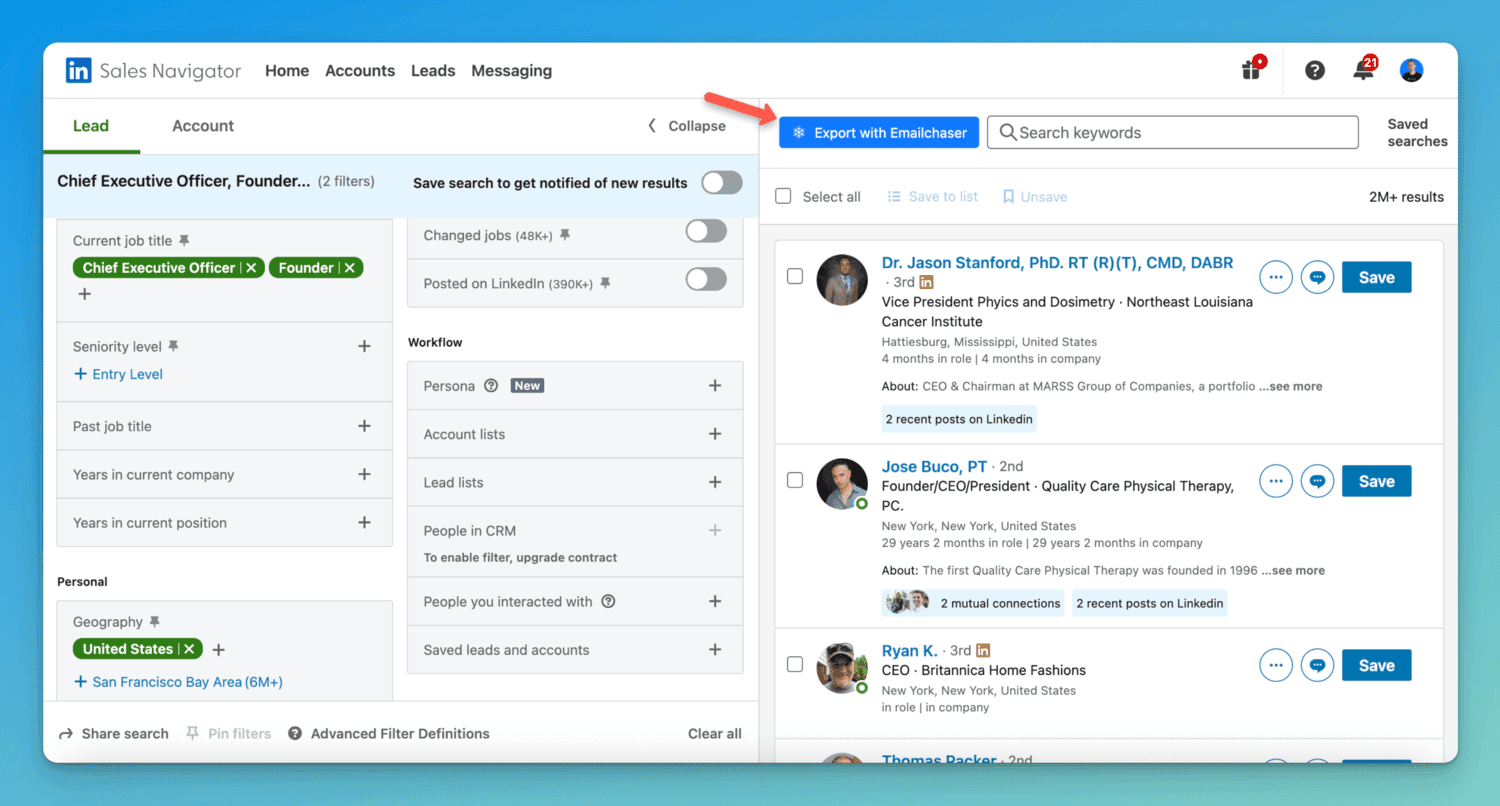
Every exported lead is double-verified — two independent verification providers must both approve an address before Emailchaser emails it — which keeps bounce rates under 1%.
The full walkthrough is in How To Use LinkedIn Sales Navigator To Generate Leads, and you can see pricing here — every plan starts with a 7-day free trial.
Frequently asked questions
Do you have to pay to message someone on LinkedIn?
No — messaging 1st-degree connections, Open Profiles, fellow group members and event attendees is free. You only pay when you want to send InMail: direct messages to strangers outside those categories.
Why does LinkedIn say I need Premium to message someone?
Because you aren't connected to them and they don't have an Open Profile, LinkedIn only offers paid InMail on that profile. Send a free connection request instead — once they accept, messaging them costs nothing.
How can I send a message on LinkedIn without Premium?
Connect with them first (messaging is free once they accept), message them directly if they have an Open Profile, or reach them through a shared LinkedIn group or event. If none of those work, find their work email with an email finder and email them instead.
How many messages can you send on LinkedIn without Premium?
Messages to 1st-degree connections are effectively unlimited. The unofficial caps (as of 2026) are roughly 100 connection requests per week, ~15 group-member messages per month and ~10 event message requests per week.
How much does LinkedIn Premium cost to message people?
As of 2026, Premium Career (~$29.99+/mo) includes 5 InMails per month, Premium Business (~$59.99+/mo) includes 15, and Sales Navigator Core (~$99.99+/mo) includes 50.
What is the best alternative to LinkedIn InMail?
Cold email. Find a prospect's work email with a free email finder — or export leads in bulk from Sales Navigator with a LinkedIn scraper — and email them directly. There are no InMail credits, weekly caps or gatekeepers in their email inbox.
Final thoughts
Yes — you can message someone on LinkedIn without Premium: connect with them first, message their Open Profile, or reach them through a shared group or event.
But every free method is capped, and even paid InMail tops out at 50 messages per month. If you're doing outreach at any real volume, use LinkedIn to find people and email to reach them: find one prospect's address with the free Email Finder, or export thousands at once from Sales Navigator with Lead Finder.
Related reading: How To Reach Out To People On LinkedIn, LinkedIn InMail vs Connection Request and LinkedIn Sales Navigator vs LinkedIn Premium.
Free tool
Find a work email by name
Found 88% of emails vs Hunter's 67% in our study. 3 free searches a day, no sign-up.
Try the free email finderRelated articles


Article by
George Wauchope
Founder of Emailchaser. George founded the company and is no longer with it.
I have been working in the sales & marketing industry for nearly a decade.
When I'm not working on my business, I enjoy eating sushi & doing jiu-jitsu.