Spintax: What It Is & How to Use It in Cold Email (2026)


Updated August 2026
Spintax is syntax like {Hi|Hey|Hello} that rotates words so no two cold emails are identical. See syntax examples, the variation math & how to use it in 2026.
Spintax lets one cold email template produce hundreds of slightly different emails — so you never send the exact same message thousands of times.
Before AI became popular, writing spintax by hand was tedious.
Now, with the right tool, you can add it to an email by clicking a button.
Note: I'm the founder of Emailchaser, so I'm biased — but everything below is fact-based.
In this article, I explain everything you need to know about spintax:
- What is spintax?
- Spintax syntax: how to write it
- How many variations does spintax create?
- Does spintax improve deliverability?
- How to use spintax in cold email
- Spintax vs custom variables
- Common spintax mistakes
- Final thoughts
What is spintax?
Spintax (short for "spinning syntax") is a text format that lists interchangeable words or phrases inside curly braces, separated by pipe characters — for example {Hi|Hey|Hello}. Each time an email is sent, the software randomly picks one option, so every message comes out slightly different.
For example, if you start your email with "Hi", you can use spintax to rotate in similar alternatives like "Hey" and "Hello":
{Hi|Hey|Hello} {first_name},
The above spintax would rotate "Hi", "Hey" and "Hello" across your cold emails, meaning that each email would be slightly different.
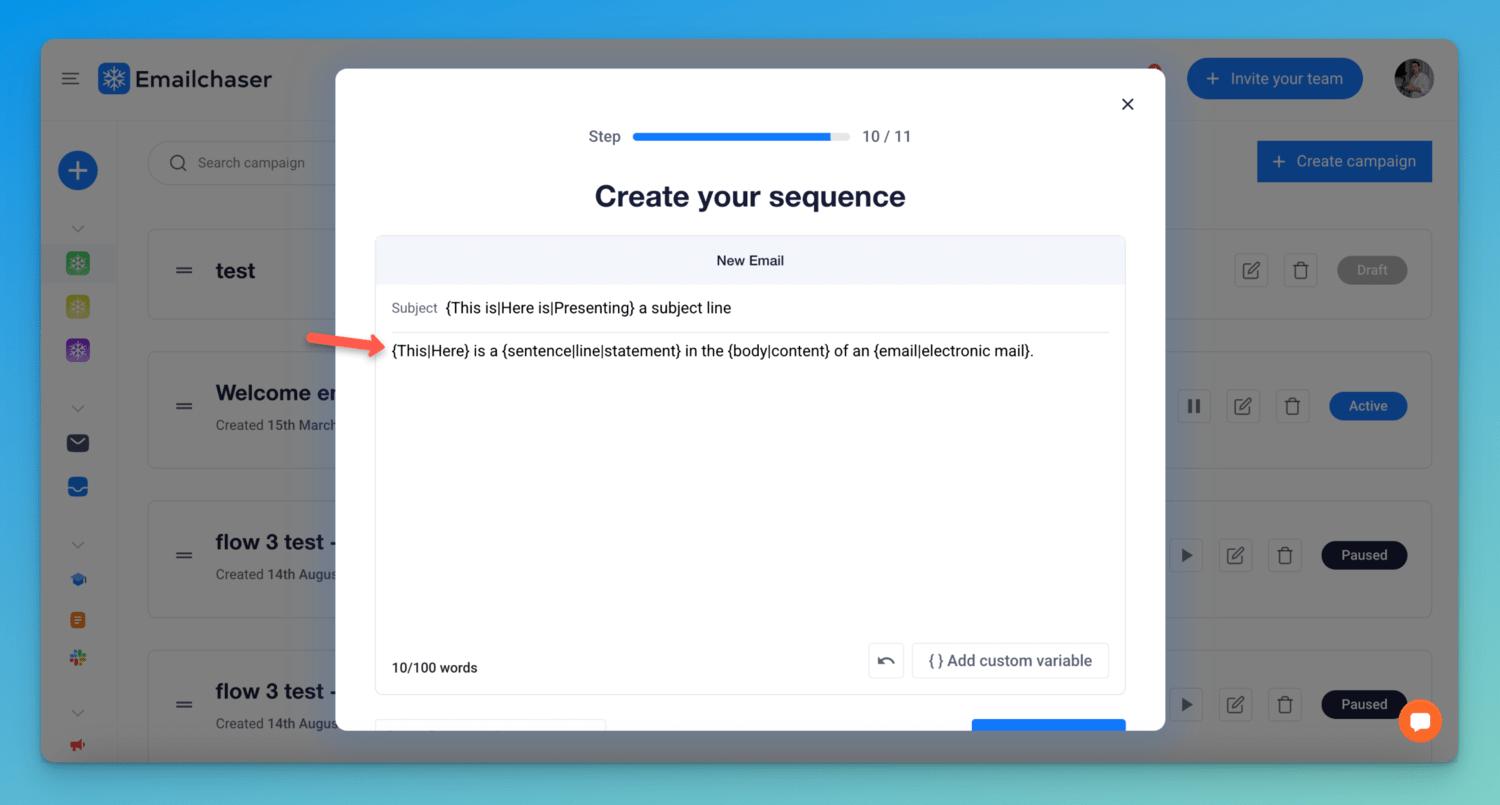
The reason people use spintax is that sending the exact same email thousands of times doesn't look natural to spam filters — identical content sent at scale is one of the patterns they look for.
You can learn more about this in my article Does Sending The Same Cold Email Multiple Times Affect Deliverability?
Not to be confused with Sprintax (with an "r"), which is US tax-prep software for nonresidents. This article is about spintax, the text-spinning syntax used in cold email.
Spintax syntax: how to write it
The syntax is simple: wrap your options in curly braces and separate them with pipes.
Basic spintax: {option1|option2|option3} — the sending tool picks one of the three at random.
Multiple spin blocks: you can place as many blocks as you like in one email. Each block is resolved independently:
{Hi|Hey|Hello} {first_name}, I {saw|noticed|came across} your post about...
Nested spintax: an option can contain its own spin, like {a|{b|c}} — useful when one branch of a sentence needs its own alternatives. Keep nesting to a level or two: going deeper rarely adds anything except bugs, and tools don't all handle deep nesting the same way.
Here is a concrete before/after:
Before: "Hi John, I noticed your company is hiring SDRs. Worth a quick chat?"
After: "{Hi|Hey|Hello} John, I {noticed|saw} your company is hiring SDRs. {Worth a quick chat?|Open to a short call?}"
Every recipient still gets the same message — only the phrasing rotates. That's the rule of good spintax: vary the words, never the meaning.
You can test any template with our free spintax generator & tester — it counts the unique variations, flags broken syntax, and shows random previews.
How many variations does spintax create?
The math is one multiplication: options within a block add up, and separate blocks multiply.
| Template | Spin blocks | Unique variations |
|---|---|---|
| {Hi|Hey|Hello} | 1 block of 3 options | 3 |
| {Hi|Hey|Hello} {there|all} | 3 × 2 | 6 |
| 3 greetings, 3 verbs, 2 calls to action | 3 × 3 × 2 | 18 |
| 5 blocks of 3 options each | 3 × 3 × 3 × 3 × 3 | 243 |
So a handful of small, natural spin blocks is enough to make hundreds of unique versions — you don't need to spin every word.
As a rule of thumb, you want comfortably more unique variations than recipients in the campaign. A few hundred combinations covers a normal cold email campaign.
Does spintax improve deliverability?
Honest answer: it helps at the margin, but it is not a fix on its own.
Spam filters fingerprint repeated content. If an inbox provider sees hundreds of near-identical emails coming from your accounts, that pattern alone can hurt you — even when every recipient is a relevant prospect. Spintax breaks the pattern by giving each message a slightly different fingerprint.
That said, there is debate in the cold email community about how much it matters, and my opinion hasn't changed:
- Low volume (a few hundred emails): spintax is not needed.
- Higher volume (thousands of emails): use it — there is little downside and mostly potential upside.
What spintax will NOT do is compensate for the things that actually decide deliverability: sending to invalid addresses, bad targeting, or copy nobody replies to. A verified list matters far more — that's why Emailchaser double-verifies every address before sending (you can try the free email verifier, and find valid work emails with the email finder).
For the full picture, read my article 13 Ways To Prevent Your Cold Emails From Going To Spam.
How to use spintax in cold email
Most cold email software supports spintax — you write the {a|b|c} syntax into your campaign sequence, and the tool resolves it at send time.
Emailchaser has an "AI spintax" feature that goes one step further: you click a button and it automatically writes the spintax for your subject line, body and signature.
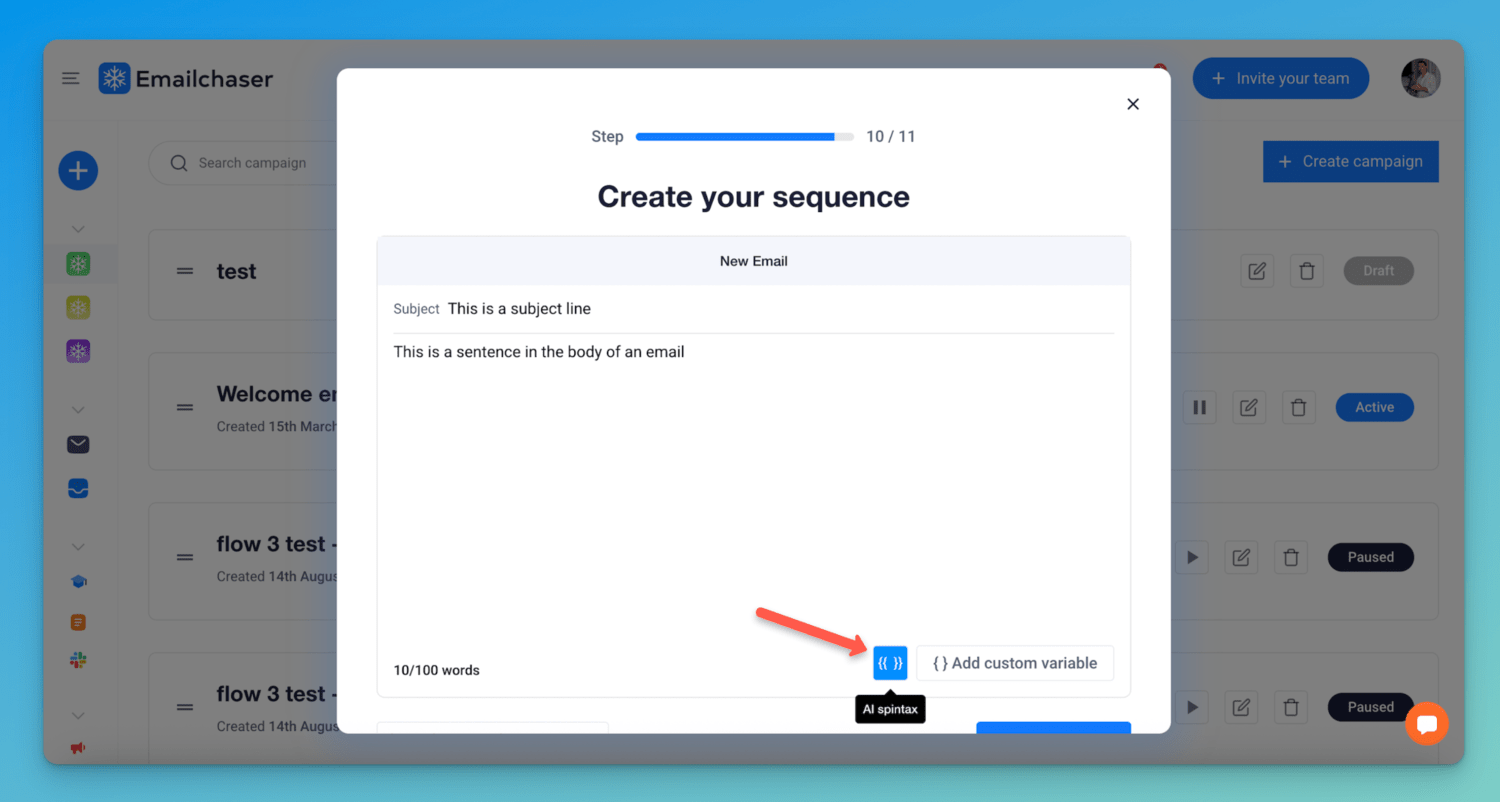
Before:
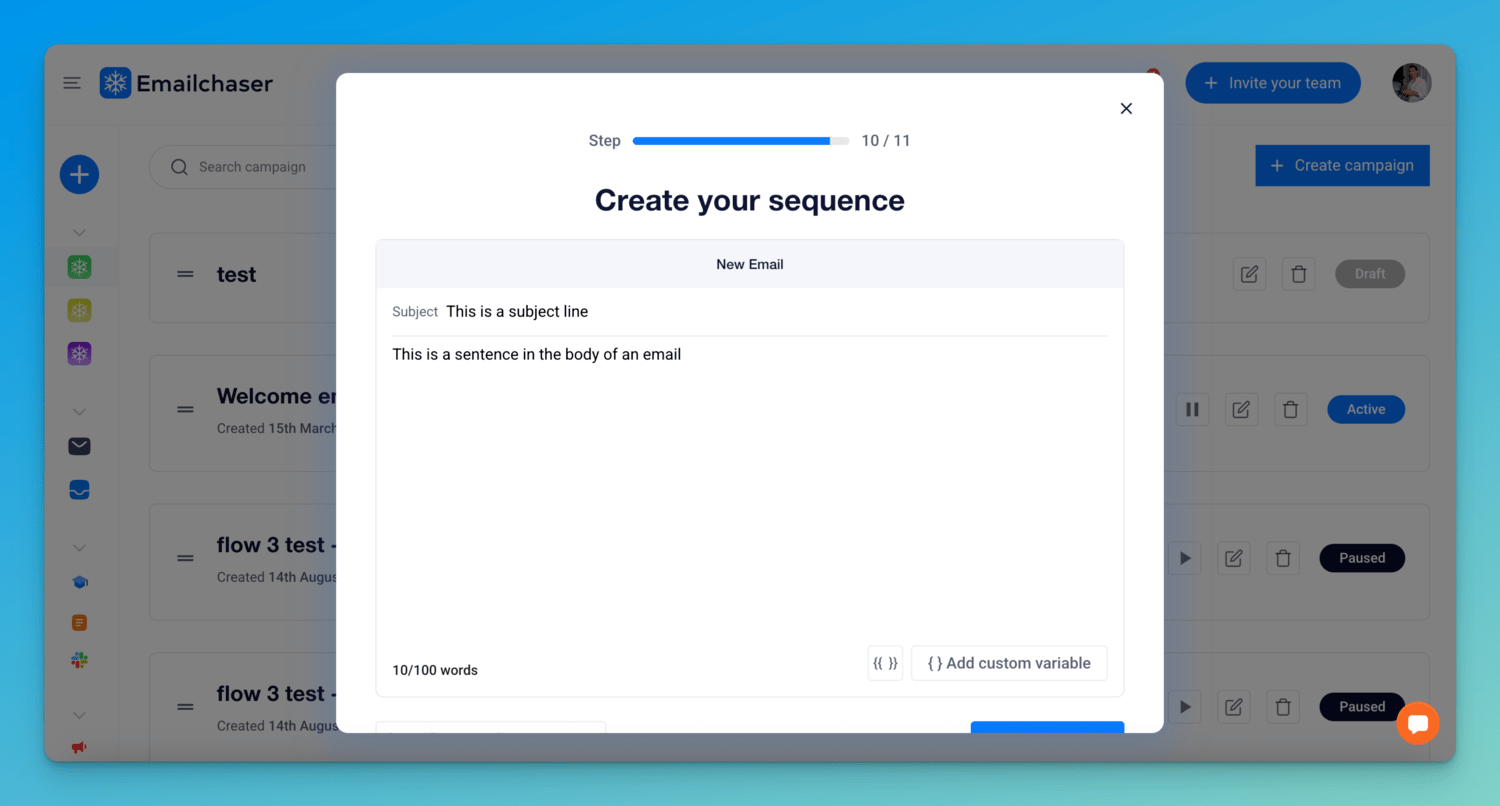
After:
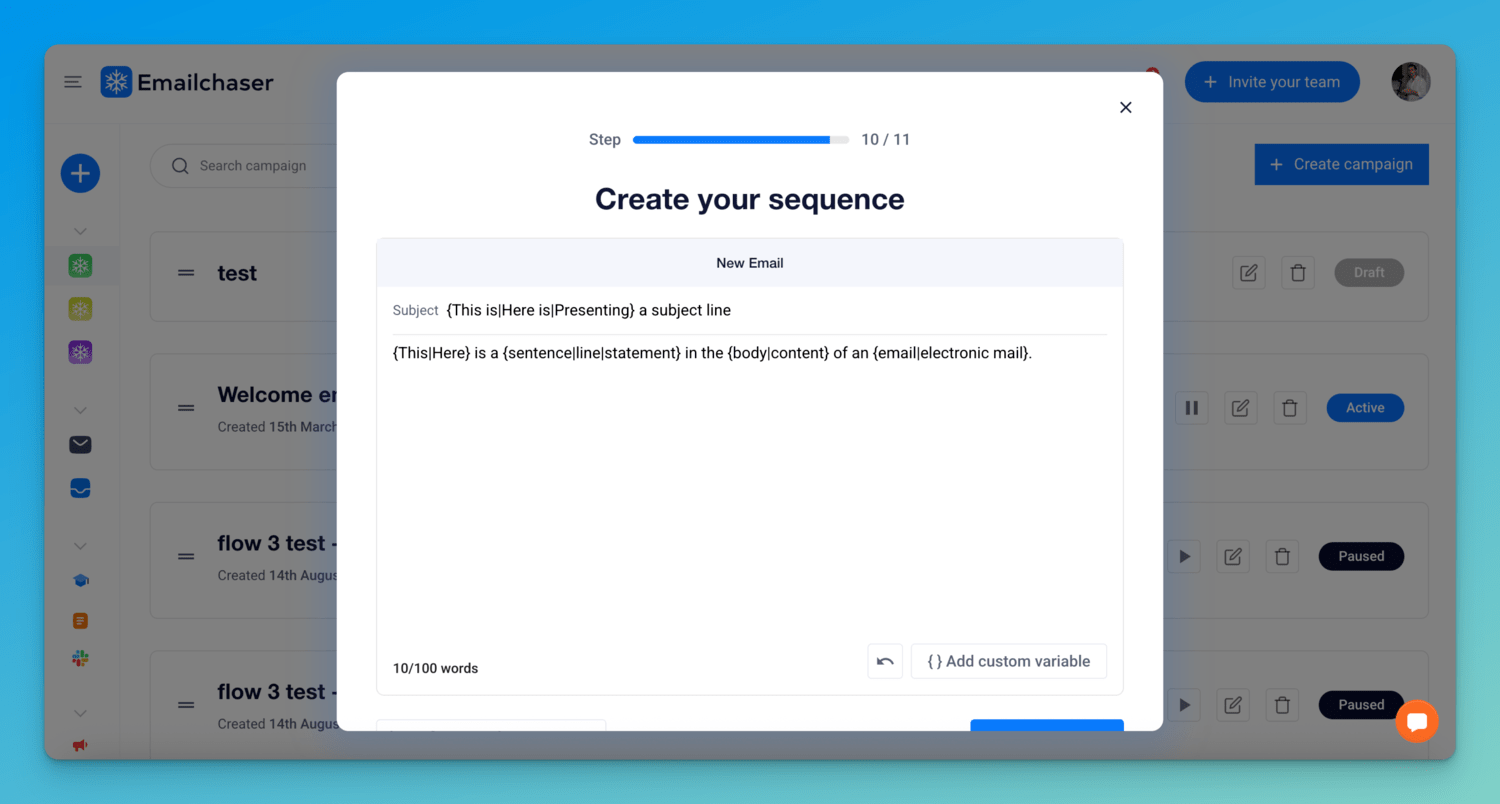
Not all platforms let you control spintax in each part of the email (subject, body and signature) — that control matters, because the subject line is the most repeated, most heavily fingerprinted part of a campaign.
One important limitation: you cannot use spintax when manually sending through Gmail or Outlook. If you paste {Hi|Hey} into a normal compose window, the recipient sees the braces and pipes exactly as typed. Spintax only works when a sending platform processes it at send time — so you connect your Gmail or Outlook accounts to a tool like Emailchaser and add spintax when creating a campaign.
Spintax vs custom variables
People confuse these constantly because both use curly braces, but they do opposite jobs:
| Spintax | Custom variables | |
|---|---|---|
| What it does | Rotates alternative phrasings you wrote | Inserts data about each lead |
| Example | {Hi|Hey|Hello} | {first_name}, {company_name} |
| Chosen how | Randomly, per email sent | From your lead list, per recipient |
| What it's for | Variation (deliverability) | Personalization (relevance) |
The tell is the pipe character: a spintax block contains | pipes with multiple options, while a custom variable is a single field name that maps to a column in your lead list. (Exact merge-tag syntax varies by tool — some platforms use double braces like {{first_name}}.)
The strongest cold emails use both: custom variables make the email relevant to the reader, spintax makes each message distinct from the others.
I cover personalization in detail in What Are Custom Variables?
Common spintax mistakes
These are the mistakes I see most often:
1. Broken braces. An unclosed { or a stray } either sends the raw syntax to the recipient or breaks the spin entirely. Always preview before launching.
2. Empty options. {Hi||Hey} contains a blank option — some of your emails will be missing the greeting entirely.
3. Options that break the sentence. Every option must fit the surrounding grammar. "{Congrats on|I saw} the funding round" reads fine with one option and broken with the other. Read a few random previews out loud.
4. Spinning the meaning instead of the phrasing. If two options say different things (different offer, different ask), they belong in separate campaigns you can measure — not in spintax. Spintax is not A/B testing: it doesn't track which variant performs better.
5. Spinning your variables. Don't put custom variables inside spin logic or add pipes to a variable — {first_name|there} is a spin block, not a fallback, and behavior varies by tool. Use your platform's built-in fallback feature instead.
6. Over-spinning. Spinning every second word produces robotic, awkward emails. A template with 50 clean variations beats one with 5,000 sloppy ones.
The fastest way to catch all of these is to paste your template into our free spintax tester before you launch — it flags unbalanced braces and empty options, and previews random versions.
Frequently asked questions
What does spintax mean?
Spintax is short for "spinning syntax" — a text format where alternative words or phrases are wrapped in curly braces and separated by pipes, like {Hi|Hey|Hello}. Sending software randomly picks one option each time, so one template produces many slightly different emails.
How do you write spintax?
Wrap your options in curly braces and separate them with pipe characters: {option1|option2|option3}. You can place multiple blocks in one email, and options can be nested like {a|{b|c}}. Every option must fit the surrounding sentence's grammar.
Does spintax improve email deliverability?
It helps at the margin by preventing spam filters from fingerprinting hundreds of identical emails, but it is not a fix on its own. List quality, targeting, and copy that gets replies matter far more — spintax is worth using at high volume and unnecessary at low volume.
What is the difference between spintax and custom variables?
Spintax randomly rotates phrasings you wrote ({Hi|Hey|Hello}), so each sent email varies. Custom variables like {first_name} insert data about each specific lead from your list. Spintax adds variation for deliverability; custom variables add personalization for relevance.
Is spintax the same as Sprintax?
No. Sprintax (with an "r") is US tax-preparation software for nonresidents, such as international students. Spintax is the {a|b|c} text-spinning syntax used in cold email and content tools — the two are completely unrelated.
Final thoughts
Spintax is a cheap insurance policy for high-volume senders: a few minutes of setup, and no two emails in your campaign look machine-copied.
If you're sending a few hundred emails, skip it. If you're sending thousands, use it — but fix your list quality and targeting first, because spintax can't save a campaign that's broken at that level.
Emailchaser adds spintax to your subject, body and signature with one click (AI spintax), and it's included on every plan — see pricing. You can start with the 7-day free trial.
Related reading:
Free tool
Test your spintax before you send
Paste any {a|b|c} template to count unique variations, catch broken braces and empty options, and preview random versions.
Try the spintax testerFree tool
Check your email for spam words
Scan your cold email for spam trigger words that send messages to spam, then fix them before you send.
Try the spam word checkerRelated articles


Article by
George Wauchope
Founder of Emailchaser. George founded the company and is no longer with it.
I have been working in the sales & marketing industry for nearly a decade.
When I'm not working on my business, I enjoy eating sushi & doing jiu-jitsu.