Mandrill SMTP Settings
Mailchimp's paid transactional add-on; the SMTP username can be any string you like.
Search for your email provider
Outgoing mail (SMTP)
SMTP server
smtp.mandrillapp.com
Port. STARTTLS
587
Port. SSL/TLS
465
Security
STARTTLS on 587 (recommended), 2525 or 25, or SSL/TLS on 465.
Incoming mail (IMAP)
IMAP
Not supported. This is a send-only service.
Incoming mail (POP3)
POP3
Not supported by this provider.
Sending limits & login
Daily send limit
Set by the block of sends you have bought.
Authentication
Use your Mandrill username (the account email address) with an API key as the password.
App password
Create the API key under Settings > SMTP & API Info.
Mandrill (Mailchimp Transactional) is a send-only relay: there is no IMAP or POP inbox. It is a paid add-on to a Mailchimp account.
Sending cold email? EmailChaser manages inboxes, warmup and deliverability for you.
Try EmailChaser freeFind the SMTP, IMAP and POP3 server settings for any email provider. Free, with no signup, every field copies with one click.
Mandrill SMTP, IMAP and POP3 settings
Mandrill is the transactional side of Mailchimp, now branded Mailchimp Transactional, and it is a paid add-on that needs a Mailchimp Standard plan or better plus prepaid blocks of 25,000 emails. Its SMTP server accepts any string at all as the username, because the API key in the password field is what identifies you. How much you can send in an hour moves with your account's reputation.
Mandrill is a send-only relay, so there's no IMAP or POP3 inbox. You only configure the SMTP server above. Use the tool to copy each value into your app or script.
Checked against Mandrill's own documentation: mailchimp.com. Ports and limits change, so check there too if something will not connect.
Mandrill settings at a glance
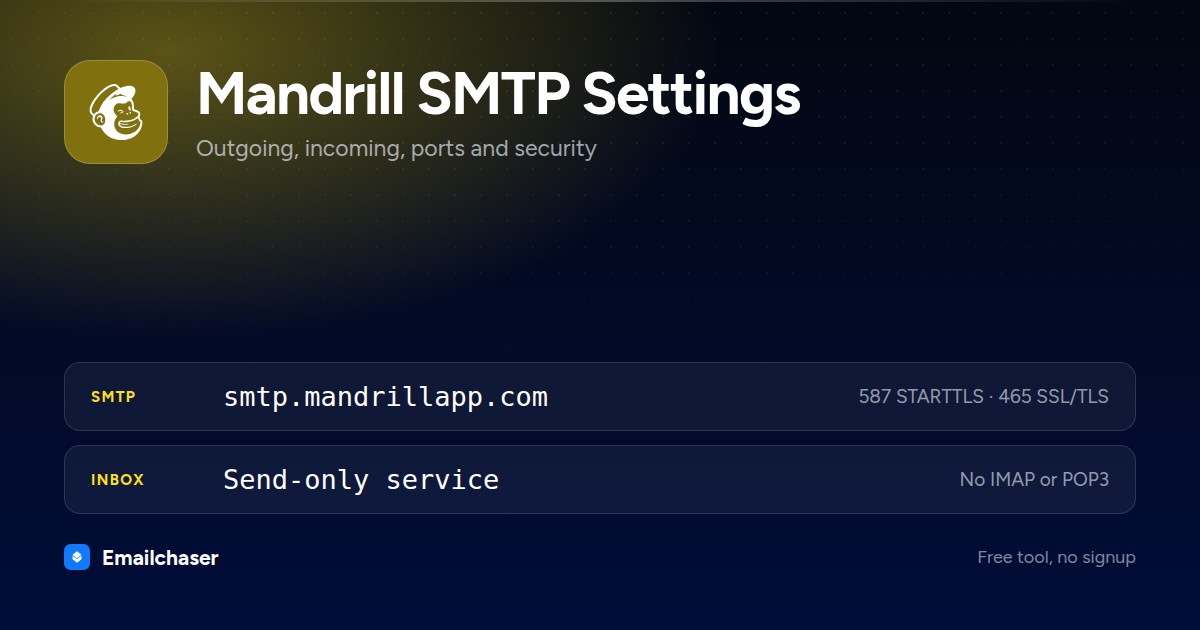
One card with every server and port on it. Right click to save it, or share the page and this is the preview people see.
What to enter as your Mandrill username and password
Wrong credentials, not a wrong port, are the usual reason a Mandrill connection fails. These are the exact values to type.
Any string is accepted; Mailchimp does not use it to authenticate and recommends your Mailchimp account's primary contact email
How to set up Mandrill in a mail client
The exact path through Mandrill's own settings, in order.
- 1
Turn on Transactional inside Mailchimp
In Mailchimp click Automations, then Transactional, then Upgrade to paid plan. It needs a Standard plan or higher and is sold in blocks of 25,000 emails purchased automatically at the beginning of each monthly billing cycle.
- 2
Generate a Transactional API key
In the Mailchimp Transactional app go to Settings (https://mandrillapp.com/settings) and create a key. It carries full account access, so store it like a password.
- 3
Add and configure your sending domain
Add the domain under Settings > Domains and publish the DNS records. Mail sent from a domain that is not fully configured is rejected with the reason unsigned.
- 4
Fill in the relay settings
Host smtp.mandrillapp.com. Ports 25, 587 and 2525 work unencrypted or with STARTTLS; port 465 is for SSL connections. Authentication is login or plain.
- 5
Optional: control the send with X-MC headers
X-MC-Track switches open and click tracking on, X-MC-Template renders a stored template, X-MC-MergeVars passes JSON merge data and X-MC-SendAt schedules the send in UTC. About twenty such headers are documented.
What Mandrill looks like filled in
Every mail client asks for the same handful of fields. Here they are with Mandrill's values already in place.
Account settings: Mandrill
Server
smtp.mandrillapp.comPort
587Encryption
STARTTLSAuthentication
RequiredUsername
Any string is accepted; Mailchimp does not use it to authenticate and recommends your Mailchimp account's primary contact emailPassword
Any valid Mailchimp Transactional API keyIMAP / POP3
Not applicable. Mandrill sends only, so there is no inbox to configure.An illustration of the fields, not a screenshot of any one app. Field names differ slightly between Outlook, Apple Mail and Thunderbird; the values do not.
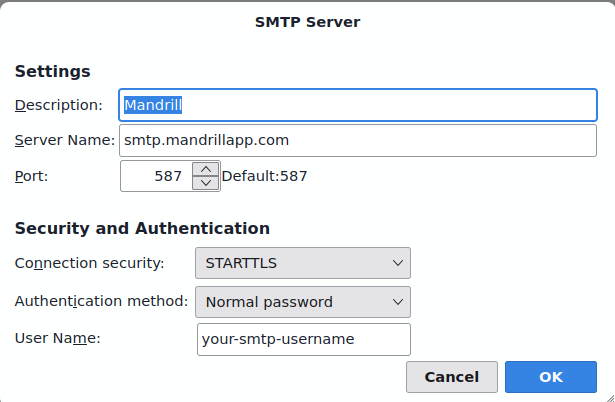
Mandrill SMTP settings in Thunderbird
The outgoing server dialog with Mandrill's details entered. Outlook and Apple Mail ask for the same four things under slightly different names.
Which port should you use for Mandrill?
STARTTLS on 587 (recommended), 2525 or 25, or SSL/TLS on 465.
STARTTLS
Starts as a plain connection, then upgrades to an encrypted one. The modern standard for sending.
SSL/TLS
Encrypted from the first byte. Widely supported and a good choice when 587 is blocked.
Plain SMTP
Meant for server-to-server relay. Home networks and cloud hosts block it, so do not use it to send from a client.
Why your Mandrill connection is failing
The failures people actually hit with Mandrill, and what fixes each one.
The From domain is not fully configured in Mailchimp Transactional. Finish the DNS setup for that domain under Settings > Domains before sending again.
You went past your hourly quota. Everything above it queues in the backlog, and Mailchimp deletes it entirely after 48 hours. Slow the send rate or improve reputation to raise the quota.
Standalone Mandrill accounts no longer exist. You need a Mailchimp Standard plan or higher, then add Transactional as an add-on, billed in blocks of 25,000 emails.
SMTP is a 7-bit-only protocol, so Mandrill expects headers encoded per RFC 2047 and body content escaped with a Content-Transfer-Encoding of base64 or quoted-printable per RFC 2045.
The whole message has to stay under 25 MB, and base64 encoding inflates a file by about a third, so a 20 MB file on disk is already too big.
Mandrill sending limits
Anything over the hourly quota goes into a backlog and is deleted after 48 hours
Per hour
A moving quota Mailchimp calculates from your account reputation and your normal sending volume; it cannot be set manually
Max attachment
25 MB for the whole message, counted after base64 encoding
Compare all 51 providers' sending limits in one table with a source link and a confidence rating for each.
Sending cold email through Mandrill
Set by the block of sends you have bought. Use your Mandrill username (the account email address) with an API key as the password.
Those caps make single-mailbox sending fine for personal mail but a poor fit for cold outreach at volume. Emailchaser spreads sending across warmed inboxes and manages deliverability, so you can scale without burning Mandrill accounts.
A new Mandrill mailbox also starts with no sending history, and hitting the cap above on its first day is what gets it filtered. Warm the mailbox up first so its daily volume climbs gradually toward that limit rather than starting at it. Emailchaser includes that ramp on every plan. Run each address through the free email checker before a send too, so bounces don't hurt the new mailbox.
Other smtp sending services
Setting up more than one mailbox? These sit in the same category as Mandrill.


Common questions about Mandrill SMTP settings
What are Mandrill's SMTP settings?
Mandrill's outgoing (SMTP) server is smtp.mandrillapp.com. Use port 587 (STARTTLS) or 465 (SSL/TLS). STARTTLS on 587 (recommended), 2525 or 25, or SSL/TLS on 465. Sign in with the SMTP credentials Mandrill issues you, not a mailbox address and password.
What is Mandrill's IMAP or POP3 server?
Mandrill is a send-only service, so it has no IMAP or POP3 inbox. You configure it as an outgoing SMTP server only.
Which port should I use for Mandrill?
Use port 587 with STARTTLS wherever it's offered, it's the modern standard for authenticated sending. Port 465 with SSL/TLS is a solid alternative. Avoid port 25, which most networks block for client sending. Mandrill's recommended value is above.
Why won't my Mandrill SMTP connection work?
Check authentication first: Use your Mandrill username (the account email address) with an API key as the password. Create the API key under Settings > SMTP & API Info. Then confirm the host, port and security method match exactly, a 587/SSL or 465/STARTTLS mismatch will fail to connect.
Can I send bulk or cold email through Mandrill?
Not at scale. Set by the block of sends you have bought. Providers throttle bursts to fight spam, so pushing cold email through one mailbox hits limits and wrecks deliverability. High-volume outreach belongs on dedicated infrastructure that spreads sending across warmed inboxes, which is what Emailchaser does.
What username does Mandrill's SMTP server want?
Any string will authenticate. Mailchimp's documentation says it does not use the SMTP username to authenticate your request and recommends your Mailchimp account's primary contact email so the logs make sense later. All of the checking happens on the password field, which has to be a valid Mailchimp Transactional API key.
Can I use Mandrill without paying for Mailchimp?
No. Mailchimp Transactional is an add-on available with the Standard plan or higher, and the transactional sends themselves come in blocks of 25,000 emails purchased automatically at the start of each monthly billing cycle.
How is my hourly sending quota decided?
Mailchimp works it out automatically from two things: your account reputation, rated Poor, Good or Excellent, and how much you normally send. Bounces, spam complaints, unsubscribes and failed content reviews push reputation down and the quota with it, and accounts with a Poor reputation see their quota grow more slowly.
Ready to let your AI agent set it up?
Give it your website. Approve once.
Start my free trial