SMTP2GO SMTP Settings
Relay with regional sending hosts and eight fallback ports, including 80 and 443.
Search for your email provider
Outgoing mail (SMTP)
SMTP server
mail.smtp2go.com
Port. STARTTLS
587
Port. SSL/TLS
465
Security
STARTTLS on 587 (recommended), 2525 or 8025, or SSL/TLS on 465.
Incoming mail (IMAP)
IMAP
Not supported. This is a send-only service.
Incoming mail (POP3)
POP3
Not supported by this provider.
Sending limits & login
Daily send limit
1,000 emails per month on the free plan; higher on paid plans.
Authentication
Authenticate with a dedicated SMTP username and password created in the SMTP2GO dashboard, not your account login.
App password
Create them under Sending > SMTP Users.
SMTP2GO is a send-only relay: there is no IMAP or POP inbox. It offers extra ports (2525, 8025) for networks that block 587.
Sending cold email? EmailChaser manages inboxes, warmup and deliverability for you.
Try EmailChaser freeFind the SMTP, IMAP and POP3 server settings for any email provider. Free, with no signup, every field copies with one click.
SMTP2GO SMTP, IMAP and POP3 settings
SMTP2GO is a relay built for networks that block the usual mail ports, so it answers on 25, 80, 587, 2525 and 8025, plus SSL on 465, 8465 and 443. Its logins are separate from your dashboard password: you create SMTP users on their own page, as many as you want. It also runs country-specific hostnames for the United States, Europe and Australia.
SMTP2GO is a send-only relay, so there's no IMAP or POP3 inbox. You only configure the SMTP server above. Use the tool to copy each value into your app or script.
Checked against SMTP2GO's own documentation: developers.smtp2go.com, support.smtp2go.com. Ports and limits change, so check there too if something will not connect.
SMTP2GO settings at a glance
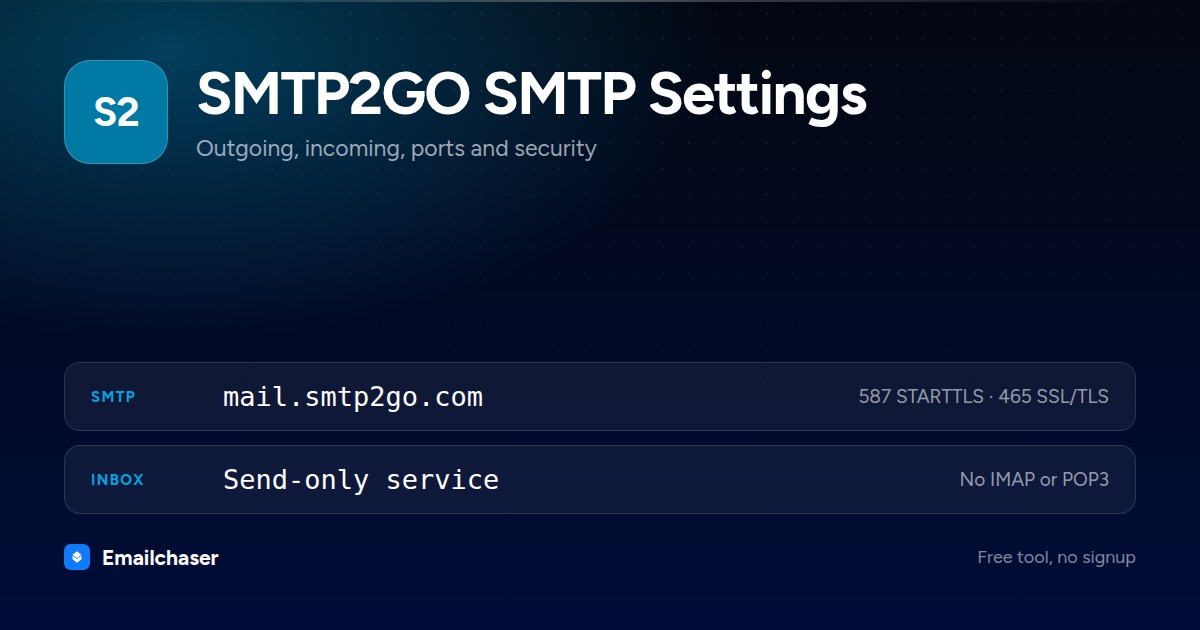
One card with every server and port on it. Right click to save it, or share the page and this is the preview people see.
What to enter as your SMTP2GO username and password
Wrong credentials, not a wrong port, are the usual reason a SMTP2GO connection fails. These are the exact values to type.
The SMTP username shown on Sending > SMTP Users, which is not the email address you sign in to the dashboard with
How to set up SMTP2GO in a mail client
The exact path through SMTP2GO's own settings, in order.
- 1
Verify your sender domain
Go to Sending > Verified Senders > Sender Domains in the dashboard and publish the DNS records SMTP2GO shows you. Verifying the domain is what gets your mail SPF- and DKIM-signed; verifying a single sender address authorizes sending but does not sign it.
- 2
Create an SMTP user
Open Sending > SMTP Users (https://app.smtp2go.com/sending/smtp_users/) and click Add SMTP user, setting a username, password and optionally a per-user rate limit. These credentials are not the same as your dashboard login, and there is no cap on how many you create.
- 3
Point your app at mail.smtp2go.com
TLS or no encryption is available on ports 25, 2525, 8025, 587 and 80; SSL on 465, 8465 and 443. SMTP2GO's own troubleshooting advice for connection failures is to try a different port from that list, since your ISP may be blocking the one you picked.
- 4
Pin to a regional host if you need one
mail-us.smtp2go.com, mail-eu.smtp2go.com, mail-eu2.smtp2go.com or mail-au.smtp2go.com keep traffic in one region. Plain mail.smtp2go.com routes you to the nearest server.
- 5
Keep parallel connections under 40
SMTP2GO allows up to 40 simultaneous connections per IP and up to 5,000 emails on a single connection.
What SMTP2GO looks like filled in
Every mail client asks for the same handful of fields. Here they are with SMTP2GO's values already in place.
Account settings: SMTP2GO
Server
mail.smtp2go.comPort
587Encryption
STARTTLSAuthentication
RequiredUsername
The SMTP username shown on Sending > SMTP Users, which is not the email address you sign in to the dashboard withPassword
The password set on that SMTP user recordIMAP / POP3
Not applicable. SMTP2GO sends only, so there is no inbox to configure.An illustration of the fields, not a screenshot of any one app. Field names differ slightly between Outlook, Apple Mail and Thunderbird; the values do not.
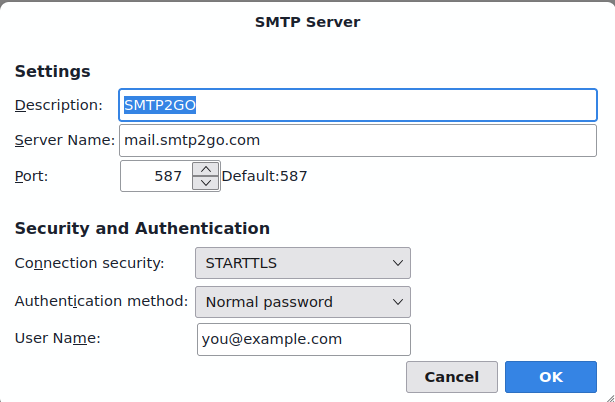
SMTP2GO SMTP settings in Thunderbird
The outgoing server dialog with SMTP2GO's details entered. Outlook and Apple Mail ask for the same four things under slightly different names.
Which port should you use for SMTP2GO?
STARTTLS on 587 (recommended), 2525 or 8025, or SSL/TLS on 465.
STARTTLS
Starts as a plain connection, then upgrades to an encrypted one. The modern standard for sending.
SSL/TLS
Encrypted from the first byte. Widely supported and a good choice when 587 is blocked.
Plain SMTP
Meant for server-to-server relay. Home networks and cloud hosts block it, so do not use it to send from a client.
Why your SMTP2GO connection is failing
The failures people actually hit with SMTP2GO, and what fixes each one.
The dashboard login and the SMTP login are two different credential sets. Copy and paste a username and password pair from Sending > SMTP Users so they match exactly.
This is not about SMTP2GO's Verified Senders. The receiving server cannot find a working MX record for your From domain. Add an MX record for it, or turn bounce notifications off, since MX records are only required when those are enabled.
You are over 40 simultaneous connections from one IP. Lower the threads or concurrency setting in your mail software.
The SMTP username only proves you may relay, not that you own the From address. Add the domain under Sending > Verified Senders > Sender Domains, or verify the single address under Single sender emails.
Move to one of the other ports SMTP2GO runs: 2525, 8025, 587 or 80 for TLS, or 465, 8465 and 443 for SSL.
SMTP2GO sending limits
Up to 40 simultaneous connections per IP and up to 5,000 emails on one connection. Free accounts are also capped at 25 an hour until the sender domain is verified
Per day
No fixed daily cap on paid plans; new accounts are held to 1,000 a day during an initial probation period
Per hour
200,000 emails an hour by default, raised on request
Recipients per message
400 per email, with 50 to 100 recommended
Max attachment
50 MB for the whole email including attachments
Compare all 51 providers' sending limits in one table with a source link and a confidence rating for each.
SMTP2GO servers by region and plan
SMTP2GO does not use one set of hostnames everywhere. Match the row to your account.
| Region or plan | SMTP | IMAP | POP3 |
|---|---|---|---|
| United States | mail-us.smtp2go.com | Not applicable | Not applicable |
| Europe and UK | mail-eu.smtp2go.com | Not applicable | Not applicable |
| European Union only | mail-eu2.smtp2go.com | Not applicable | Not applicable |
| Australia | mail-au.smtp2go.com | Not applicable | Not applicable |
SMTP2GO quirks by mail client
Gmail app
SMTP2GO's own Gmail guide gives only port 25 or 587 for Gmail's Send mail as screen, so the wider set of fallback ports is not selectable there.
Sending cold email through SMTP2GO
1,000 emails per month on the free plan; higher on paid plans. Authenticate with a dedicated SMTP username and password created in the SMTP2GO dashboard, not your account login.
Those caps make single-mailbox sending fine for personal mail but a poor fit for cold outreach at volume. Emailchaser spreads sending across warmed inboxes and manages deliverability, so you can scale without burning SMTP2GO accounts.
A new SMTP2GO mailbox also starts with no sending history, and hitting the cap above on its first day is what gets it filtered. Warm the mailbox up first so its daily volume climbs gradually toward that limit rather than starting at it. Emailchaser includes that ramp on every plan. Run each address through the free email checker before a send too, so bounces don't hurt the new mailbox.
Other smtp sending services
Setting up more than one mailbox? These sit in the same category as SMTP2GO.


Common questions about SMTP2GO SMTP settings
What are SMTP2GO's SMTP settings?
SMTP2GO's outgoing (SMTP) server is mail.smtp2go.com. Use port 587 (STARTTLS) or 465 (SSL/TLS). STARTTLS on 587 (recommended), 2525 or 8025, or SSL/TLS on 465. Sign in with the SMTP credentials SMTP2GO issues you, not a mailbox address and password.
What is SMTP2GO's IMAP or POP3 server?
SMTP2GO is a send-only service, so it has no IMAP or POP3 inbox. You configure it as an outgoing SMTP server only.
Which port should I use for SMTP2GO?
Use port 587 with STARTTLS wherever it's offered, it's the modern standard for authenticated sending. Port 465 with SSL/TLS is a solid alternative. Avoid port 25, which most networks block for client sending. SMTP2GO's recommended value is above.
Why won't my SMTP2GO SMTP connection work?
Check authentication first: Authenticate with a dedicated SMTP username and password created in the SMTP2GO dashboard, not your account login. Create them under Sending > SMTP Users. Then confirm the host, port and security method match exactly, a 587/SSL or 465/STARTTLS mismatch will fail to connect.
Can I send bulk or cold email through SMTP2GO?
Not at scale. 1,000 emails per month on the free plan; higher on paid plans. Providers throttle bursts to fight spam, so pushing cold email through one mailbox hits limits and wrecks deliverability. High-volume outreach belongs on dedicated infrastructure that spreads sending across warmed inboxes, which is what Emailchaser does.
Why does my SMTP2GO account password not work for sending?
Because it is not meant to. SMTP2GO keeps dashboard logins and relay logins apart. You create relay credentials yourself on Sending > SMTP Users, and there is no limit on how many you make. Creating one per application means a leaked credential can be deleted without breaking anything else.
Should I use mail.smtp2go.com or one of the regional hostnames?
Plain mail.smtp2go.com sends you to the nearest server automatically, which is what most people want. Pick mail-us, mail-eu, mail-eu2 or mail-au when you need traffic to stay inside one region, for example for data residency. mail-eu2 is the EU-only variant, while mail-eu covers the EU and the UK.
Can I use my saved email templates over SMTP?
No. SMTP2GO's documentation states that email templates are only supported when sending via its API. If you want template rendering on the server side you have to move that traffic to the API and send the fully built message over SMTP instead.
Ready to let your AI agent set it up?
Give it your website. Approve once.
Start my free trial