163 Mail (NetEase) SMTP Settings

NetEase's free Chinese mailbox at 163.com, sharing one system with 126.com and yeah.net.
Search for your email provider
Outgoing mail (SMTP)
SMTP server
smtp.163.com
Port. SSL/TLS
465
Security
SSL/TLS on 465 (or 994). NetEase requires an encrypted connection.
Incoming mail (IMAP)
IMAP server
imap.163.com
Port. SSL/TLS
993
Incoming mail (POP3)
POP3 server
pop.163.com
Port. SSL/TLS
995
Sending limits & login
Daily send limit
Per-account daily caps apply on free 163 mailboxes.
Authentication
Switch on POP3/IMAP/SMTP service in NetEase settings, then authenticate with the client authorisation code.
App password
Generate the code under Settings > POP3/SMTP/IMAP. Use it in place of your account password.
The same servers cover 126.com and yeah.net (swap 163 for 126 in the hostnames).
Sending cold email? EmailChaser manages inboxes, warmup and deliverability for you.
Try EmailChaser freeFind the SMTP, IMAP and POP3 server settings for any email provider. Free, with no signup, every field copies with one click.
163 Mail (NetEase) SMTP, IMAP and POP3 settings
NetEase runs 163.com next to 126.com and yeah.net on one platform, and all three want a 16-character client authorisation code in place of your login password. Its IMAP server has a quirk of its own: it turns away any client that fails to send an IMAP ID command naming itself, answering "Unsafe Login". Outlook, Foxmail and NetEase's own app send that command already; hand-written scripts usually do not.
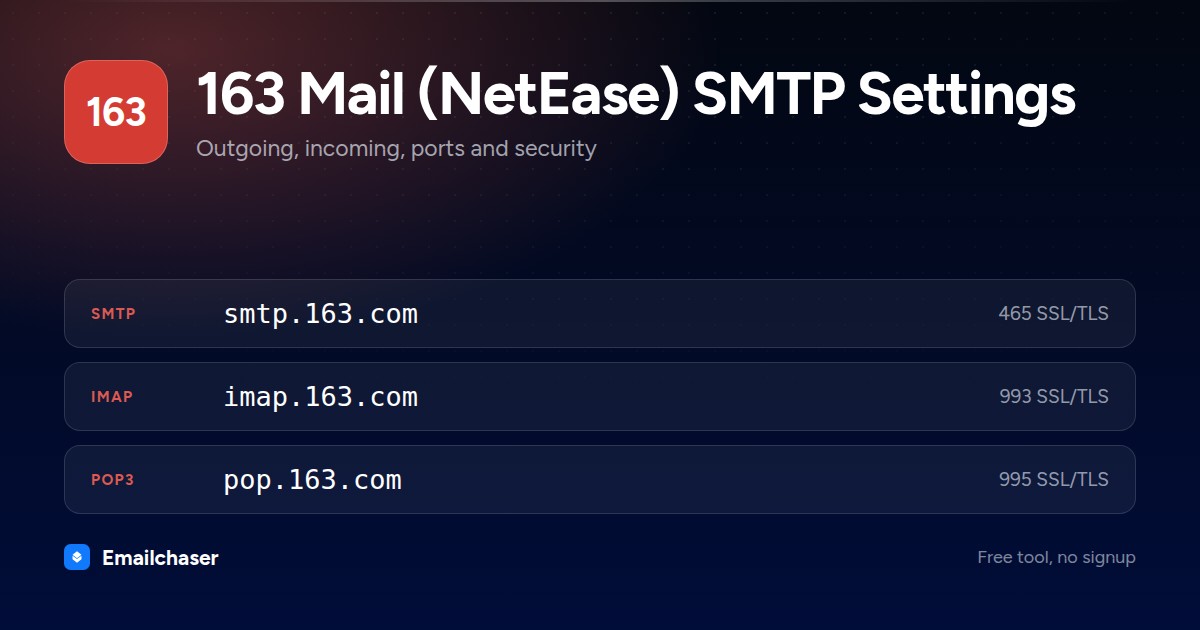
For incoming mail, use the IMAP server imap.163.com on port 993, or POP3 at pop.163.com on port 995. Pick the exact values from the tool above and copy them straight into your mail client.
Checked against 163 Mail (NetEase)'s own documentation: help.mail.163.com. Ports and limits change, so check there too if something will not connect.
163 Mail (NetEase) settings at a glance
One card with every server and port on it. Right click to save it, or share the page and this is the preview people see.
What to enter as your 163 Mail (NetEase) username and password
Wrong credentials, not a wrong port, are the usual reason a 163 Mail (NetEase) connection fails. These are the exact values to type.
Your full 163 address, for example name@163.com
The 16-character client authorisation code, not your web login password
Get your 客户端授权码 (client authorisation code)How to set up 163 Mail (NetEase) in a mail client
The exact path through 163 Mail (NetEase)'s own settings, in order.
- 1
Sign in to the web mailbox
Open https://email.163.com/ and sign in. The protocol switches and the authorisation code live only in the web version.
- 2
Open Settings, then POP/SMTP/IMAP
Click 设置 (Settings) at the top of the page and pick the POP/SMTP/IMAP tab to reach the client protocol screen.
- 3
Turn on IMAP or POP3
Switch on the receiving protocol you want. NetEase recommends IMAP because it stays in step with the web mailbox.
- 4
Pass the SMS check
A popup asks you to send a text message. Scan the QR code to send it, or use 手动发送短信 (send SMS manually), then click the confirm button.
- 5
Save the 16-character authorisation code
The code is shown once and cannot be recovered. You can create more later with 新增授权码 (add authorisation code) on the same tab, or in Mail Master under 我的 > 邮箱管理 > 第三方登录管理.
- 6
Fill in the server settings
imap.163.com port 993 with SSL, pop.163.com port 995 with SSL, smtp.163.com port 465 or 994 with SSL.
What 163 Mail (NetEase) looks like filled in
Every mail client asks for the same handful of fields. Here they are with 163 Mail (NetEase)'s values already in place.
Account settings: 163 Mail (NetEase)
Server
smtp.163.comPort
465Encryption
SSL/TLSAuthentication
RequiredUsername
Your full 163 address, for example name@163.comPassword
The 16-character client authorisation code, not your web login passwordServer
imap.163.comPort
993Encryption
SSL/TLSAn illustration of the fields, not a screenshot of any one app. Field names differ slightly between Outlook, Apple Mail and Thunderbird; the values do not.
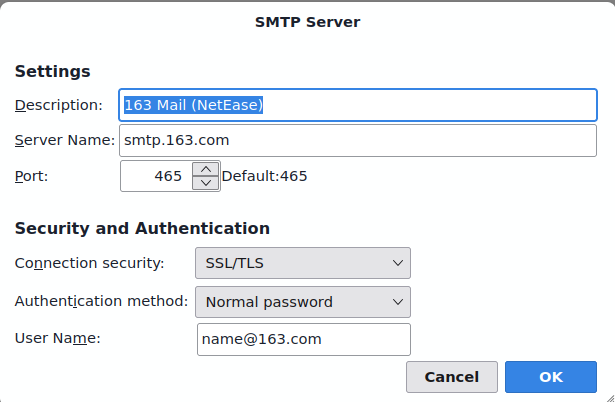
163 Mail (NetEase) SMTP settings in Thunderbird
The outgoing server dialog with 163 Mail (NetEase)'s details entered. Outlook and Apple Mail ask for the same four things under slightly different names.
Which port should you use for 163 Mail (NetEase)?
SSL/TLS on 465 (or 994). NetEase requires an encrypted connection.
STARTTLS
163 Mail (NetEase) does not offer STARTTLS on this service. Use the SSL/TLS port instead.
SSL/TLS
Encrypted from the first byte. Widely supported and a good choice when 587 is blocked.
Plain SMTP
Meant for server-to-server relay. Home networks and cloud hosts block it, so do not use it to send from a client.
Why your 163 Mail (NetEase) connection is failing
The failures people actually hit with 163 Mail (NetEase), and what fixes each one.
NetEase refuses IMAP clients that do not identify themselves. The client has to send an IMAP ID command carrying fields such as name, version, vendor and support-email. Outlook, Foxmail and NetEase Mail Master already do this; custom code has to add the call.
NetEase's paid extra traffic covers only the web mailbox and its own Mail Master app, never third-party clients. Wait roughly 24 hours for the block to lift by itself, or send from the web mailbox.
NetEase displays each code exactly once and has no recovery route. Create a fresh one at Settings > POP/SMTP/IMAP > 新增授权码 and paste it into the client.
NetEase attributes this to a stale browser cache. Clear the cache or open the mailbox in a different browser and the option reappears.
You went past the recipients-per-message cap or the running daily recipient total. Free accounts get 50 recipients per message, so split the list and slow the sending rate.
163 Mail (NetEase) sending limits
Going over a limit blocks sending until the system clears it, normally within 24 hours; membership raises limits for the web mailbox and Mail Master only.
Per day
About 300 to 400 messages on a free account, 700 to 800 on basic membership, 1,300 to 1,400 on super membership
Recipients per message
50 per message on a free account, 200 for members
Max attachment
Files over 50 MB are pushed into NetEase's cloud attachment route, which takes up to 3 GB per file for free accounts
Compare all 51 providers' sending limits in one table with a source link and a confidence rating for each.
163 Mail (NetEase) servers by region and plan
163 Mail (NetEase) does not use one set of hostnames everywhere. Match the row to your account.
| Region or plan | SMTP | IMAP | POP3 |
|---|---|---|---|
| 126.com mailboxes | smtp.126.com | imap.126.com | pop3.126.com |
| yeah.net mailboxes | smtp.yeah.net | imap.yeah.net | pop.yeah.net |
| Paid VIP mailboxes (vip.163.com) | smtp.vip.163.com | imap.vip.163.com | pop.vip.163.com |
| Paid VIP mailboxes (vip.126.com) | smtp.vip.126.com | imap.vip.126.com | pop.vip.126.com |
163 Mail (NetEase) quirks by mail client
Outlook
NetEase says current Outlook and Foxmail builds sign in with the 163 address plus the authorisation code and fill in the server names for you.
other
NetEase Mail Master, the company's own app, signs in without an authorisation code and is the only client the paid high-traffic allowance applies to.
Sending cold email through 163 Mail (NetEase)
Per-account daily caps apply on free 163 mailboxes. Switch on POP3/IMAP/SMTP service in NetEase settings, then authenticate with the client authorisation code.
Those caps make single-mailbox sending fine for personal mail but a poor fit for cold outreach at volume. Emailchaser spreads sending across warmed inboxes and manages deliverability, so you can scale without burning 163 Mail (NetEase) accounts.
A new 163 Mail (NetEase) mailbox also starts with no sending history, and hitting the cap above on its first day is what gets it filtered. Warm the mailbox up first so its daily volume climbs gradually toward that limit rather than starting at it. Emailchaser includes that ramp on every plan. Run each address through the free email checker before a send too, so bounces don't hurt the new mailbox.
Other consumer email providers
Setting up more than one mailbox? These sit in the same category as 163 Mail (NetEase).


Common questions about 163 Mail (NetEase) SMTP settings
What are 163 Mail (NetEase)'s SMTP settings?
163 Mail (NetEase)'s outgoing (SMTP) server is smtp.163.com. Use port 465 (SSL/TLS). SSL/TLS on 465 (or 994). NetEase requires an encrypted connection. Sign in with your full email address and password (or app password).
What is 163 Mail (NetEase)'s IMAP or POP3 server?
163 Mail (NetEase)'s incoming IMAP server is imap.163.com on port 993 (SSL/TLS). If you prefer POP3, use pop.163.com on port 995.
Which port should I use for 163 Mail (NetEase)?
Use port 587 with STARTTLS wherever it's offered, it's the modern standard for authenticated sending. Port 465 with SSL/TLS is a solid alternative. Avoid port 25, which most networks block for client sending. 163 Mail (NetEase)'s recommended value is above.
Why won't my 163 Mail (NetEase) SMTP connection work?
Check authentication first: Switch on POP3/IMAP/SMTP service in NetEase settings, then authenticate with the client authorisation code. Generate the code under Settings > POP3/SMTP/IMAP. Use it in place of your account password. Then confirm the host, port and security method match exactly, a 587/SSL or 465/STARTTLS mismatch will fail to connect.
Can I send bulk or cold email through 163 Mail (NetEase)?
Not at scale. Per-account daily caps apply on free 163 mailboxes. Providers throttle bursts to fight spam, so pushing cold email through one mailbox hits limits and wrecks deliverability. High-volume outreach belongs on dedicated infrastructure that spreads sending across warmed inboxes, which is what Emailchaser does.
Does 163 IMAP work from outside mainland China?
Yes. NetEase's help centre states that the IMAP protocol is supported for overseas use. You still have to enable the protocol in the web mailbox first and sign in with an authorisation code rather than your password.
Why does my script get "Unsafe Login" when Outlook connects fine?
NetEase requires an IMAP ID handshake that names the connecting client. Mainstream clients send it automatically, a bare IMAP library does not. NetEase publishes Java sample code and points to RFC 2971, and says developers in other languages must add the equivalent call.
Do 163.com, 126.com and yeah.net share one setup?
The steps are identical but the hostnames follow the domain, so a 126.com account uses smtp.126.com and imap.126.com. The ports do not change: 993 for IMAP, 995 for POP3, and 465 or 994 for SMTP over SSL.
Ready to let your AI agent set it up?
Give it your website. Approve once.
Start my free trial