The 8 Best Email Tracking Tools in 2026
Email tracking tells you what happened to the email you sent. These are the eight we would shortlist for sales email, compared on what they track, what they cost a month and what you get free.
Updated 5 November 2026
Emailchaser is our pick for tracking sales email by what counts: replies, positive replies, bounces and meetings, with reply stats for each step and each A/B variant and every reply in one Unibox, from $47 a month. It adds no tracking pixel to your emails, on purpose.
If you want to see opens, Mailtrack, Yesware, Mailbutler, Mixmax, HubSpot, Streak and Saleshandy all list open tracking, and four of them have a free plan or free tools.
Here is how the eight email tracking tools compare at a glance.
Swipe sideways to see every column.
| # | Tool | What it tracks | Entry price | Free start | Where it works |
|---|---|---|---|---|---|
| 1 |  Emailchaser | Replies, positive replies, bounces and meetings, by step and variant | $47 a month | 7-day free trial | Its own campaign sender, warm-up and Unibox |
| 2 | Mailtrack | Opens, with link clicks on Mailsuite | Mailtrack, $6.99 a user a month | Free plan | Gmail, iOS and Android |
| 3 | Yesware | Opens, links and attachments | Pro, $19 a seat a month | Free plan | Your inbox, with Salesforce on Enterprise |
| 4 | Mailbutler | Opens, with device, location and per-recipient detail on Smart | Starter, $4 a user a month, billed yearly | 14-day free trial | Your email app |
| 5 | Mixmax | Email tracking in every paid plan | $29 a month for 100 recipients | 50 recipients a month free | Your inbox and its sequences |
| 6 | HubSpot | Opens and link clicks, saved to the contact record | Free; Starter $7 a seat, billed annually | Free tracking | Gmail, Outlook and HubSpot |
| 7 | Streak | Email and link tracking in its free tools | Free email tools | Free forever tools | Gmail |
| 8 |  Saleshandy | Unlimited 1:1 email tracking | Starter, $41 a month | 7-day free trial | Its own cold email sender |
Prices and features as published on each vendor's own pages, monthly billing unless the cell says billed yearly or annually, read on 5 November 2026. Each card below links to the vendor's page.
Four of these tools track email for free, and the paid entry plans run $6.99 to $47 a month.
HubSpot, Mailtrack, Streak and Yesware have a free plan or free tracking tools, and Mailbutler's Starter is $4 a user a month on yearly billing only, so none of those are bars. Emailchaser's plan includes the campaign sender, warm-up and the Unibox, and tracks replies, not opens. Read 5 November 2026.
Email tracking means three different things, and the tools split along them.
Mailtrack, Yesware, Mailbutler, HubSpot, Streak and Saleshandy list open tracking, and Mixmax lists email tracking, so you see that a message was opened.
Yesware, Mailtrack's Mailsuite plan and HubSpot also track link clicks, and Yesware tracks attachments too.
Emailchaser counts replies, positive replies, bounces and meetings on every campaign, because a reply is the event that leads to a meeting.
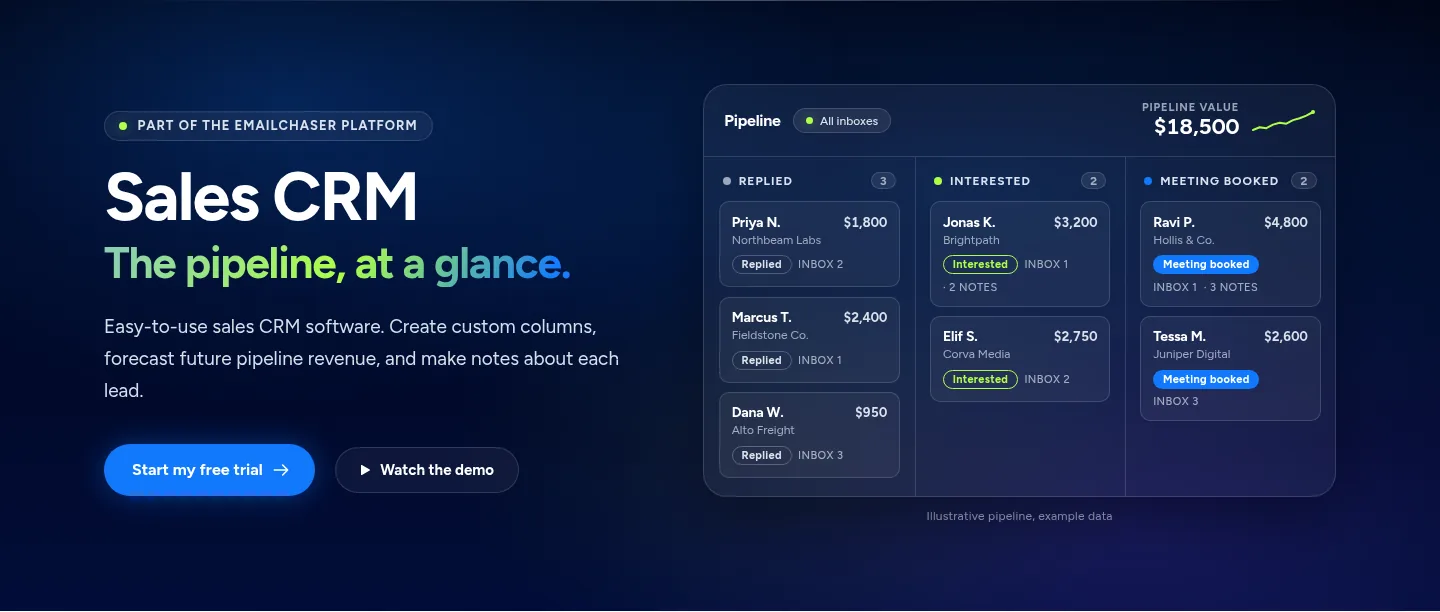
Replies from every mailbox land in one Unibox, and on Max and Enterprise interested leads move into the Sales CRM.
Track a campaign by its replies in five steps.
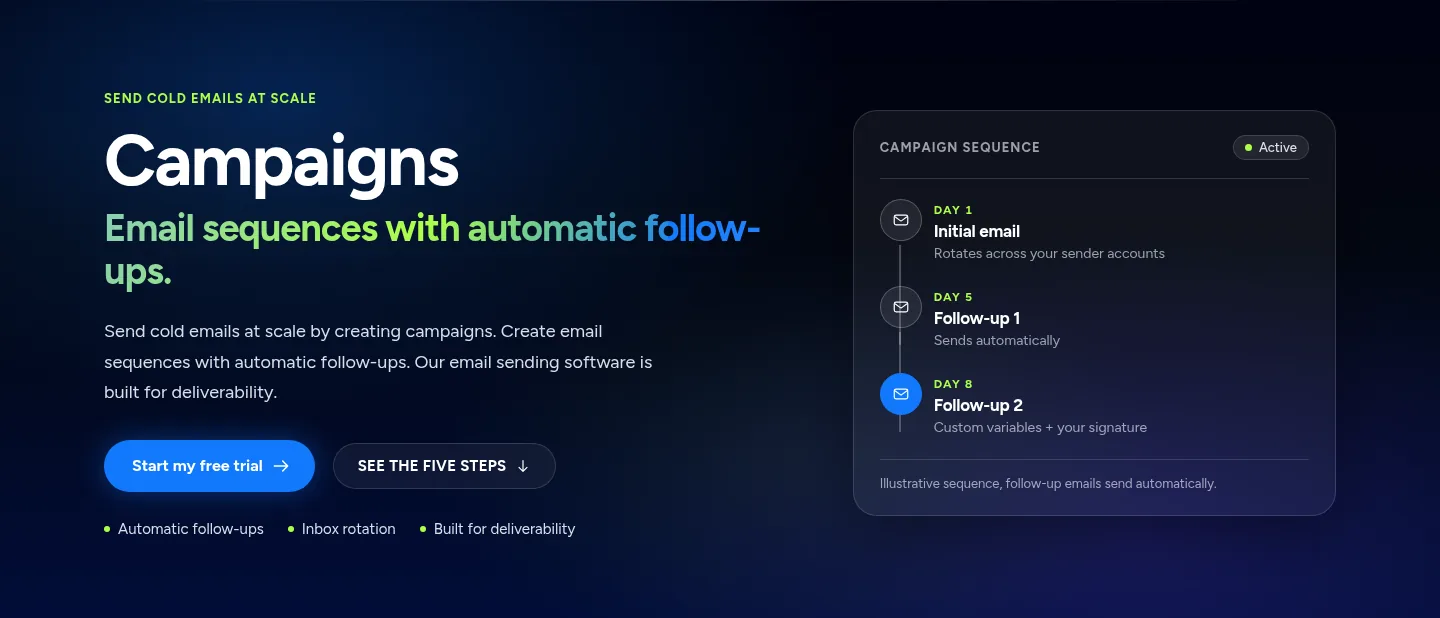
- LaunchSend a campaign with automatic follow-ups from your own mailboxes.
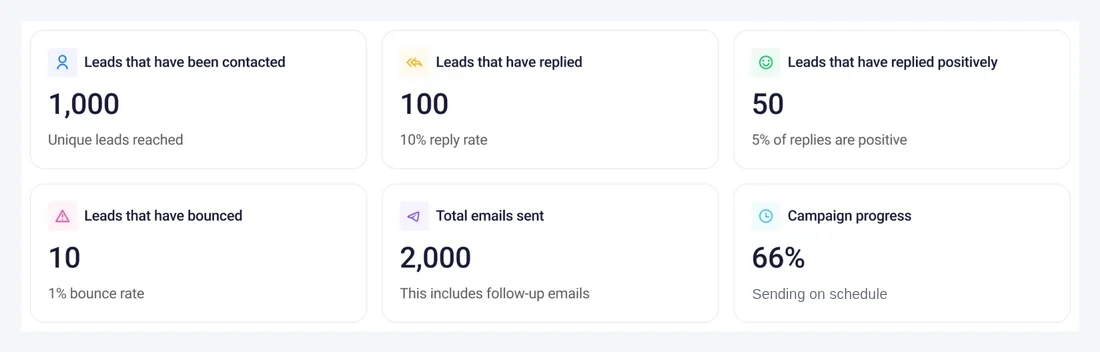
- WatchRead the counters: contacted, replied, replied positively, bounced and sent.
- ReplyAnswer from the Unibox, where replies are sorted by what they say.
- MoveOn Max, put interested leads in a Sales CRM column and note the next step.
- ConnectSend reply and bounce events to your own tools with webhooks.
Follow-ups go out on their own, and they stop when a lead replies.
We compared them on five things that decide which tracking fits a sales team.
- What it tracks: opens, clicks, attachments or replies.
- The entry price per month, and whether it is per user, per seat or per plan.
- What a free start gives you before you pay.
- Whether the data lands in a CRM or pipeline.
- Whether it works in your inbox or in the tool that sends the campaign.
Every fact below comes from the vendor's own pages, read on 5 November 2026.
These are the eight email tracking tools worth a look in 2026.
1. Emailchaser tracks replies, positive replies, bounces and meetings on every campaign, with no tracking pixel in your emails, from $47 a month.
Emailchaser's campaign analytics count the leads contacted, the leads that replied, the leads that replied positively, the leads that bounced and the emails sent. Every reply from every connected mailbox lands in one Unibox, and on Max and Enterprise interested leads move into the Sales CRM pipeline.
- Reply stats are kept for each step of a sequence and for each A/B variant, up to 26 variants a step, so you can see which email earns the replies.
- Replies in the Unibox are sorted by what they say, such as interested or out of office.
- Webhooks send events such as replies and bounces to your own tools, and the API reads the same numbers.
- It leaves open and click tracking out on purpose, so no tracking pixel is added to your emails. The free trial runs 7 days.
Best for: Sales teams that judge email by replies and meetings, not by opens.
2. Mailtrack adds read receipts to Gmail for free, and its paid Mailtrack plan is $6.99 a user a month on monthly billing.
Mailtrack's pricing page lists a free plan with unlimited tracked emails, double-check read receipts in Gmail, instant open alerts and a Mailtrack signature on your emails. It works inside Gmail and in the iOS and Android app.
- The $6.99 Mailtrack plan removes the signature and keeps a 7-day tracking history.
- The $19.99 Mailsuite plan adds a complete tracking history, link click tracking, tracked PDFs, weekly reports and email campaigns up to 60,000 recipients a month.
- Yearly billing takes the plans to $2.99 and $9.99 a month.
Best for: Gmail users who want to know when a message was opened.
Source: mailsuite.com/en/pricing, read 5 November 2026.
3. Yesware has a free plan, and its Pro plan is $19 a seat a month with unlimited open, link and attachment tracking.
Yesware sells email tracking to sellers who work from their inbox. Its free plan lists basic open tracking and basic attachment tracking, and the page notes that some of its tracking is limited to emails sent less than 24 hours ago.
- Pro lists unlimited email open tracking, link tracking and attachment tracking, with a personal activity report and a recipient engagement report.
- Premium is $45 a seat a month and adds team reporting, shared templates and unlimited campaigns.
- Enterprise is $85 a seat a month and adds Salesforce syncing.
Best for: Individual sellers who want to see opens, links and attachments in one feed.
Source: yesware.com/plans-and-pricing, read 5 November 2026.
4. Mailbutler's Starter plan is $4 a user a month on yearly billing, and its Smart plan adds engagement data and per-recipient tracking.
Mailbutler's pricing page lists basic email tracking and real-time notifications from Starter, and engagement data, device and location details, per-recipient tracking and smart follow-ups from the Smart plan.
- Professional is $7 a user a month and Business is $24, with a custom subdomain, IP blacklisting and CRM tracking data sync on Business.
- The prices are for yearly billing, which the page says saves up to 25%.
- The 14-day free trial includes all features and needs no credit card.
Best for: Teams that want opens with device and location details at a low price.
Source: mailbutler.io/pricing, read 5 November 2026.
5. Mixmax includes email tracking in every paid plan, from $29 a month for 100 recipients.
Mixmax prices by how many recipients you reach each month, and its pricing page says every paid plan includes every core feature, from email tracking to scheduling.
- The free plan covers 50 recipients a month with limited features.
- The higher tiers on the page are 1,500 recipients a month at $89 and 3,000 recipients at $129.
- A 14-day trial is offered on the paid plans.
Best for: Sellers who want tracking, scheduling and sequences priced by how many people they reach.
Source: mixmax.com/pricing, read 5 November 2026.
6. HubSpot's email tracking is free and saves every open and click to the contact record in its CRM.
HubSpot's free email tracking tool notifies you when a prospect opens an email or clicks a link, and saves those interactions to the contact record in its Smart CRM database.
- It works with Gmail, Google Workspace, Outlook and Office 365, and you can also send tracked emails inside HubSpot.
- Notifications can arrive in Sales Hub, your browser, your desktop or a third-party CRM.
- Sales Hub Starter is listed at $7 a seat a month on a limited-time offer, billed annually.
Best for: Teams that want tracking tied to a free CRM.
Source: hubspot.com/products/sales/email-tracking, read 5 November 2026.
7. Streak lists email and link tracking among its free email tools, with a full CRM that lives in Gmail.
Streak's pricing page says you can use its email power tools for free forever: email and link tracking, snippets, mail merge at 50 a day, Streak Share and a thread splitter.
- Its paid plans are a full CRM in Gmail with unlimited pipelines and records.
- Its paid plans list AI credits per user, and the plan prices are on its site.
Best for: Gmail users who want free tracking now and a CRM later.
Source: streak.com/pricing, read 5 November 2026.
8. Saleshandy includes unlimited 1:1 email tracking, and its Starter plan is $41 a month on monthly billing.
Saleshandy is a cold email sender, and its plan comparison lists unlimited 1:1 email tracking next to sequences, subsequences and a unified inbox.
- Starter lists 2,000 active prospects, Pro lists 30,000 and Scale is unlimited.
- Billed annually the plans are $34, $76 and $149 a month.
Best for: Teams that want opens in the same tool that sends the cold email.
Source: saleshandy.com/pricing, read 5 November 2026.
The right email tracking tool depends on whether you want to see opens or count replies.
| Your job | Start with |
|---|---|
| Count replies, bounces and meetings on a sales campaign | Emailchaser |
| See when a Gmail message was opened | Mailtrack |
| Track opens, links and attachments from your inbox | Yesware |
| Get device and location details on opens | Mailbutler |
| Track email for free and save it to a CRM | HubSpot or Streak |
| Track opens inside a cold email sender | Saleshandy |
Related reading: the best cold email software, the best sales outreach tools, the best email automation software and the best sales engagement platforms. To see why open rates mislead, use the open rate calculator, and to see the tracking first, read about campaigns and the Sales CRM. For every kind of tool, see the best cold email and sales tools.
People ask these questions about email tracking tools.
What is the best email tracking tool in 2026?
It depends on what you want to track. To see opens in Gmail, Mailtrack, Yesware and HubSpot are the ones with free plans or free tracking. For sales email where replies and meetings matter, we pick Emailchaser: it counts replies, positive replies, bounces and meetings, and it does not track opens or clicks.
Does Emailchaser track email opens?
Emailchaser leaves open and click tracking out on purpose, so no tracking pixel is added to your emails. It counts replies, positive replies, bounces and meetings, the events that lead to a sale.
Why does Emailchaser not track opens?
An open is counted when a tiny image loads, and mail apps and security scanners can load it without a person reading the email. Our open rate calculator explains it. A reply is an event nobody can fake, and it is what leads to a meeting.
What does Emailchaser track on a campaign?
The leads contacted, the leads that replied, the leads that replied positively, the leads that bounced and the emails sent, with reply stats for each step and for each of up to 26 A/B variants a step.
Is there a free email tracking tool for Gmail?
Yes. Mailtrack's free plan adds read receipts to Gmail with unlimited tracked emails, Streak lists email and link tracking in its free tools, and HubSpot's email tracking is free and works with Gmail and Outlook. Yesware has a free plan with basic open tracking.
How much does email tracking software cost?
From the vendors' own pages on monthly billing, Mailtrack's paid plan is $6.99 a user, Yesware Pro is $19 a seat, Mixmax is $29 a month for 100 recipients and Saleshandy is $41 a month. Mailbutler starts at $4 a user on yearly billing. Emailchaser's plans start at $47 a month and include the campaign sender.
How do I know if someone read my sales email?
Open tracking tools tell you the email was loaded. The sure sign is a reply, which Emailchaser counts per campaign, per step and per variant, and sorts in the Unibox by what it says.
Still not convinced?
Read all 34 customer messages.
SEE REVIEWSP.s. these are actually real reviews (not fake G2 reviews) 🙂
“Btw thanks for your continuous help, best support ever! It means a lot as when I understand how the tool works, esp. In problematic situations, and And what it can do and cannot so from the start, I have more trust. There’s nothing worse for a user than what Smartlead does: lots of great features that don’t really work, including crucial ones for a sequencer like auto fallback to connected accounts when account gets disconnected (doesn’t have to get back to the original one after reconnection, no one expects miracles, just a solid infra delivering on its specs - not promises), plus their low quality support when the issues are revealed.”
“Got my first reply with Emailchaser :)”
“We've recently upgraded to the premium plan to increase our sending volume. Just wanted to say thanks for such an awesome platform and the support you've already given in getting us started.”
Ready to let your AI agent set it up?
Give it your website. Approve once.
Start my free trial