The 7 Best Reverse Email Lookup Tools in 2026
A reverse email lookup starts with an address and finds who is behind it. These are the seven we would shortlist, compared on what each one returns, how you start free and what you pay when you want more.
Updated 3 November 2026
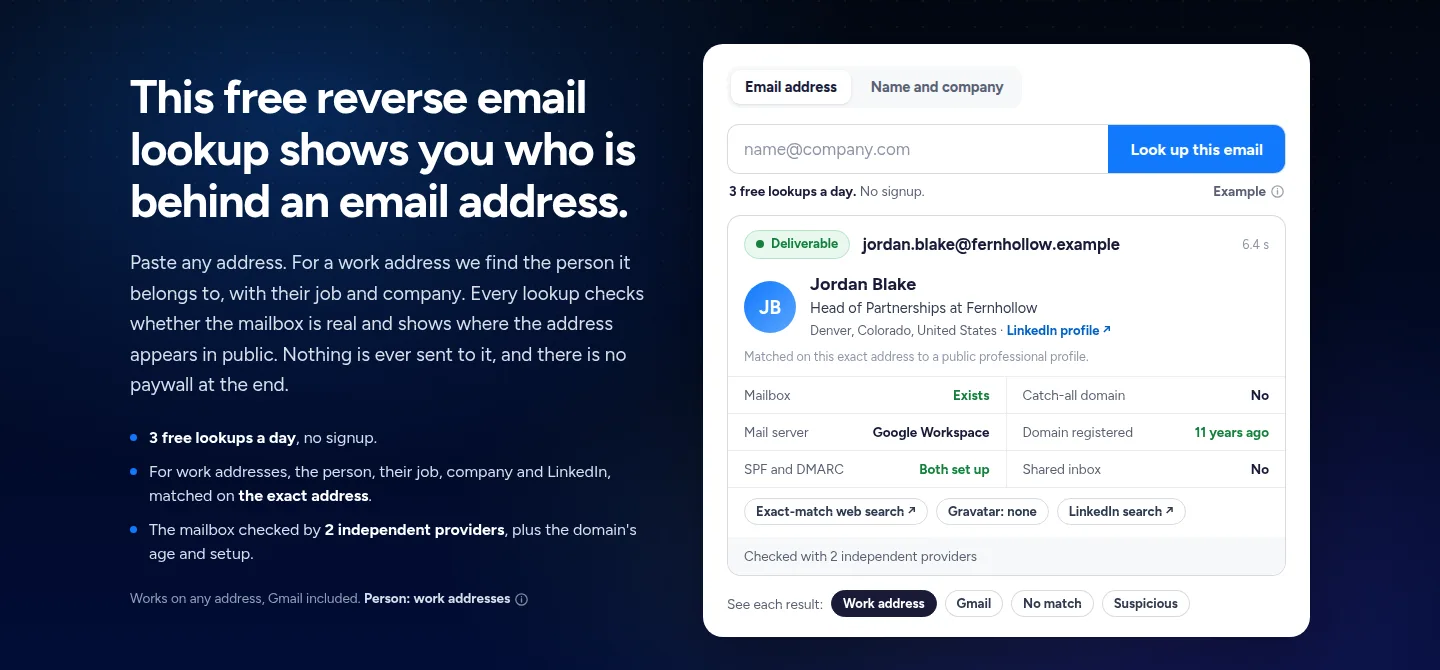
Emailchaser is our pick. Its free lookup gives 3 results a day with no signup, shows the person, job, company and LinkedIn behind a work address, and checks the mailbox with 2 independent providers, so you also learn whether the address is real.
Mailmeteor and Hunter also give a free lookup of professional addresses. GetProspect, Overloop and PeopleSmart sell lookups inside prospecting tools, and Findsio searches personal records for a weekly fee.
Here is how the seven reverse email lookup tools compare at a glance.
Swipe sideways to see every column.
| # | Tool | What it returns | Free start | Cost after the free start | Also in the account |
|---|---|---|---|---|---|
| 1 |  Emailchaser | The person behind a work address, the mailbox check, the domain's age and its email setup | 3 free lookups a day, no signup | Nothing to see the result | Email finder, verifier, warm-up and the campaign sender |
| 2 | Mailmeteor | Name, job title and company | Free, no sign-up | Nothing for the lookup | Mail merge for Gmail, plus a separate email checker |
| 3 |  Hunter | Name, job title, employer, location and social profiles | A free lookup with no account | Plans from $34 a month billed yearly | Email finder, verifier and cold email sequences |
| 4 | Overloop | A browser check of syntax, mail server, SPF and Gravatar | A free checker in your browser | Starter is $69 per user a month | Email finder, verifier and outreach sequences |
| 5 | GetProspect | A reverse lookup listed on every plan | A free plan with 50 valid emails | Starter is $49 a month for 1,000 valid emails | Bulk email finder, verifier and a LinkedIn extension |
| 6 | PeopleSmart | Name, employer, education, alternate emails and contact details | $1 for a 7-day trial | $69 a month for 150 contacts | Contact search and lead enrichment |
| 7 | Findsio | Name, linked addresses, relatives, online profiles and phone numbers | $1 for a 7-day trial | $14.90 a week | Phone and image searches |
Prices and features as published on each vendor's own pages, read on 3 November 2026. Each card below links to the vendor's page.
Reverse email lookup tools fall into three groups, and each one returns different information.
Emailchaser, Mailmeteor and Hunter match a work address to a public professional profile and return a name, job title and company.
GetProspect, Overloop and PeopleSmart do the lookup inside a tool built for outreach and sell it by credits, seats or contacts.
Findsio searches personal records and returns relatives, phone numbers and past addresses.
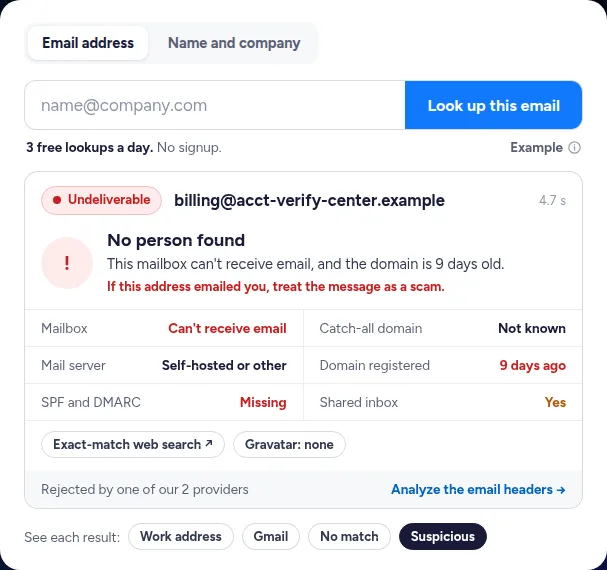
A good lookup also tells you when an address looks like a scam.
Find out who sent an unknown email in four steps.
- PastePut the sender's address into the lookup.
- ReadCheck the person's name, job and company, and whether they match the message.
- TestSee whether the mailbox exists, how old the domain is and whether SPF and DMARC are set.
- TraceOpen the exact-match web search to see every public page that shows the address.
We compared them on five things that decide how useful a lookup is.
- What the result contains: a person, a company, a mailbox check or personal records.
- Whether you can see a full result free, and without signing up.
- What you pay once the free start runs out, and how it is billed.
- Whether the tool works on personal addresses such as Gmail or only on work addresses.
- What else the same account does with the address afterwards.
Every fact below comes from the vendor's own pages, read on 3 November 2026.
These are the seven reverse email lookup tools worth a look in 2026.
1. Emailchaser's lookup is free, shows the person behind a work address and checks the mailbox too.
Paste any address into Emailchaser's free reverse email lookup. For a work address it shows the owner's name, job, company and LinkedIn when a public professional profile is linked to that exact address, and every lookup says whether the mailbox is real and where the address appears in public.
- The result you see is the whole result: there is no report to buy at the end, and nothing is ever sent to the address.
- It also shows who runs the domain's mail, how old the domain is and whether SPF and DMARC are set up, which are the signs that separate a real sender from a scam.
- A person is shown only on an exact match, never guessed from the name in the address, and home addresses, phone numbers and relatives are never shown.
- A Gmail, Outlook.com or Yahoo address gets the mailbox check and the public trails, but no name.
- The same account finds emails by name and company, verifies lists and sends the campaign.
Best for: Anyone identifying a work email sender or checking a lead, who also wants to know the mailbox is real.
2. Mailmeteor offers a free reverse email lookup that needs no signup.
Mailmeteor's reverse email lookup page says it enriches any professional email address with the person's name, job title, company and more, free and with no sign-up required.
- It calls the tool OSINT-powered, which means it draws on open sources.
- Its tool tabs list a separate Email Finder and Email Checker next to the lookup, so checking the mailbox is a second step.
- Mailmeteor's main product is a mail merge for Gmail, and it lists free tools such as a spam checker and an email extractor.
Best for: Gmail users who want a quick free lookup of a professional address.
Source: mailmeteor.com/tools/reverse-email-lookup, read 3 November 2026.
3. Hunter has a free lookup for one address and an API that enriches a whole list.
Hunter's guide to reverse email lookup says its free tool returns the person's full name, job title, employer, location and social profiles, and that you do not need an account to try it. It says Hunter uses only publicly available sources.
- It works on professional addresses: the guide says a lookup on a personal Gmail created last month will usually return nothing.
- To look up a list, the Person Enrichment API returns the same data as JSON at a rate limit of 500 requests a minute, and answers with a 404 when it has nothing.
- On its pricing page the free plan has 50 credits a month, and Starter is $34 a month billed yearly with 24,000 credits a year.
Best for: Teams that want to enrich a stale CRM list through an API.
Source: hunter.io, reverse lookup guide and pricing page, read 3 November 2026.
4. Overloop's free checker runs in your browser and leaves the name and company to its email finder.
Overloop's free reverse email lookup checks syntax, the mail server, SPF and Gravatar live in your browser, and says the address is never sent to or stored by Overloop. For a verified name, role and company it points you to its email finder.
- Its guide says no browser tool can hand you a name and a job title, so it treats the free pass as triage.
- Overloop can reverse-match an email to a contact profile and run an email check alongside it.
- Its guide lists the Starter plan at $69 per user per month with 250 credits a month, with no overage bill.
Best for: Anyone who wants a private first look and may later buy a prospecting suite.
Source: overloop.com/blog/reverse-email-lookup, read 3 November 2026.
5. GetProspect lists a reverse email lookup on every plan, free included.
GetProspect's pricing page lists a reverse email lookup among the features of all plans, next to a bulk email finder, CSV enrichment, a LinkedIn extension and API access.
- The free plan includes 50 valid emails and 100 email verifications a month.
- Starter is $49 a month for 1,000 valid emails, and Growth is $99 a month for 5,000.
- You spend a credit only when it gives you a valid email you do not already own, and not-found results are free.
Best for: Teams that want lookups, finding and verifying in one prospecting tool.
Source: getprospect.com/pricing, read 3 November 2026.
6. PeopleSmart sells contact reports on a plan that starts with a $1 trial.
PeopleSmart's reverse email lookup asks for an address and promises the owner's name, employer, education, alternate email addresses and contact details. Its pricing page says every plan includes a 7-day trial for $1.
- Professional is $69 billed monthly for 150 contacts a month, which it prices at $0.46 per contact.
- Business is $99 billed monthly for 300 contacts a month, at $0.33 per contact.
- Every plan has the same features, including email addresses, phone numbers, data enrichment and CSV export.
Best for: Recruiters and sales teams that buy contact reports in a monthly batch.
Source: peoplesmart.com/pricing, read 3 November 2026.
7. Findsio searches personal records for a personal address and charges a weekly fee after a $1 trial.
Findsio's reverse email lookup says it finds the name behind an email, with linked addresses, relatives, online profiles and phone numbers, drawn from publicly available online records.
- Its page offers 7 days for $1, then a premium plan at $14.90 a week.
- It also searches by phone number and by image.
- It lists no job title or company, so it suits a personal address rather than a business lead.
Best for: Checking who is behind a personal address when you accept paying weekly.
Source: findsio.com/reverse-email-lookup, read 3 November 2026.
The right reverse email lookup depends on who you are checking and why.
| Your job | Start with |
|---|---|
| Identify the sender of a work email and check it is real | Emailchaser's free reverse email lookup |
| Get a name, job title and company from a work address | Emailchaser, Mailmeteor or Hunter |
| Enrich a long list of addresses through an API | Hunter |
| Look up addresses inside a prospecting tool | GetProspect, Overloop or PeopleSmart |
| Search personal records behind a personal address | Findsio |
Related reading: the best email finder tools, the best B2B data providers and the best email verification tools. To go the other way, from a name to an address, use the free email finder.
People ask these questions about reverse email lookup.
What is the best reverse email lookup tool in 2026?
For work addresses we pick Emailchaser: it is free with 3 lookups a day and no signup, shows the person, job, company and LinkedIn when a public professional profile matches the exact address, and checks the mailbox with 2 independent providers. Mailmeteor and Hunter are the other free options, and Hunter adds an API for whole lists.
Is there a free reverse email lookup?
Yes. Emailchaser gives 3 free lookups a day with no signup and no report to buy at the end. Mailmeteor's lookup is free with no sign-up, Hunter's free lookup needs no account, and Overloop's free checker runs in your browser.
How do I find out who owns an email address?
Paste it into a reverse email lookup. For a work address, a tool that matches it to a public professional profile shows the owner's name, job title and company, and the mailbox check tells you whether the address is real. Searching the address in double quotes on Google also shows any public page that publishes it.
Can I do a reverse email lookup on a Gmail address?
Yes, but you will not get a name. Emailchaser shows the person only for work addresses, so a Gmail, Outlook.com or Yahoo address comes back with the mailbox check and the public trails. Hunter's guide says the same: a personal address made recently usually returns nothing, because there is no public record to match.
What is the difference between reverse email lookup and an email finder?
They go in opposite directions. A reverse email lookup starts with an address and finds the person. An email finder starts with a person's name and company and finds their address. Emailchaser's free tool does both, one tab apart.
How can I tell if an email is a scam?
Check four things: whether the mailbox exists, how old the domain is, whether it has SPF and DMARC records, and whether the person matches the address. Emailchaser's lookup shows all four, and a brand-new domain with a mailbox that cannot receive email is a reason to be careful.
How much does a reverse email lookup cost?
It can be free. Emailchaser, Mailmeteor and Hunter's lookup cost nothing, and GetProspect has a free plan with 50 valid emails. Paid options from the vendors' own pages: Hunter's Starter is $34 a month billed yearly, GetProspect's $49 a month, PeopleSmart's $69 a month after a $1 trial, Overloop's $69 per user a month and Findsio's $14.90 a week after a $1 trial.
Is reverse email lookup legal?
Yes, for legitimate reasons such as identifying a sender, checking a lead or protecting yourself from a scam. Emailchaser shows professional information only and never home addresses, phone numbers or relatives.
Still not convinced?
Read all 34 customer messages.
SEE REVIEWSP.s. these are actually real reviews (not fake G2 reviews) 🙂
“Btw thanks for your continuous help, best support ever! It means a lot as when I understand how the tool works, esp. In problematic situations, and And what it can do and cannot so from the start, I have more trust. There’s nothing worse for a user than what Smartlead does: lots of great features that don’t really work, including crucial ones for a sequencer like auto fallback to connected accounts when account gets disconnected (doesn’t have to get back to the original one after reconnection, no one expects miracles, just a solid infra delivering on its specs - not promises), plus their low quality support when the issues are revealed.”
“Got my first reply with Emailchaser :)”
“We've recently upgraded to the premium plan to increase our sending volume. Just wanted to say thanks for such an awesome platform and the support you've already given in getting us started.”
Ready to let your AI agent set it up?
Give it your website. Approve once.
Start my free trial