The 8 Best Sales Automation Software Tools in 2026
Sales automation software does the repeat work of selling: finding prospects, sending the first email and the follow-ups, and keeping the pipeline current. These are the eight we would shortlist for a small sales team, compared on what they automate and what they cost.
Updated 5 November 2026
Emailchaser is our pick for small teams. Autopilot reads your website, sizes the audience for free and drafts a 4-email sequence, then waits for your approval, campaigns send the follow-ups from your own mailboxes and the Unibox collects the replies, all on plans from $47 a month. Max and Enterprise add the Sales CRM.
Pipedrive, HubSpot and Close are CRMs that added automation, and Reply.io, Instantly, Saleshandy and Salesforge are cold email senders with sequences.
Here is how the eight sales automation tools compare at a glance.
Swipe sideways to see every column.
| # | Tool | What it automates | Entry price | Free start | Pipeline or CRM |
|---|---|---|---|---|---|
| 1 |  Emailchaser | Prospecting with Autopilot, the sequence and its follow-ups, and reply drafts | $47 a month | 7-day free trial with 500 lead credits | Unibox with AI reply drafts, Sales CRM on Max |
| 2 | Pipedrive | Automations and email sequences from Growth | Lite, $24 a seat a month | 14-day free trial | Pipeline CRM |
| 3 | HubSpot Sales Hub | Simple automation on Starter, advanced on Professional | Starter, $7 a seat (limited-time), billed annually | Free plan, up to 2 users | Smart CRM |
| 4 | Close | Workflows and bulk email from Growth | Solo, $19 a user a month | See their site | CRM with calling, email and SMS |
| 5 |  Reply.io | Multichannel sequences | Email Volume, $49 a user a month, billed annually | 14-day trial on Multichannel | See their site |
| 6 |  Instantly | Cold email sequences and warm-up | Growth, $47 a month | See their site | On higher plans |
| 7 |  Saleshandy | Multichannel sequences and subsequences | Starter, $41 a month | 7-day free trial | See their site |
| 8 | Salesforge | Sequences with email and LinkedIn senders | Pro, $40 a month, billed annually | See their site | See their site |
Prices and features as published on each vendor's own pages, monthly billing unless the cell says billed annually, read on 5 November 2026. Each card below links to the vendor's page.
The cheapest plan with sequences or workflows runs $41 to $109 a month, and Emailchaser's $47 also includes Autopilot and the Unibox.
Each bar is the entry plan whose page lists sequences, automations or workflows, on monthly billing. Pipedrive's and Close's prices are per seat or per user. HubSpot, Reply.io and Salesforge are not in the chart because their pages print annual-billing prices or a limited-time offer. Read 5 November 2026.
Sales automation covers three jobs, and most tools do one of them well.
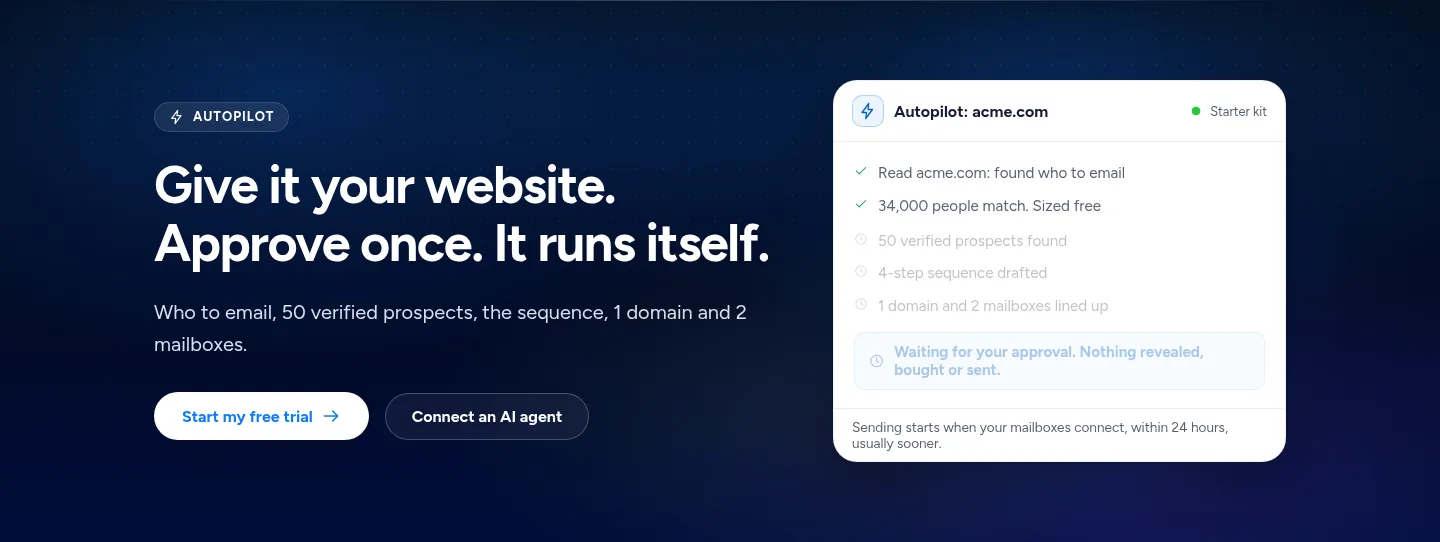
Autopilot sizes your audience free and reveals verified prospects at 1 credit each, and the Lead Finder extension exports LinkedIn Sales Navigator searches.
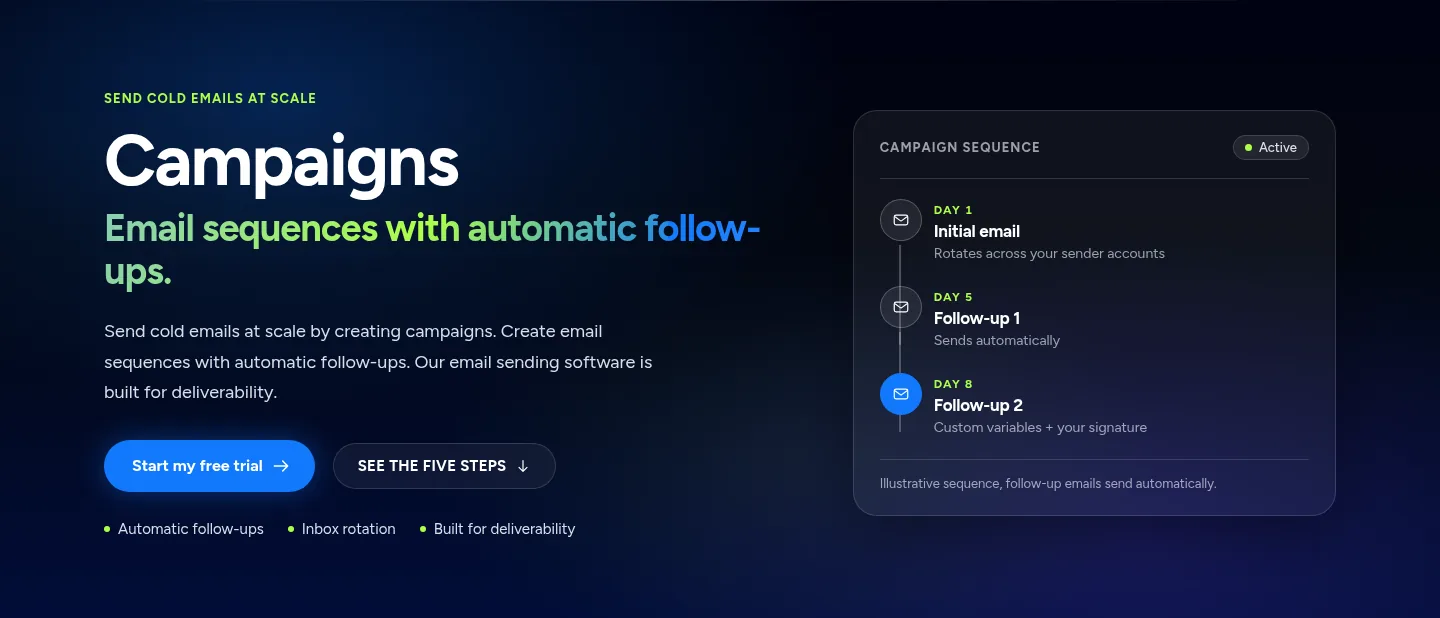
Campaigns send the opening email and the automatic follow-ups from your own mailboxes until a lead replies.
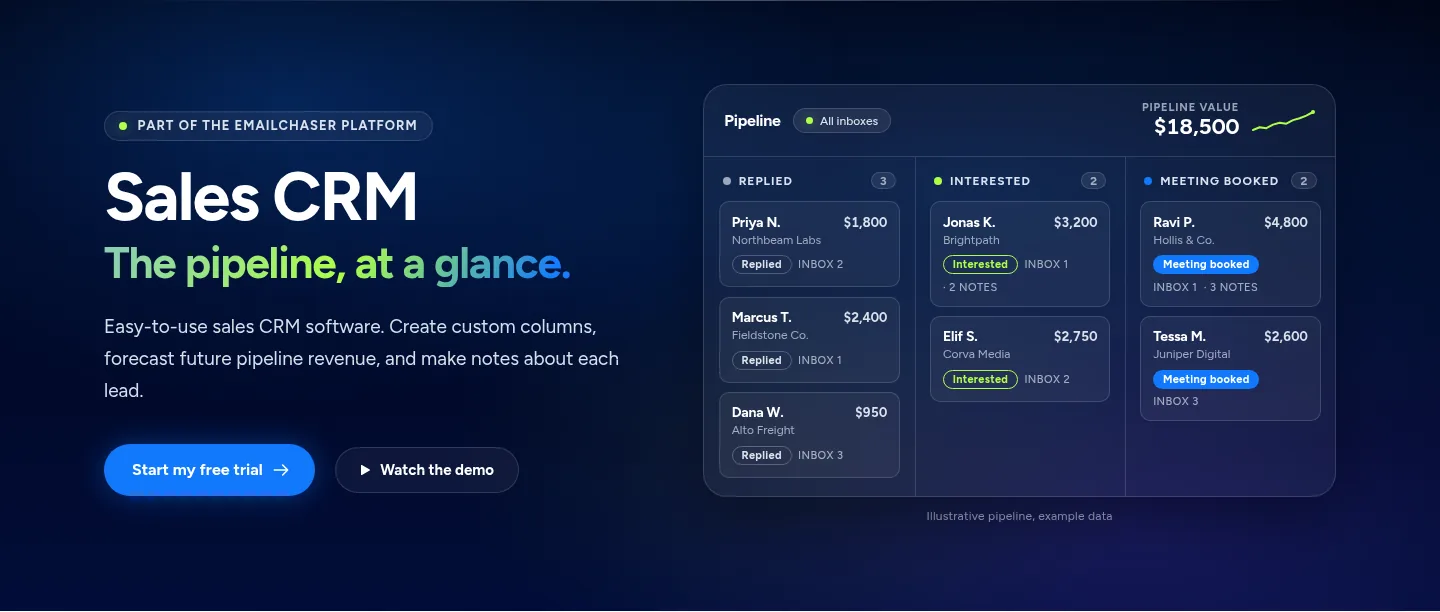
On Max and Enterprise, the Sales CRM groups replied, interested and meeting-booked leads in columns, with notes and a total pipeline value.
Autopilot shows who to email, the audience and the draft sequence before anything goes out.
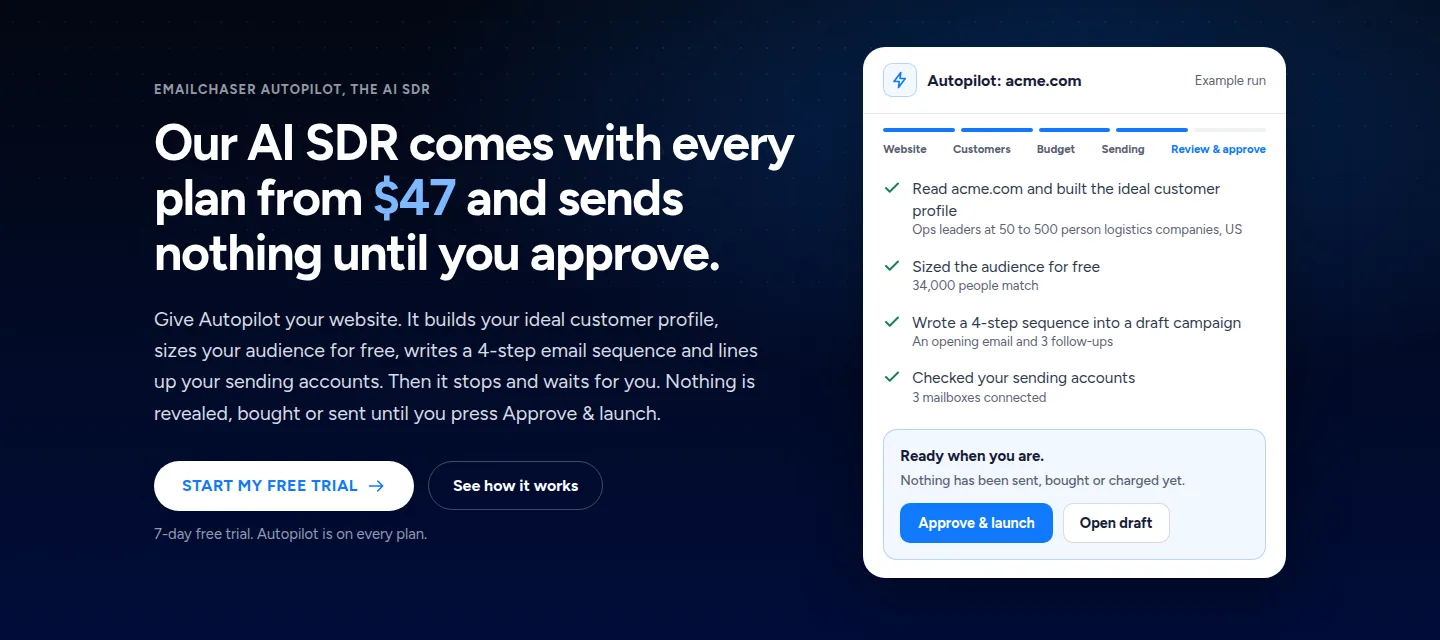
Automate prospecting and follow-ups with Emailchaser in five steps.
- Give your websiteAutopilot reads it and works out who to email.
- Approve the audienceYou see the audience and the estimated cost before anything is revealed.
- Review the draftIt writes a 4-email sequence into a draft campaign.
- LaunchEmails go out from your mailboxes, with automatic follow-ups.
- Work the repliesAnswer from the Unibox, and on Max move interested leads through the Sales CRM pipeline.
Campaigns send the opening email and each follow-up on the days you set.
On Max and Enterprise, the Sales CRM turns replies into a pipeline with a total value.
We compared them on five things that decide which tool fits a small sales team.
- What it automates: prospecting, the sequence, the follow-ups or the pipeline.
- The entry price per month, and whether it is per seat, per user or per plan.
- What a free start gives you before you pay.
- Whether a CRM is included or you add one.
- Whether prospecting and sending happen in the same account.
Every fact below comes from the vendor's own pages, read on 5 November 2026.
These are the eight sales automation tools worth a look in 2026.
1. Emailchaser's Autopilot finds the prospects and drafts the emails, campaigns send the follow-ups and the Unibox collects the replies, all from $47 a month.
Give Autopilot your website and it works out who to email, sizes the audience for free and drafts the sequence, then waits for your approval before anything is revealed, bought or sent. Campaigns send each email and its follow-ups from your own mailboxes, and replies land in one Unibox, with a Sales CRM pipeline on Max and Enterprise.
- Autopilot reveals verified prospects at 1 credit each, with credits at $33 per 1,000, and writes a 4-email sequence: an opening email and 3 follow-ups.
- Starter at $47 a month sends 5,000 emails to 1,000 active contacts and includes 1,500 lead credits, and Pro at $97 sends 125,000 emails to 25,000 contacts.
- Autopilot runs unattended after you approve: it tops up prospects, promotes winning variants and drafts replies for you to send.
- The 7-day free trial includes 500 lead credits.
Best for: Founders and small sales teams that want prospecting, follow-ups and a pipeline without three tools.
2. Pipedrive's Growth plan is $49 a seat a month and adds automations, email sequences and tracked bulk email.
Pipedrive is a sales CRM first. Its Growth plan lists a full sync with Gmail, Outlook or your company email, bulk email with open and click tracking, and sequences of personalized emails and follow-ups.
- Lite is $24 a seat a month, Premium is $79 and Ultimate is $99 on monthly billing.
- Billed annually the plans are $14, $39, $59 and $79 per seat a month.
- The 14-day free trial needs no credit card.
Best for: Sales teams that already think in deals and stages and want the automation inside the CRM.
Source: pipedrive.com/en/pricing, read 5 November 2026.
3. HubSpot Sales Hub has a free plan, Starter at $7 a seat a month on a limited-time offer and Professional at $90.
HubSpot's pricing page lists a free plan with a unified contact view, deals and activity tracking, then Starter with simple automation and email campaigns and Professional with advanced automation.
- Starter is listed at $7 a seat a month as a limited-time 65% off and covers up to 10 users.
- Professional is $90 a seat a month and adds advanced automation and AI deal tools, and Enterprise is $175.
- The prices on the page are for billing annually.
Best for: Teams that want to start free and add automation as they grow.
Source: hubspot.com/pricing/sales, read 5 November 2026.
4. Close's Growth plan is $109 a user a month and adds automated workflows, bulk email and a power dialer.
Close is a CRM for calling, email and SMS. Its pricing page lists Essentials at $49 a user a month with unlimited contacts, a centralized inbox and built-in email, calling and SMS, and puts workflows from Growth up.
- Solo is $19 a user a month for 1 user and up to 10,000 leads, with no workflows.
- Growth adds automated workflows, custom activities and bulk email, and Scale at $149 adds role-based permissions and a predictive dialer.
- Billed annually the plans are $9, $35, $99 and $139 per user a month.
Best for: Phone-and-email sales teams that want the dialer and the CRM in one tool.
Source: close.com/pricing, read 5 November 2026.
5. Reply.io's Email Volume plan starts at $49 a user a month on annual billing, and its Multichannel plan adds LinkedIn, calls and SMS from $89.
Reply.io sells outreach plans with unlimited emails, email warm-up and an anti-spam and deliverability suite, and charges by the number of active contacts a month.
- Email Volume includes 1,000 active contacts a month and unlimited mailboxes, and LinkedIn automation is $69 a month per account.
- Multichannel lists unlimited active contacts, email, LinkedIn, SMS and calls, and has a 14-day trial.
- Its AI SDR, Jason, starts at $500 a month.
Best for: Sales teams that sequence across email, LinkedIn, calls and SMS.
Source: reply.io/pricing, read 5 November 2026.
6. Instantly's Growth plan is $47 a month for 5,000 emails and 1,000 uploaded contacts, with unlimited email accounts.
Instantly is a cold email sender first. Its Growth plan lists unlimited email accounts and unlimited email warm-up, 1,000 uploaded contacts and 5,000 emails a month with chat support.
- Its higher plans raise the contact and email limits, and an Enterprise plan is custom-priced.
- Lead credits are sold on a separate tab of the pricing page.
Best for: Teams that want to send cold email from many mailboxes and bring their own leads.
Source: instantly.ai/pricing, read 5 November 2026.
7. Saleshandy's Starter plan is $41 a month on monthly billing for 2,000 active prospects, with a 7-day free trial.
Saleshandy's pricing page says there are no per-seat surprises and lists multichannel sequences, subsequences, a unified inbox, unlimited prospect storage and unlimited 1:1 email tracking.
- Pro is $99 a month on monthly billing for 30,000 active prospects, and Scale is $189 with unlimited active prospects.
- Billed annually the plans are $34, $76 and $149 a month.
- Unlimited prospect storage and unlimited 1:1 email tracking are listed in its plan comparison.
Best for: Teams that want a cold email sender with one flat monthly price and a lead finder.
Source: saleshandy.com/pricing, read 5 November 2026.
8. Salesforge's Pro plan is $40 a month on annual billing for 5,000 emails and 1,000 active contacts in sequence.
Salesforge's pricing page sells a Pro plan for solopreneurs with unlimited email senders and one LinkedIn sender, and a Growth plan with unlimited email and LinkedIn senders.
- Pro lists 300 email validation credits and 300 personalization credits a month, unlimited premium warm-up and smart mailbox rotation.
- Growth is $80 a month on annual billing for 10,000 active contacts and 50,000 emails a month.
- Both prices are for annual billing.
Best for: Solo sellers who want unlimited mailboxes and one LinkedIn sender in the plan.
Source: salesforge.ai/pricing, read 5 November 2026.
The right sales automation tool depends on which part of selling you want off your plate.
| Your job | Start with |
|---|---|
| Find prospects, send the sequence and track replies in one account | Emailchaser |
| Add automation to a deal pipeline | Pipedrive, HubSpot Sales Hub or Close |
| Sequence across email, LinkedIn, calls and SMS | Reply.io |
| Send cold email from many mailboxes | Instantly, Saleshandy or Salesforge |
| Start free with a CRM | HubSpot Sales Hub |
Related reading: the best sales engagement platforms, the best AI sales tools, the best sales outreach tools and the best email automation software, plus the Outreach alternatives and the Salesloft alternatives. To see the automation first, read about Autopilot, the Sales CRM and campaigns.
People ask these questions about sales automation software.
What is the best sales automation software in 2026?
For a small sales team that wants prospecting, follow-ups and replies in one account we pick Emailchaser: Autopilot finds and drafts, campaigns send the follow-ups and the Unibox collects replies, on plans from $47 a month, and Max adds the Sales CRM pipeline. Pipedrive, HubSpot Sales Hub and Close are the CRM-first alternatives.
What is sales automation software?
It is software that does the repeat work of selling for you: finding prospects, sending the first email and the follow-ups, logging replies and moving leads through a pipeline. Some tools do one of these jobs and some do all of them.
Does Autopilot send emails on its own?
Only after you approve. Autopilot reads your website, sizes the audience for free and drafts the sequence as a draft campaign, and nothing is revealed, bought or sent until you approve. After that it runs on its own, and its reply drafts stay drafts for you to send.
Does Emailchaser have a CRM?
Yes, on Max and Enterprise. The Sales CRM groups leads in custom columns, keeps notes on each lead, shows the total pipeline value and lets you share it with your team.
How much does sales automation software cost?
From the vendors' own pages on monthly billing, entry plans start at $24 a seat at Pipedrive, $19 a user at Close, $41 at Saleshandy and $47 at Instantly, and HubSpot Sales Hub has a free plan. Emailchaser's plans start at $47 a month with Autopilot, campaigns and the Unibox included.
Can I try sales automation software for free?
Yes. HubSpot has a free plan for up to 2 users, Pipedrive and Reply.io have 14-day trials, Saleshandy has a 7-day free trial and Emailchaser has a 7-day free trial that includes 500 lead credits.
Which sales automation tool is best for a small team?
It depends on what you want automated. A small team that wants prospecting and sending together gets the most from Emailchaser at $47 a month, while a team that already runs on a CRM can add automation inside Pipedrive, HubSpot Sales Hub or Close.
Still not convinced?
Read all 34 customer messages.
SEE REVIEWSP.s. these are actually real reviews (not fake G2 reviews) 🙂
“Btw thanks for your continuous help, best support ever! It means a lot as when I understand how the tool works, esp. In problematic situations, and And what it can do and cannot so from the start, I have more trust. There’s nothing worse for a user than what Smartlead does: lots of great features that don’t really work, including crucial ones for a sequencer like auto fallback to connected accounts when account gets disconnected (doesn’t have to get back to the original one after reconnection, no one expects miracles, just a solid infra delivering on its specs - not promises), plus their low quality support when the issues are revealed.”
“Got my first reply with Emailchaser :)”
“We've recently upgraded to the premium plan to increase our sending volume. Just wanted to say thanks for such an awesome platform and the support you've already given in getting us started.”
Ready to let your AI agent set it up?
Give it your website. Approve once.
Start my free trial