The 7 Best Email Extractor Tools in 2026
An email extractor pulls addresses out of text, a web page, a company domain or a LinkedIn search, and the right one depends on where the addresses are today. These are seven email extractors and email scrapers we would shortlist, compared on where each gets its addresses, how you start free and what you can do with the list afterwards.
Updated 3 November 2026
Emailchaser is our pick. Its free email extractor pulls every address out of any text you paste, removes duplicates and runs in your browser so nothing is uploaded, and the same account finds LinkedIn leads, verifies the list and sends the campaign.
For every email on a company domain, Anymail Finder and Hunter are the tools to use. Snov.io, Skrapp and Lusha work as browser extensions on the page you have open, and GetProspect enriches whole files in bulk.
Here is how the seven email extractors compare at a glance.
Swipe sideways to see every column.
| # | Tool | Where it gets the addresses | Free start | Whole lists at once | Checks the addresses |
|---|---|---|---|---|---|
| 1 |  Emailchaser | Text you paste, LinkedIn profiles and Sales Navigator searches | Free extractor with no signup, and 3 free LinkedIn lookups a day | No fixed cap on pasted text, and 10,000 profile links a run | A free verifier, and two verification services on paid checks |
| 2 | Anymail Finder | A company domain, a name and domain, or a LinkedIn URL | 100 trial credits | Bulk email finder | Every result is verified |
| 3 |  Hunter | A company domain through Domain Search, or a name and domain | 50 free credits a month | Saved lead lists, from 100,000 leads on the free plan | Auto-verification on paid plans |
| 4 |  Snov.io | Web pages through its Email Finder extension, plus company and prospect searches | A free trial plan | Bulk prospect search and bulk company search | 7-tier email verification |
| 5 | Skrapp | Company websites and LinkedIn, through browser extensions | 50 free credits | List exports on Professional | An email verifier on every plan |
| 6 | GetProspect | A LinkedIn extension and bulk file enrichment | 50 valid emails | Bulk email finder and CSV enrichment | Valid emails only, plus a verifier |
| 7 |  Lusha | A browser extension on LinkedIn, CRMs and any website | 40 credits a month | Bulk enrichment from the Starter plan | Verified emails and phone numbers |
Free starts and features as published on each vendor's own pages, read on 3 November 2026. Each card below links to the vendor's pricing.
Four different jobs hide behind the words email extractor, and each needs a different tool.
A web page, a spreadsheet column, a PDF or an email thread. A text extractor finds every address in what you paste.
You know the company and want the public work emails on its domain. Anymail Finder and Hunter do this.
A browser extension reads the page in front of you. Snov.io, Skrapp and Lusha work this way.
A finder reads a profile or a Sales Navigator search and works out each work email. Emailchaser, GetProspect and Skrapp do this.
An email scraper and an email extractor are not the same thing.
An extractor reads text you already hold and finds the addresses in it. A scraper goes and gets the pages first, then extracts. Emailchaser's free extractor is the first kind: it does not fetch web addresses, so you paste the page's text or its source, and nothing leaves your browser.
Extracting only proves an address has the shape of an email, not that anyone reads it, so verify the list before you send.
Turn a pasted page into a send-ready list in five steps.
- PasteDrop in any text, CSV, page or document that contains emails.
- TidyRemove duplicates, lowercase and sort the list.
- ExtractEvery address comes out in one click, in the order it appeared.
- VerifyRun the list through a verifier, because extracted addresses are only pattern matches.
- SendAdd the verified list to a campaign.
We compared them on five things that decide how useful an extractor is.
- Where the addresses come from: text you paste, a company domain, a web page or LinkedIn.
- How you can try it free, and how much the free start covers.
- Whether a whole list or file can run at once.
- Whether the addresses are checked before you use them.
- What happens next: an export, a verification or sending the campaign.
Every fact below comes from the vendor's own pages, read on 3 November 2026.
These are the seven email extractors worth a look in 2026.
1. Emailchaser's free extractor pulls every address out of any text and never uploads it.
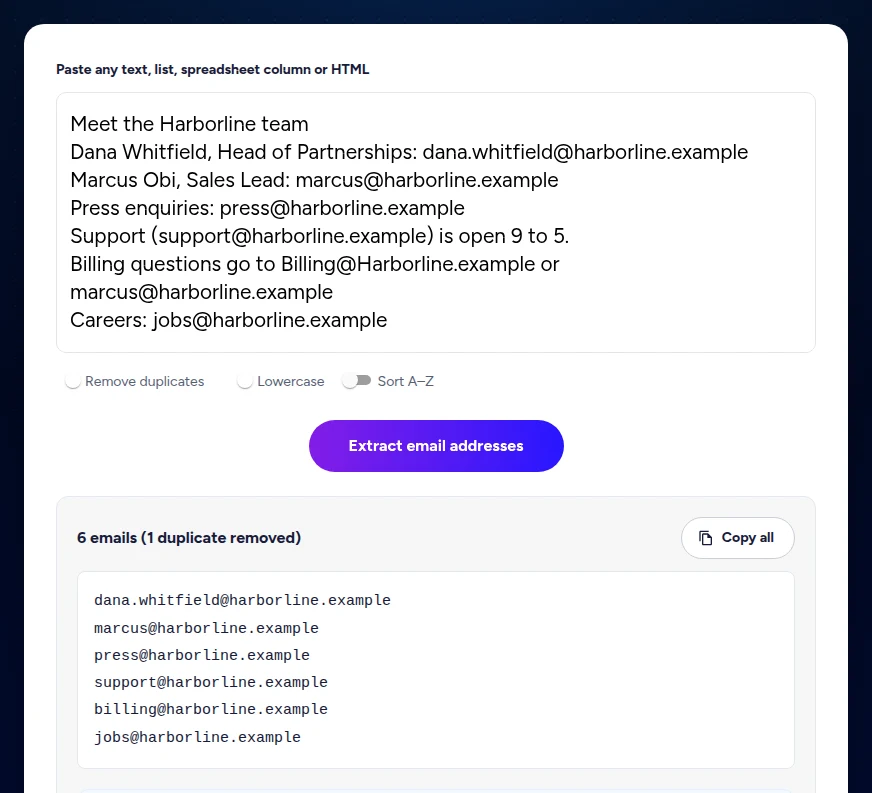
Paste any text, list, spreadsheet column or page source into Emailchaser's free email extractor and click Extract. It finds every address, removes duplicates, can lowercase and sort the list, and lets you copy it in one click. It does not fetch web addresses for you, so you paste the page's text or its source.
- Addresses come out in the order they appear, with later duplicates dropped, and addresses that differ only in capital letters are merged.
- Nothing you paste is uploaded, so it is safe for customer lists and other files that hold personal data.
- Verify the result before you send: the free email checker gives 3 checks a day with no signup, and a paid verification job checks up to 50,000 addresses.
- For people rather than text, the LinkedIn email finder and the Lead Finder extension turn profiles and Sales Navigator searches into verified work emails.
Best for: Anyone with a messy page, list or export of text who needs a clean list of addresses.
2. Anymail Finder returns up to 20 emails for one credit when you search a company domain.
Anymail Finder's Find Company Emails search takes a domain or a company name and returns up to 20 emails for 1 credit, only if it finds verified emails. Verification is included in every result.
- A person search by name and domain, or by LinkedIn URL, costs 1 credit when a verified email is found.
- Searching by role and domain costs 2 credits.
- Its product menu lists a Chrome extension, a bulk email finder and an API.
Best for: Teams that want the public work emails on a company domain.
Source: anymailfinder.com/pricing, read 3 November 2026.
3. Hunter spends the same credits on Domain Search, its finder and its verifier.
Hunter's pricing page says one pool of credits is used for Email Finder, Email Verifier and Domain Search, so the same credits cover finding an address, checking it and searching a whole domain. Its sequences tool sends the campaign.
- The free plan has 50 credits a month, and the paid plans start at 24,000 credits a year.
- Every plan has unlimited team members and can save lead lists, from 100,000 saved leads on the free plan.
- Starter connects 3 email accounts for sequences, and paid plans verify automatically.
- Our Hunter pricing guide prices every plan against Emailchaser.
Best for: Teams that search domains and want finding, checking and sending in one place.
Source: hunter.io/pricing, read 3 November 2026.
4. Snov.io offers an Email Finder extension and bulk searches in the same suite as cold email.
Snov.io sells prospecting, verification and cold email sending in one suite, billed in credits. Its plans list an Email Finder extension, a LinkedIn Prospect Finder extension, bulk prospect search and bulk company search.
- Every plan includes 7-tier email verification and unlimited exports.
- It also sends campaigns, with unlimited senders, follow-ups and campaigns.
- Our Snov.io pricing guide prices every plan against Emailchaser.
Best for: Teams that want extracting, verifying and sending in one suite.
Read our Snov.io pricing guide
Source: snov.io/pricing, read 3 November 2026.
5. Skrapp's extensions cover company websites, LinkedIn and Sales Navigator.
Skrapp's pricing page lists an email finder, an email verifier and extensions for company websites, LinkedIn Basic, Sales Navigator and LinkedIn Recruiter, and says you only pay for deliverable emails.
- The free plan includes the email finder, the email verifier and the extensions, with 50 credits.
- Professional adds list exports, list CRM sync and AI enrichment, and credits roll over.
- Enterprise adds an API.
Best for: Teams that collect addresses from company websites and LinkedIn as they browse.
Source: skrapp.io/pricing, read 3 November 2026.
6. GetProspect includes a bulk email finder and CSV enrichment on every plan.
GetProspect charges 1 credit when it gives you a valid email you do not already own. Its pricing page says not-found, invalid and unverifiable catch-all results are free.
- The free plan includes 50 valid emails and 100 email verifications.
- Every plan includes a LinkedIn extension, a bulk email finder, CSV enrichment, API access and unlimited teammates.
- Exports come as CSV and XLSX files, with a Google Sheets integration.
Best for: Teams that enrich whole files of contacts and want a LinkedIn extension too.
Source: getprospect.com/pricing, read 3 November 2026.
7. Lusha's browser extension works on LinkedIn, CRMs and any website.
Lusha sells verified emails and phone numbers in credits. Its plan comparison lists a browser extension for LinkedIn, CRMs and any website, plus bulk enrichment from the Starter plan.
- The free plan has 40 credits a month and 1 seat.
- Pro adds an API, CSV enrichment and webhooks.
- Our Lusha pricing guide prices every plan against Emailchaser.
Best for: Sales teams that want contact details from whatever site they are on.
Source: lusha.com/pricing, read 3 November 2026.
The right email extractor depends on where your addresses are.
| Your job | Start with |
|---|---|
| Pull addresses out of text you already have | Emailchaser's free email extractor |
| List the public emails on a company domain | Anymail Finder or Hunter |
| Read the web page you have open | Snov.io, Skrapp or Lusha |
| Turn LinkedIn profiles and Sales Navigator searches into emails | Emailchaser, GetProspect or Skrapp |
| Extract, verify and send the campaign from the same account | Emailchaser, Snov.io or Hunter |
Related reading: the best email finder tools, the best LinkedIn email finder tools and the best email verification tools. Two free tools help after an extract: remove duplicate emails and the email checker.
People ask these questions about email extractors.
What is the best email extractor in 2026?
It depends on where your addresses are. For text you already have we pick Emailchaser's free extractor, which is free with no signup and never uploads your text. For every email on a company domain, Anymail Finder and Hunter are the tools to use, and Snov.io, Skrapp and Lusha work as browser extensions.
Is there a free email extractor?
Yes. Emailchaser's email extractor is free with no signup: paste any text and it lists every address, with duplicates removed. Hunter has a free plan with 50 credits a month, Skrapp 50 credits, GetProspect 50 valid emails and Lusha 40 credits a month, and Anymail Finder starts with 100 trial credits.
What is the difference between an email extractor and an email scraper?
An email extractor reads text you already have and pulls the addresses out of it. An email scraper fetches web pages first and then extracts the addresses from them. Emailchaser's free extractor does not fetch web addresses, so you paste the page's text or source.
How do I extract email addresses from a website?
Copy the page's visible text, or view its source and copy that, paste it into an extractor and click Extract. To list the emails on a whole company domain use a domain search such as Anymail Finder or Hunter, and to read the page you have open use a browser extension from Snov.io, Skrapp or Lusha.
Can I extract emails from a PDF or Word document?
Yes. Select all the text in the file, copy it and paste it into the extractor. A scanned PDF has no selectable text, so run it through text recognition first and then extract.
Is it safe to paste a customer list into an extractor?
It is with Emailchaser's: the extractor runs entirely in your browser, so the text you paste is never uploaded and there is no outside copy to account for. Check how any other tool handles pasted or uploaded files before you use it on personal data.
Should I verify extracted email addresses before I send?
Yes. An extractor only checks the shape of an address, so old, mistyped or dead addresses come through too, and they bounce. Run the list through a verifier first: Emailchaser's email checker gives 3 free checks a day with no signup.
Why did the extractor miss an email address?
The usual reasons are disguised addresses and accented characters. An address written as name [at] company dot com has no real @ sign, and addresses with accented or non-Latin characters fall outside the standard pattern, so both are skipped. Rewrite them in your text and extract again.
Still not convinced?
Read all 34 customer messages.
SEE REVIEWSP.s. these are actually real reviews (not fake G2 reviews) 🙂
“Btw thanks for your continuous help, best support ever! It means a lot as when I understand how the tool works, esp. In problematic situations, and And what it can do and cannot so from the start, I have more trust. There’s nothing worse for a user than what Smartlead does: lots of great features that don’t really work, including crucial ones for a sequencer like auto fallback to connected accounts when account gets disconnected (doesn’t have to get back to the original one after reconnection, no one expects miracles, just a solid infra delivering on its specs - not promises), plus their low quality support when the issues are revealed.”
“Got my first reply with Emailchaser :)”
“We've recently upgraded to the premium plan to increase our sending volume. Just wanted to say thanks for such an awesome platform and the support you've already given in getting us started.”
Ready to let your AI agent set it up?
Give it your website. Approve once.
Start my free trial